Why won't D-force follow gravity?
 comixfana
Posts: 278
comixfana
Posts: 278
in The Commons
Why won't D-force follow gravity?
Okay, so good news, I finally got my "Michael Keaton era" Batsuit to look decent. The frustrating news is that Robin's cape in the enclosed render looks tied to his ankles? He's delivering a drop-kick, the cape should be hanging down! Is there a fix I don't know of?
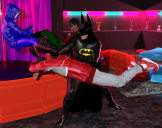
Batman and Robin cleaning house.png
843 x 665 - 848K

Daz 3D is part of 
Connect
DAZ Productions, Inc.
7533 S Center View Ct #4664
West Jordan, UT 84084
Licensing Agreement | Terms of Service | Privacy Policy | EULA
© 2026 Daz Productions Inc. All Rights Reserved.
Comments
It looks like the cape was poking through the boot when the simulation started, or possibly the boot passed through the cape during the simulation too quickly during the pose animation. As a start, make sure at the start of the simulation that the cape is well out of the way of the body and any other objects. If the leg passes through the cape early in the simulation, it's even more reason to have the cape out of the way, or possibly adjust the animation so it goes more slowly or the leg doesn't go as far through the cape. Once part of the mesh "snags" on some geometry it tends to stick in my experience.
Sometimes if an object intersects with another during a simulation, it will become stuck to it. That's probably what happened here, although it's hard to know based on that image and the little information you've given us.
Makes sense, I'll start by zero posing Robin and then re-apply the pose :)
Had to delete the cape, re-add it, and hit the simulation, yeah it fixed it, thanks!
Excellent! Glad you got it working. Looks much better.
You shouldn't need to delete dForce items to clear the sims. With the simulation pane open right click the simulation tab and choose "clear simulation data"