Scale & Move Daz Character Imported Into Maya?
 SpaceCoyote
Posts: 25
SpaceCoyote
Posts: 25
Hello! I could really use some help with scaling and moving a character in Maya after importing it using the Daz to Maya Bridge. At first, the Bridge works great and I can easily get my character into Maya and, as long as I keep the character in place and at the same scale, I can pose it quite easily with all the IK points and all, which is great. But the big problem is that I can't move or scale the character without having the body deforming in weird (and horrifying) ways or the skeleton does not move with the body. In the past, when I've exported an FBX from Daz and imported it into Maya, there were ways I could group the Daz objects and attach certain parts to a new locator so I could properly scale/move the body with the skeleton but I haven't been able to figure out any tricks like this for the Daz to Maya bridge. Without being able to scale and move my character, the Bridge essentially has no use for me, unfortunately.
After importing using the Daz to Maya Bridge, is there a way for me to scale and move a character in Maya? Thanks for any assistance!!

Daz 3D is part of 
Connect
DAZ Productions, Inc.
7533 S Center View Ct #4664
West Jordan, UT 84084
Licensing Agreement | Terms of Service | Privacy Policy | EULA
© 2026 Daz Productions Inc. All Rights Reserved.
Comments
Hi,
I am not very sure this can be done today, but what you can do is from Daz3d you can play with the "Height" morph before you export using the daz2maya plugin. That is what I use because it is difficult to scale in Maya.
Regards,
I tried scaling in DazStudio before exporting. My Maya scale is quite small compared to Daz (0.033, so a little less than 3.5%), but the scale comes in close enough that I can tweak the scale in Maya without exploding the mesh/rig. So far, so good... But moving the character at all is still giving me movement issues -- the rig and the mesh are not locked in together and they immediately start to slide off each other. At least in this instance the rig still operates the mesh without problem, and I even seem to be able to move the rig/bones manually back into place (inside the mess) and it still seems to operate the mesh without problem... But is there no way to get them to move together? I've tried grouping the rig folder and the mesh folder together. I even grouped that group folder again onto another group. The rig/skeleton and the mesh just seem to move at different "scales" or "speeds". Is there any fix for this?
Thanks for any thoughts on this.
Looks like there has been some improvements since I last used the Daz to Maya bridge, which I appreciate. I can now move the entire figure in Maya by selecting the root locator (Character1_Ctrl_Reference) and moving that. I also really appreciate the 1-click button to convert all the materials to Arnold materials.
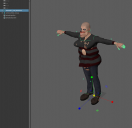
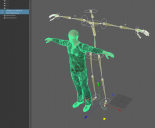
Still can't scale the figure without crazy, unwanted deformations, which is unfortunate. But my Maya scene uses the same units as in Daz and I can scale in Daz first if I don't want a 6' tall person. But then this leads to a mismatch in size of the skeleton and the mesh/skin (see screenshot), though manipulating the joints seems to still manipulate the character as I would want, so even though the skeleton is a different size it's still usable, but not ideal. It would be awesome if scaling could be improved in a future update of the Maya bridge.
Edit: Looks like the Daz 'Height' morph works as expected after the figure is in Maya (recommandation from tunde.famakinwa_5d565f45cc) and the skeleton and mesh match in size, but this is not ideal as the Height morph basically scales the figure vertically and not in any other dimension, which can result in the character looking a bit too wide and stout.