• Daz 3D
  • Shop
  • 3D Software
    • Daz Studio Premier
    • Daz Studio
    • Install Manager
    • Partnerships
    • AI Training data
    • Exporters
    • Daz to Roblox
    • Daz to Maya
    • Daz to Blender
    • Daz to Unreal
    • Daz to Unity
    • Daz to 3ds Max
    • Daz to Cinema 4D
  • 3D Models
    • Genesis 9
    • Genesis 8.1
    • Free 3D Models
  • Community
    • Gallery
    • Forums
    • Blog
    • Press
    • Help
  • Memberships
    • Daz Premier
    • Daz Plus
    • Daz Base
    • Compare
  • Download Studio
ADVANCED SEARCH
  • Menu
  • Daz 3D
ADVANCED SEARCH
Add image
  • Shop
  • 3d Software
    • Daz Studio Premier
    • Daz Studio
    • Install Manager
    • Partnerships
    • AI Training data
    • Exporters
    • Daz to Roblox
    • Daz to Maya
    • Daz to Blender
    • Daz to Unreal
    • Daz to Unity
    • Daz to 3ds Max
    • Daz to Cinema 4D
  • 3D Models
    • Genesis 9
    • Genesis 8.1
    • Free 3D Models
  • Community
    • Our Community
    • Gallery
    • Forums
    • Blog
    • Press
    • Help
  • Memberships
    • Daz Premier
    • Daz Plus
    • Daz Base
    • Compare

Notifications

You currently have no notifications.

Loading...
    • Categories
    • Recent Discussions
Daz 3D Forums > 3rd Party Software > 3ds Max Discussion

Texture seem to not appear

davegvdavegv Posts: 165
August 2020 edited August 2020 in 3ds Max Discussion

When i import std V8 into max i hit unfreeze all and the face texture will appear, and the clothes will appear, but i cannot figure how to get the body to appear. when i load the material editor, the textures are assigned ( to a multi-material shader )  any help will be greatly appreciated.

I also have Maya and all the textures appear as they should in Maya. If i send the maya file directly to Max the texture again will not appear. If i send directly to Motionbuilder, the textures will appear, ( except the eye shader ) also the roll bones in G8 cause a error in the MB rigging, but that is a different issue.... I'd just like the materials/textures to work in max and be able to convert them to VRay.

EDIT: the problem with the textures seems to be character specific, which is really wierd. some seem to come thru just fine and others do not. The rigging is really helpful though and what a time saver. Especially the Maya rigging which is HumanIK. the Max rigging is a Cat Rig which is not nearly as versitile as the HumanIK. If any body has clues as to why some textures would work and others on different characters will not, I would love to be enlightened. Thanx
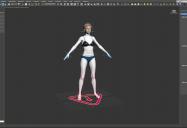



2020-08-01_8-32-15.jpg
1923 x 1314 - 252K
Post edited by davegv on August 2020

Comments

  • hansolocambohansolocambo Posts: 649
    August 2020 edited August 2020

    Could simply be that materials aren't displayed in the viewport. It's not by default in Max. 

    To display all materials in the viewport, check options there  : View > Show Materials in Viewport as > Realistic Materials with maps

    You can also try to activate the display of each material straight from the Material Editor (M). Cf screenshot thereafter. 


    2020-08-02 10_58_45-Slate Material Editor.png
    761 x 723 - 94K
    Post edited by hansolocambo on August 2020
Sign In or Register to comment.
Adding to Cart…

Daz 3D is part of Tafi

Connect

DAZ Productions, Inc.
7533 S Center View Ct #4664
West Jordan, UT 84084

HELP

Contact Us

Tutorials

Help Center

Sell Your 3D Content

Affiliate Program

Documentation Center

Open Source

Consent Preferences

JOIN DAZ

Memberships

Blog

About Us

Press

Careers

Bridges

Community

In the Studio

Gallery

Forum

DAZ STORE

Shop

Freebies

Published Artists

Licensing Agreement | Terms of Service | Privacy Policy | EULA

© 2025 Daz Productions Inc. All Rights Reserved.
