• Daz 3D
  • Shop
  • 3D Software
    • Daz Studio Premier
    • Daz Studio
    • Install Manager
    • Partnerships
    • AI Training data
    • Exporters
    • Daz to Roblox
    • Daz to Maya
    • Daz to Blender
    • Daz to Unreal
    • Daz to Unity
    • Daz to 3ds Max
    • Daz to Cinema 4D
  • 3D Models
    • Genesis 9
    • Genesis 8.1
    • Free 3D Models
  • Community
    • Gallery
    • Forums
    • Blog
    • Press
    • Help
  • Memberships
    • Daz Premier
    • Daz Plus
    • Daz Base
    • Compare
  • Download Studio
ADVANCED SEARCH
  • Menu
  • Daz 3D
ADVANCED SEARCH
Add image
  • Shop
  • 3d Software
    • Daz Studio Premier
    • Daz Studio
    • Install Manager
    • Partnerships
    • AI Training data
    • Exporters
    • Daz to Roblox
    • Daz to Maya
    • Daz to Blender
    • Daz to Unreal
    • Daz to Unity
    • Daz to 3ds Max
    • Daz to Cinema 4D
  • 3D Models
    • Genesis 9
    • Genesis 8.1
    • Free 3D Models
  • Community
    • Our Community
    • Gallery
    • Forums
    • Blog
    • Press
    • Help
  • Memberships
    • Daz Premier
    • Daz Plus
    • Daz Base
    • Compare

Notifications

You currently have no notifications.

Loading...
    • Categories
    • Recent Discussions
Daz 3D Forums > 3rd Party Software > 3ds Max Discussion

HD morphs/subdivisions export?

AmbrozewiczAmbrozewicz Posts: 7
July 2020 in 3ds Max Discussion

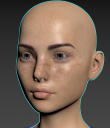
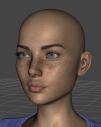
The new DazToMax plugin is great guys but it still doesn't offer the most important feature of all and that's to include HD morphs/subdivision export. My original characters do not look exactly the same as they do in DAZ because of the lack of HD morphs. In the end, the plugin will mostly be useless without this option (especially when you have a high attention to detail). Pics below:

First pic is a subdivision from DAZ, second is a pic from 3ds Max subdivided with turbosmooth. You can clearly see the lips are very different (there's a gap between the lower and the upper lip when subdividing in 3ds Max).

Any plans to update the plugin with the native DAZ subdivisions export feature?
01daz.PNG
810 x 1022 - 983K
01max.PNG
808 x 939 - 946K

Comments

  • voodoofuzzvoodoofuzz Posts: 10
    August 2020

    Those two heads look nothing alike?

    Sub level won't change the shape, only the detail.

    You can export manually as an obj file at whatever sub level you want.

    Replace your base model with the hi res version.

  • hansolocambohansolocambo Posts: 649
    August 2020

    DAZ MultiResolution Morph Support is limited to some Published Artist, vendors who sell their content on Daz's site.

    To get access to that forever hoarded possibility, you'll have, I guess, to produce great looking ZBrush sculpted morphs and convince the DAZ Team that your work is worth something. 

    Some vendors like RawArt on the DAZ Store obviously have access to the MultiResolution Morph. But his work obviously deserved that privilege. 

    For common users like you and I, only solution is to sculpt on an exported fbx/obj. And do the rigging from scratch I guess. 

  • sonikalien_8c78c22c11sonikalien_8c78c22c11 Posts: 3
    August 2020

    I'm struggling to see the point of the bridge then. It seems less hassle to export to OBJ for hi res static mesh and FBX for rigged / animation. Quicker too. 

    What does the bridge offer that obj/fbx export doesn't?

Sign In or Register to comment.
Adding to Cart…

Daz 3D is part of Tafi

Connect

DAZ Productions, Inc.
7533 S Center View Ct #4664
West Jordan, UT 84084

HELP

Contact Us

Tutorials

Help Center

Sell Your 3D Content

Affiliate Program

Documentation Center

Open Source

Consent Preferences

JOIN DAZ

Memberships

Blog

About Us

Press

Careers

Bridges

Community

In the Studio

Gallery

Forum

DAZ STORE

Shop

Freebies

Published Artists

Licensing Agreement | Terms of Service | Privacy Policy | EULA

© 2025 Daz Productions Inc. All Rights Reserved.