• Daz 3D
  • Shop
  • 3D Software
    • Daz Studio Premier
    • Daz Studio
    • Install Manager
    • Partnerships
    • AI Training data
    • Exporters
    • Daz to Roblox
    • Daz to Maya
    • Daz to Blender
    • Daz to Unreal
    • Daz to Unity
    • Daz to 3ds Max
    • Daz to Cinema 4D
  • 3D Models
    • Genesis 9
    • Genesis 8.1
    • Free 3D Models
  • Community
    • Gallery
    • Forums
    • Blog
    • Press
    • Help
  • Memberships
    • Daz Premier
    • Daz Plus
    • Daz Base
    • Compare
  • Download Studio
ADVANCED SEARCH
  • Menu
  • Daz 3D
ADVANCED SEARCH
Add image
  • Shop
  • 3d Software
    • Daz Studio Premier
    • Daz Studio
    • Install Manager
    • Partnerships
    • AI Training data
    • Exporters
    • Daz to Roblox
    • Daz to Maya
    • Daz to Blender
    • Daz to Unreal
    • Daz to Unity
    • Daz to 3ds Max
    • Daz to Cinema 4D
  • 3D Models
    • Genesis 9
    • Genesis 8.1
    • Free 3D Models
  • Community
    • Our Community
    • Gallery
    • Forums
    • Blog
    • Press
    • Help
  • Memberships
    • Daz Premier
    • Daz Plus
    • Daz Base
    • Compare

Notifications

You currently have no notifications.

Loading...
    • Categories
    • Recent Discussions
Daz 3D Forums > 3rd Party Software > Cinema 4D Discussion

Feedback for the C4D Bridge

«123»

Comments

  • contatomagmusiccontatomagmusic Posts: 2
    August 2020 edited August 2020

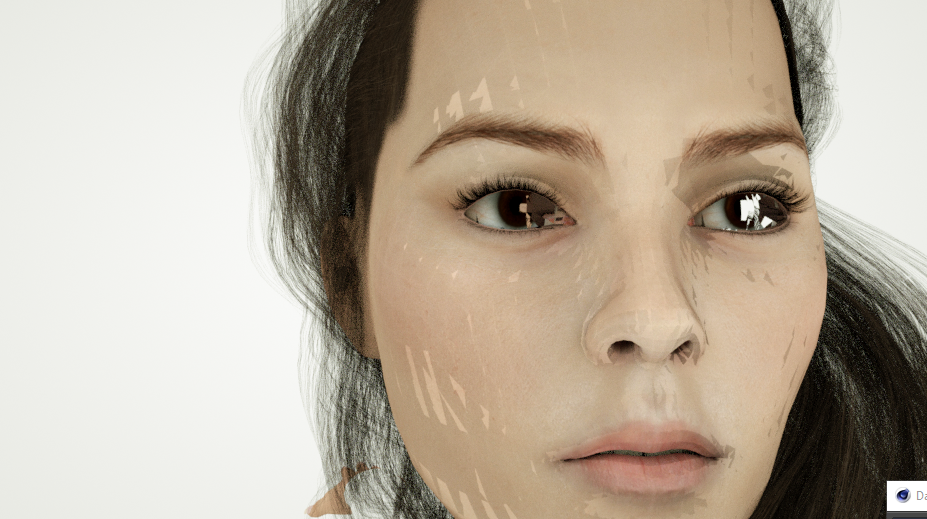
    Does anyone know how i can fix this?
    if I move the model, these marks appear.
    it looks like the model has a low resolution.​


    Post edited by Chohole on August 2020
  • mxomxo Posts: 32
    August 2020
    kromekat said:

     When you say 'merge them into your import', How do you mean?

    This bridge doesn't import corrective morphs by default. Thats the morphs that make your joints look natural when you do basic posing. You have to export them yourself separately.

  • prixatprixat Posts: 1,616
    August 2020
    contatomagmusic said:

    Does anyone know how i can fix this?
    if I move the model, these marks appear.
    it looks like the model has a low resolution.​

    Thats the usual base resolution that gets exported. Just add a Subdivision modifier in Cinema.

  • kromekatkromekat Posts: 25
    August 2020
    mxo said:
    kromekat said:

     When you say 'merge them into your import', How do you mean?

    This bridge doesn't import corrective morphs by default. Thats the morphs that make your joints look natural when you do basic posing. You have to export them yourself separately.

    Ah ok, so you mean to export the missing morphs as fbx, and then copy over to the bridged version in C4D?

  • contatomagmusiccontatomagmusic Posts: 2
    August 2020 edited August 2020
    prixat said:
    contatomagmusic said:


    Thats the usual base resolution that gets exported. Just add a Subdivision modifier in Cinema.

    I tried to put subdivision in the mesh, but it was full of errors
     

    EDIT: thank you. it worked: D
    Post edited by contatomagmusic on August 2020
  • hzrhzr Posts: 208
    August 2020
    mxo said:
    cc_70f110d6 said:
    Thanks for your answer! The subdivision tip works great. However, I don't understand which solution you're referring too regarding morphs. Is it the script you've uploaded previously? Could you give more precisions (because I'm struggling using it)? Thank you.

    Glad first tip helped.

    I can't help much with the second one without posting a correctly exported file which is verboten by mods. But basically - you need to export the corrective morphs, merge them into your daz bridge import and then the script will pick them up once its activated. You can add your own mappings to whatever morphs exist. Last iteration adds two step morphs too - which I didn't know existed until pointed out here.

    Hopefully in the future Daz Bridge to C4D can:

    • Export materials and meshes consistently
    • Apply subd modifier to exported meshes
    • Automatically generate a script/x-presso to map the morphs

    Until then its not really going to be very useful.

    Exactly how I would describe it aswell. I got to say that I am stunned about the non-communication by DAZ thus far, basically leaving us as users to figure all of this out. Some of us have pointed out what the bridge would need to be in a workable state. 

    Of course there are some unrealistic expectations by some of the users regarding 1-click solutions for entire scenes, and we should not expect this. For scene setups you should not use that bridge but instead export obj or alembic and these processes will not be 1-click. I am sad to say but these things are not available because it is not easy to come up with a 1-click solution to it, otherwise it would already exist. As a C4D user you should also know this already as we are often the red headed stepchild when it comes to these types of things.

    What we really want this bridge to do is to simply export the figure with a bit of control about which morphs get exported, a proper joint alignment after the import, so faulty alignments on the C4D import function will be realigned automatically to fit with how it is in DS, and then map the corrective morphs by either using the solution a couple of us worked out for you above, or by using traditional expresso range mappers.

    If you get this working, then the bridge will be useful. Do not expect us to do this for you. Is it too much to ask if you as a company could get this done and salvage the situation and turn it into a success? And honestly, if you do this, I will absolutely appologize for criticising you and praise the DAZ team for a job well done.

  • jamslutjamslut Posts: 17
    December 2020

    mmdestiny said:

    If anyone is interested, I can put together a tutorial for how to convert pose morph target meshes into simple vertex delta morphs in the pose morph tag.  Again, this is much more performance friendly and in my opinion much more versatile.

    I'm interested as well if you haven't done so already.

  • smyrkphacesmyrkphace Posts: 3
    January 2021

    Hi peeps. I seem to not be able to get any pose morph tags on my imports to c4d at all. I previously had no luck then I changed the morph rules to Visemes, eyes mouth all to export and had it working just on refular fbx export. But still no luck with the bridge. So far Ive been using the duplicate mesh to copy the pose morphs onto the rigged mesh but its obviously not ideal going forward. Any ideas why I cant get pose morph tags on my bridge exports?

«123»
Sign In or Register to comment.
Adding to Cart…

Daz 3D is part of Tafi

Connect

DAZ Productions, Inc.
7533 S Center View Ct #4664
West Jordan, UT 84084

HELP

Contact Us

Tutorials

Help Center

Sell Your 3D Content

Affiliate Program

Documentation Center

Open Source

Consent Preferences

JOIN DAZ

Memberships

Blog

About Us

Press

Careers

Bridges

Community

In the Studio

Gallery

Forum

DAZ STORE

Shop

Freebies

Published Artists

Licensing Agreement | Terms of Service | Privacy Policy | EULA

© 2025 Daz Productions Inc. All Rights Reserved.