Librarian Outfit for G3f - sleeve and waistband glitch
 clivewil2
Posts: 129
clivewil2
Posts: 129
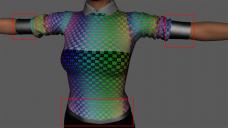
hello all, i am attempting to use ironman13's Librarian Outfit on a G3 female, but have weird surfacing on the lowermost part of the sleeves and the waistband parts of the sweater - see pic
please excuse the UV grid, but yes the error still occurs on the default texture set (i'll change it back once i find the troublesome file)
these are definitely part of the sweater mesh, and the bumpmap seems to be being used, but i haven't found anything relating to diffuse or specular maps for the affected areas - but on close inspection they look rather generic and un-detailed compared to the rest of the sweater
the outfit comes with a destroyed/zombie option, but as far as i know i'm not using those textures - but maybe related to those somehow?
does anyone have an idea of how i can fix this? i'm an experienced max user but new to Daz 3d, so it's probably a simple user error...
thanks for reading.

Daz 3D is part of 
Connect
DAZ Productions, Inc.
7533 S Center View Ct #4664
West Jordan, UT 84084
Licensing Agreement | Terms of Service | Privacy Policy | EULA
© 2026 Daz Productions Inc. All Rights Reserved.
Comments
ok, i managed to solve the issue by going into the sweater's appropriate sub-meshes and selecting Geometry > Cutout > Opacity > and set it to 0.
i did a quick render and it seemed to shadow correctly without artifacts, but if there's a correct and different way of doing this, please let me know
Surfaces with less than full opacity do not preview well in Texture Shaded - I'm pretty sure the result would have been correct if you had rendered using Iray or 3Delight.
thanks Richard, 3delight is what i'm using, and that screenshot i posted is 3delight with just the default lighting rig - i gave up on iray for the moment, due to it's horribly long rendering times and that speckled dithering which seems to characterise it - 3delight will suffice for now, until i get more of a handle on how to use daz and exactly what its capabilities are. maybe then iray will be of some value to me.
i suspect those extra sleeve portions are something to do with the 'destroyed' versions - probably for alpha-mapped tattered fringes, but i just find it really odd that they seem to contain none of the supplied diffuse or opacity maps (i replaced the texture maps one by one, looking for the sleeve ends to change, but they never did.)
for now, i'm just glad i have a way to turn them off.
Ah, sorry - I read the boxes you'd drawn as bounding boxes in the Viewport. If you have the Cutout Opacity property rather than regular Opacity that means the surface is using the Iray Uber Base shader, which won't auto-convert to 3Delight - I would suggest applying the AoA SSS Shader (or some 3delight fabric shader you like) before rendering.
ok, that sounds like a handy thing to try, i'll make a note of that. thanks!