Face Transfer...could be worse
 AllenArt
Posts: 7,175
AllenArt
Posts: 7,175
Not bad between Face Transfer and Face Transfer Shapes I got a decent looking face from a pic I made playing around with Artbreeder :D The skin is Kala 8's and I did slightly adjust a morph or three.
Laurie
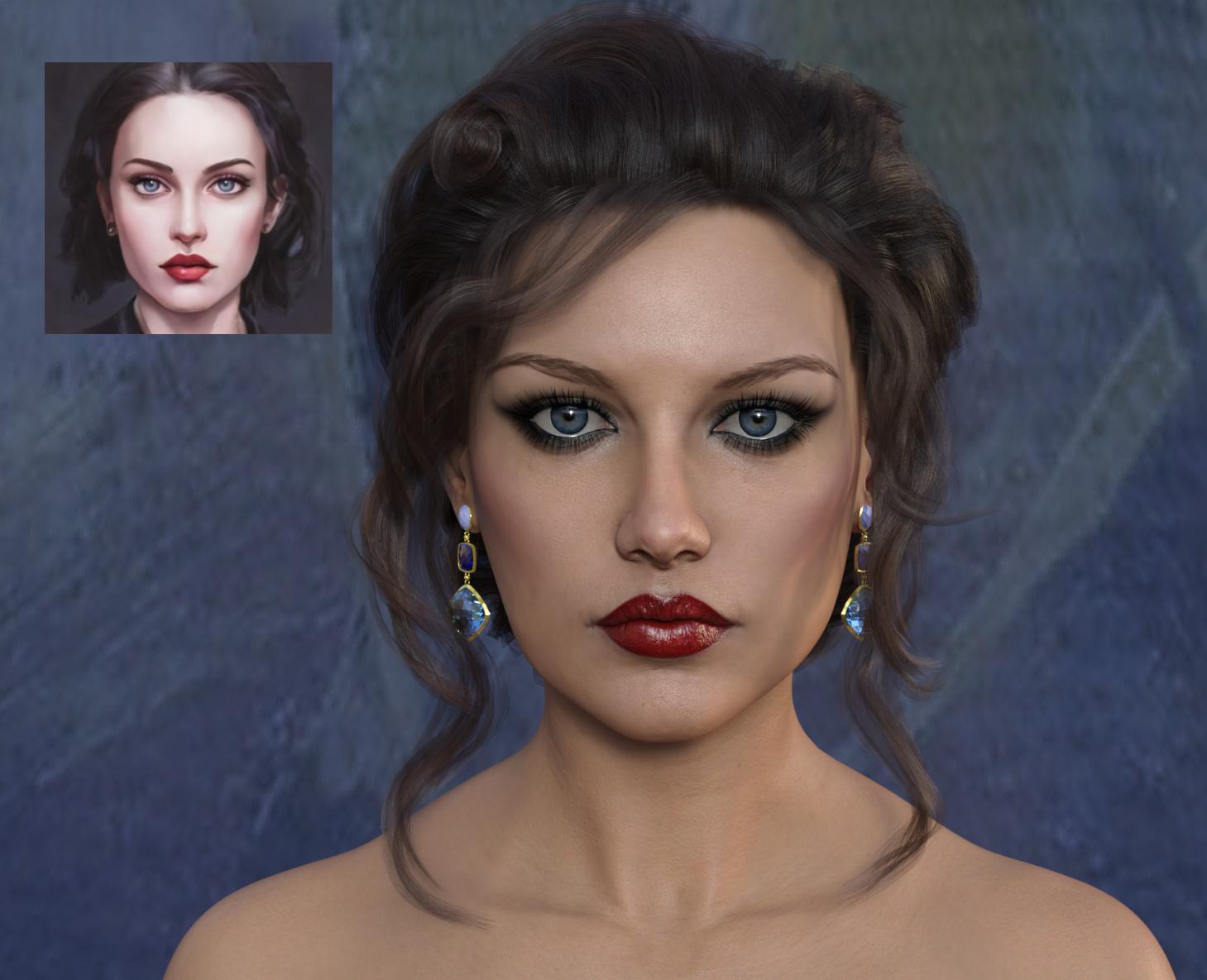
Face01.jpg
1459 x 1185 - 1M
Post edited by AllenArt on

Daz 3D is part of 
Connect
DAZ Productions, Inc.
7533 S Center View Ct #4664
West Jordan, UT 84084
Licensing Agreement | Terms of Service | Privacy Policy | EULA
© 2026 Daz Productions Inc. All Rights Reserved.
Comments
I really like this, well done. :)
I think its hit or miss, but I quite like it.
To get a decent face morph you need an image with decent lighting contrast on the face, and a reasonable smile. One thing I noticed was that if you wanted to use the base skin from the face transfer, you were better off using a skin from flatter lighting. However, the morph from even lighting was often questionable. (Occasionally the evenly lit faces would result in flat nose tips which was interesting to discover.)
It helps to have a side profile image to try and adjust the morphs. Sometimes the face will be flat in profile but workable.
Wow! Stunning character! She looks like a silver screen star from old classic Hollywood. Lovely!
This one had downturned eyes that were kinda droopy, but I like it! LOL I love how it makes asymmetry automatically...makes the faces look even better (although I do have the right eyebrow up a little).
I believe that you may have discovered the best way to use the utility, Laurie. Nice results.
In a related note, the title of the thread made me think of an epitaph for my alter ego: "SixDs - he could have been worse".
looks very classy
Great use of face transfer! I will have to try this soon....
Those turned out really nice. Good stuff. If you start out with ideal reference images, this thing seems to work okay. How are the profiles?
This one had downturned eyes that were kinda droopy, but I like it! LOL I love how it makes asymmetry automatically...makes the faces look even better.
LMAO
I got the Face Transfer Shapes by PhilW (I think...forgive me if I 'm wrong) when I bought Face Shapes yesterday and one click and it fixes the profiles. BOOM!...fixed :). The profiles look good. :)
Laurie
Here are the profiles for the above characters after the Face Transfer Shapes were applied. Before that they were kind of flat ;)
Laurie
Face Shapes? Is that a new one for use with Face Transfer?
https://www.daz3d.com/face-transfer-shapes-for-genesis-8
or
https://www.daz3d.com/face-shapes-for-genesis-8-female
It's new-ish I think, but not super new. And it's the Face Transfer Shapes, not Face Shapes.
Laurie
@AllenArt
So where is this, according to you, ranked against FaceGen?
Or, well, anyone else, not to be rude or Highjack the thread. lol
I don't have FaceGen so I can't give ya an answer on that ;). I can tell ya that Face Transfer doesn't have much in the way of tweaking before it makes the morph. You get what you get. Anything you want changed you have to do after the fact with morphs that you've got. Some pictures just aren't good enough to get a decent transfer. Without the Face Transfer Shapes, the profile looks really, REALLY bad and will take a lot of adjusting.
Laurie
Like @AllenArt says, FaceTransfer is "fire and forget" , you put in picture, a face / character roles out. Nothing much you can do in between.
FaceGen allows you to place dots, and does a good (not great) job of extracting points and textures. I could try inputting the same image into FaceGen and see what it makes of it and share. One of the problems is that FaceGen often overestimates the cheekbones, and I haven't found a good way around that. It probably was calibrated for a long shot portrait photo. I only succeeded once in getting a somewhat satisfactory character I could use right away.
I could/swear by facegen - but that image above looks like a Daz character. So I think that last step of swapping out the skin textures is key.
But then, you can do that with a regualt Daz-created-Morphed character....so I dunno...
The whole point of the roll-your-own is usually the skin.
That's what caught your eye to begin with.
Here is the comparison. Left is Facetransfer and right is FaceGen Artist Pro 2 . It seems to me that the Facegen result creates a barrel distortion compared to the FaceTransfer. They are both usuable, but Facetransfer + Face Transfer Shapes creates a version that seems to be more accurate on the whole. I will also try to see what the textureset from Facegen is to get the complete picture.
Face transfer looks better but for me none of them look like the original.
I am not using the texture, this is purely face shape... texture is a next step.
It's an interesting tool, but I ultimately love spinning the dials so much. I can already randomize or spin a few faces that I like to find new things in the data.
Maybe for a child's face? Or an older person? Daz models mostly fit that Adult-Early Middle Age range (with 20-something Hollywood Teens being the "Teen" models in G8, IMO).
The recent older figures have been solid, though everyone can't look like Floyd. A little shape variance through a tool like this might be good. To me, it's the shapes outside the regular Daz box that might sell me on the face transfer, but my use case for those figures is so small and limited.
Great results! I am definitely going to give FT another try after seeing these.
My first Face Transfer fail/
Is that a fail? I immediately recognized her.
Margaret Thatcher?
Because of this Topic (found in google search) I discovered "https://www.daz3d.com/artbreeder--generating-new-characters-with-artificial-intelligence"; for FaceTransfer and... well, see below. :)
Of course there was still a lot of postwork with texturing (the facegen texture merged with anoter one) than a bit more sahping, but this tool was a rrally great help for starting. I tried befor withoout and failed :)
You can see how the process whittles down and makes smaller the original geometry of the artwork on the left in your example.
Just curious, has anyone tried using both Face Transfer and Face Gen, and then blending the morphs from each one together? The example above gave me the idea. It seems that they might minimise the distortions in each other and get much closer to the original this way.