Sky Jumper Outfit help.
 jd641
Posts: 463
jd641
Posts: 463
https://www.daz3d.com/sky-jumper-outfit-for-genesis-8-female-s
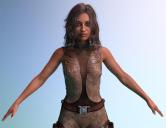
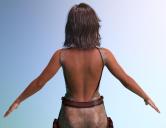
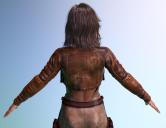
I think it's great except for the back of the outfit. I didn't realize when I bought it that the bare back is exposed without the jacket on. Even with the jacket covering most of the back, there's still a slight gap that's visible and I'd like to find a way to cover that lower area so it looks like there never was a gap there. I have some body suits from other sets but I don't know of an easy way to just have the back part of the suit visible and how I could easily do that for a scene where I have several figures wearing the Sky Jumper outfit.
Any help is appreciated.

Daz 3D is part of 
Connect
DAZ Productions, Inc.
7533 S Center View Ct #4664
West Jordan, UT 84084
Licensing Agreement | Terms of Service | Privacy Policy | EULA
© 2026 Daz Productions Inc. All Rights Reserved.
Comments
In theory this could be done with a GeoGraft to patch the hole, but that would be a fair bit iof work (in part dpending on the resolution of the mesh - I once started a similar project with a different outfit but gave up due to the high density of the mesh) and might be tricky to texture to match.
You could go without the vest and kitbash in something else. However, I really do like the look of the vest from the front.
As said above, applying a geoshell seems like your best option. But matching the texture from the sides will be a nightmare.
So my suggestion would be to apply a dark brown colour similar to the one used in front together with a greyscale noise texture to break the uniformity.
Yeah, the front is great. Why they decided to make something that looks practical from the front and sides into an openback outfit from behind confuses me a lot.
I honestly don't know anything about geoshells, they sound scary and I'm far from technically sound in Studio. But I can do kitbashing!
I used a body suit from another outfit and ignoring the pokethrough and honeycomb texture, it looks pretty good to me.
Is there any easy way to hide all the parts that I don't need on the body suit so that only the exposed part on the Sky Jumper will be visible? If there is, how can I make it a preset so I can just apply it to the body suit any time I use it with the SJ outfit?
If the suit comes with different material zones (look in the Surface tab), you can hide those you don't need, by setting Cutout oppacity to 0. If there isn't appropriate material zones, then you can paint a black-white image and set in the cutout oppacity map (white means visible, black invisible) using the UV map (or the diffuse texture) as reference, so you know where to paint.
A geoshell is in essence a very tight body suit, usually offset by 1 mm from the body, and the way to use it would be similar to a clothing bodysuit.
You can hide bodysuit parts with the cutout opacity, but it depends on how the material zones are set up. You might be able to get a combination that works to cover the area of interest otherwise you would need a transparency mask. Once textured the way you want, you can save a new materials preset for the bodysuit.
Geoshells are very simple. Studio will generate it for you, so there is zero skill required. Select G8F, and Create -> New Geometry Shell. Name it if you want (you can change it later), and select it in the Scene tab (by default it is not selectable in the viewport). Go to the Parameters tab and look for Shell -> Visibility. Surfaces will turn visibility on/off for the main Surfaces, and Face Groups will handle smaller sub-surfaces (actually related to the rigging, but has smaller groups of polygons).
What you want to do is hide all surfaces except the Torso, and then hide face groups on the torso to leave just the parts you want to use, i.e., abdomen, upper abdomen (which will cover the exposed area), optionally the chest, upper chest, left and right pectorals. The different combinations will look like some sort of undergarment, like a corset or camisole, under the suit. The outline might be a bit rough, but you won't see the edges, for the most part. Texture it with any appropriate shader (basic material, chain mail, scales, whatever). It doesn't necessarily have to be an exact match, could even be high contrast. It will show behind the front center panel of the suit, but it isn't a terrible look. To save it, you should save as a Properties Preset on the geoshell, and include Materials and Other (for the shell visibility). Whatever is selected will get saved, and be re-applied when loaded.