Surface properties sliders - parameter numbers disappear when using slider?
 hacsart
Posts: 2,037
hacsart
Posts: 2,037
Just upgraded to 4.12.1.117, 64 bit. Win 10 Home (1909 - build 18363.836) Geforce GTX 1650 Super, Nvidia driver version 445.87.
When I drag a surface property slider, the parameter numbers disappear, makes it hard to make adjustments.. Now I can't remember seeing this in 4.10. Am I going crazy, or is there something I can change to "fix" this, or is this normal behaviour. The sliders in the parameters pane don't dispaly this behaviour.
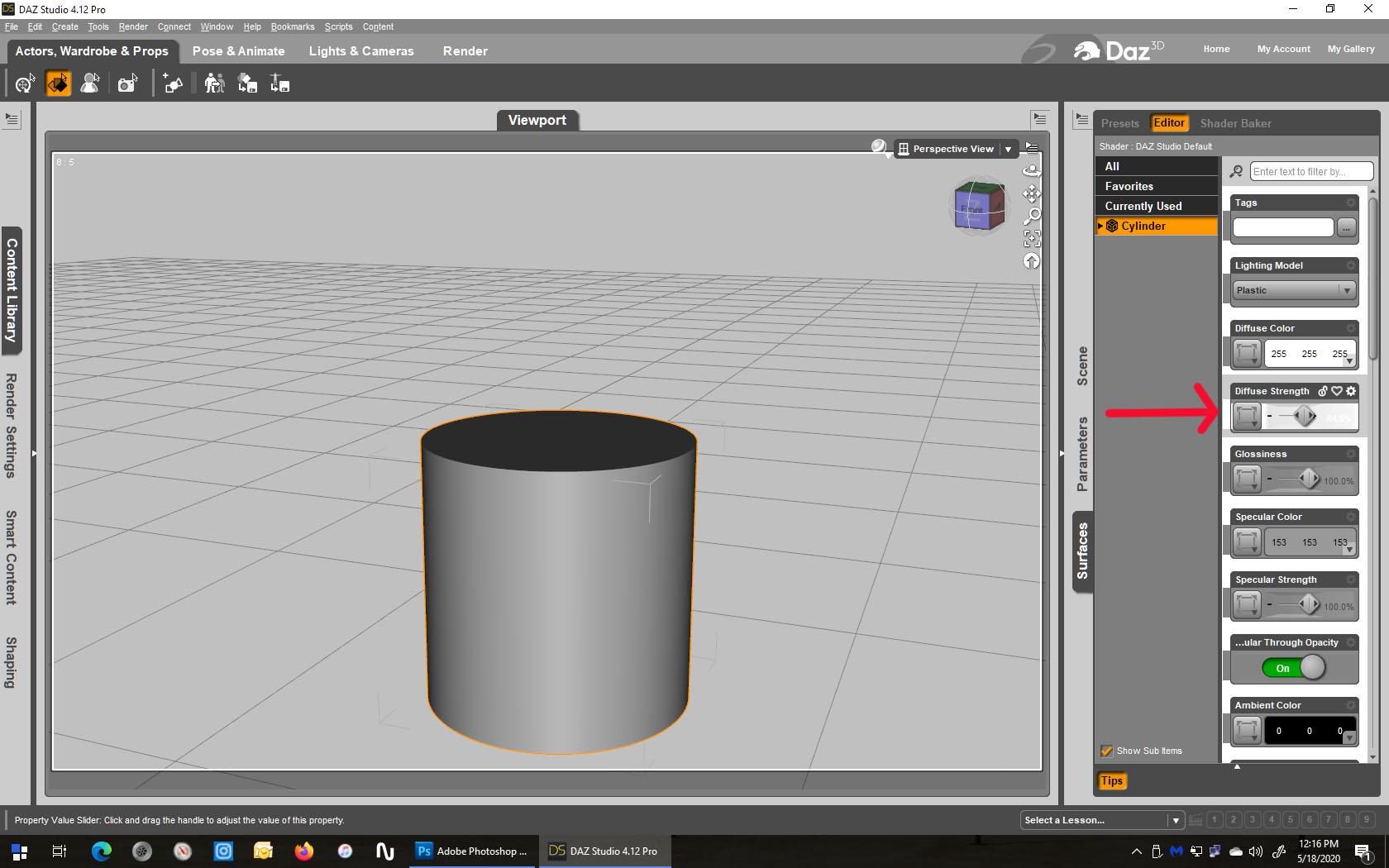
Thanks!
surface_slider.jpg
1680 x 1050 - 251K
Post edited by hacsart on

Daz 3D is part of 
Connect
DAZ Productions, Inc.
7533 S Center View Ct #4664
West Jordan, UT 84084
Licensing Agreement | Terms of Service | Privacy Policy | EULA
© 2026 Daz Productions Inc. All Rights Reserved.
Comments
That doesn't happen for me using the Darkside Style - you might be able to use Window>Style>Customise Style
Oddly enough, as you suggest, the sliders behave normally in "Darkside" sadly, that style is really hgard for me to use due to font size and colour scheme. Both "Highway" and "Mainstreet" exhibit the same disapperaing numbers. What style parameter would I need to adjust?
You shouldn't be seeing this in 4.12.1.117 - http://docs.daz3d.com/doku.php/public/software/dazstudio/4/change_log_4_12_0_86#4_12_0_85 includes
You may want to try reloading the style (Window>Style>Select Style) and see if that fixes the issue.
Tried that.. Still no joy... (4.11 works fine..) - reinstalled 4.12.1.117 - no joy there. Created a style in 4.11 that worked, applied it in 4.12, same thing. Oddly enough, its ONLY in the surfaces pane.. all others seem to work fine ..
EDIT: Fixed it by customizing the style and chaning the Background Color to 145,145,145, Foreground to 255,255,255, and Base to 120.120.120 ..
At least now I can see the parameters change when using the sliders..
Thanks!
Did you reload the default style or your customised version? A customised version will have the old values baked in, it wouldn't update to the modified default values in the newer version since it's no longer that style.
Reloaded the default style, then custimized and saved to a new style.. That seems to have fixed it..