Need Some Lighting Advice
 kwannie
Posts: 870
kwannie
Posts: 870
OK, so I generally only attempt doing Stage and concert scenes, because I have lots of singing animation files, but I am absolutely clueless about lighting. So I'm hoping for someone with some artistic capability could lend their talent. In the examples below I have a stage with curtains I put together from different packages with kind og a retro flair. It has a lighing truss and in the last picture you can see where I placed some emmisive panes to simulate pen lights. In the first pic I just have one distant light which is no good for a cozy bar scene, the curtains show up but ruins the effect. In the second is nothing but spot lights but I would like the cutains to at least show in the scene a bit. In the last picture is spots and emissive panes but of course this requires like 1000 iterations to eleminate the noise. I denoiser just makes the character completely blurred.
Could any of you share how you would go about lighting a scene like this? I would like to add a few tables and a foor depending on how fast I can get the renders. I do have ghost lights 2, and tenebroso lighting just really don't know the best way to place them. So I'm really going for somethink like a jazz club environment with maybe some abient light but still have the sharp spotlght effects.



Daz 3D is part of 
Connect
DAZ Productions, Inc.
7533 S Center View Ct #4664
West Jordan, UT 84084
Licensing Agreement | Terms of Service | Privacy Policy | EULA
© 2026 Daz Productions Inc. All Rights Reserved.
Comments
Here is one I did.
https://www.daz3d.com/forums/discussion/comment/2722511/#Comment_2722511
Try doing an image search on Jazz Club Lighting. There's a lot of light bouncing around.
My preference when doing indoor lighting is to emulate the kinds of light sources you would find in that type of room. On a stage, you would frequently have footlights that illuminate from the bottom front. You would have some gels as you show in your third image to provide backlighting on the figures on stage. Also, in a jazz club, depending on the period you are working in, there might be some smoky haze. This provides a lot of atmosphere, but obviously adds to render time, even with low density. To avoid the increase in render time, you can try to use the Matte Fog effect in Environment settings to see if that gives a pleasing effect, but Matte Fog does not give the same light beam effect as volumetric props. All it does is obscure what's visible in the scene. Personally I think the volumetric atmospherics give a better result, but that's just me.
Examples! Same lighting, same background. First example with 10m Matte Fog. Second example with the atmospheric prop, background and lights from Colm Jackson's Render Studio 2.0, which is awesome.
The first image is 90% converged after 2 or 3 minutes, and the second only 25% converged after around 10 minutes with Folding@Home running in the background, but I like the graininess for a stage light effect, but again, that's personal taste.
Each of the prop stage lights in the first image should be a source of light for your scene. If using Iray, add a high emmissive surface, if using 3DL place a daz spotlight at each pointing at your star on stage. Most stages are bombarded with 20 light sources from all sides and above
Thank you so much for the feedback and great ideas. I guess my main issue with many of the suggestions in that I am doing animation not still photos. Most songs will make the animation somewhere in 6000 to 8000 frame neighborhood, so I am very limited to the types of lighting. From what I understand direct lighting like spot lights or distant lights are the fastest, since there is no scattering that has to be calculated. In the photo I attach that had the emmissive planes still did not finish because I only used 150 iterations for each photo, and all of them rendered under one minute.
I would say that I love each of the examples that all of you gave. First Bastion were you talking about the lighting fixtures on the stage, such as making the light bulbs emissive ? How do you make all surfaces highly emissive? Would using seperate spot lights directed at each section of the curtains at very low lumens be the best way to make the curtains show up while maintaining the full effect of the spot light on the main character?
Did a couple more with actual stages. I stopped both at around 150 iterations. The key to making the lighting look like actual stage lighting is to light it the way an actual stage, especially a musical stage is, and that is with colour. This is done to give the effect of 3-dimensionality to the set, which we also want to do. Source: I did a year or so of theatre along with photography in college, before switching to something more soul-crushing.
In the Jazz Corner, I have red tinted light coming from front overhead green tinted lights from the right and blue tinted light from the left and white light from the rear. For that I used the light fixtures that come with the set. I added an emissive plane at the bottom of the stage.
On the Aslan stage, I have the footlights that come with the set providing white light. Then I added a blue spot coming from rear right and a red spot coming from rear left.
Finally, just out of curiosity, I added an Atmospheric prop from Colm Jackson's set to the Aslan scene using low density. This render took 179 iterations and 75 seconds on a 2080ti.
In all cases, lighting is scene only and everything that's not in the frame that's not lighting has been hidden.
I did a very short animation, which is pretty bad because I don't know anything about animation, just to show how the atmospheric effect looks in an animation.
Sevrin, Thank you! You are the guiding light (no pun intended) I was looking for. The stage I used in my pics was made from from the Asian Theater like you have. I have a sample of a fog cam render that I have somewhere but generally I stay away from atmosphere because of the rendering times. Animation simply cannot render for more than a few seconds per frame or else it will take a week for one animation. I like the Jazz Club render you have and I wish it was possible to include a band behind the singer. I would love to to do some swanky old style 1930's type of Jazz Cub scenes with an actual animated audience and a singer on stage. Staging and arrangement including the lighting is always troublesome to me. I have converted many MMD singing and music motions so let me know if you want a BVH to test out.
When you did your renders did you hide other parts of the night club prop that were not on camera, to save memory
By the way, it is sad that even with a 2080ti you still get quiet a bit of graininess, I only have a standard 1080.
I usually hide everything that's not in frame to avoid bounced light where I can, unless I want bounced light, or want to block HDRI lighting, which wasn't the case here.
As far as the graininess, are you talking about the particles from the atmospheric prop? Those are part of the bargain and only get smoothed out over many more iterations. However, if you slow down the clip, you can see shadows being cast on the particles on the left side of the figure which help situate the character in space. The unfortunate thing is that noise in Iray is not random for every render, so other than where the shadows are moving the visible light beams look like an overlay. I guess you could animate the lights like they do in rock concerts, but that would take some fiddling to get right, and wouldn't be appropriate for every stage production.
The other thing with graininess is that you have to make the usual choice of two, and there's no way around that:
But is graininess all bad? To me it's like the endless search for photorealism. Image crispness and photorealism shouldn't be ends on their own. And they're not essential for every story you want to tell. And if we're not telling interesting stories, then there's no good reason for us to be doing any of this. This is a family forum, so I won't get into what metaphors I think are appropriate for the search for technical perfection for its own sake.
So I wanted to watch Knives Out, and during one hour and fifty-one minutes of that, I did another render with spotlights and a touch - really very little - of atmospheric volume. In order to alleviate the static noise, I set the spotlights to follow parts of the figure. I had bought some aniblocks when they were crazy cheap a while back, and used one of the idle animations, just to have the figure move in place a bit. The noise is still static at the top of the image, but you can see the beams moving a little bit, and there's a lot of movement on the left as the figure moves her arms around. Not so much from the red spot, due to its angle. In hindsight, it might have been better to use a magenta and a mint spot, but this was mostly to get an idea of what result animating the lights would give.
It's best watched on Youtube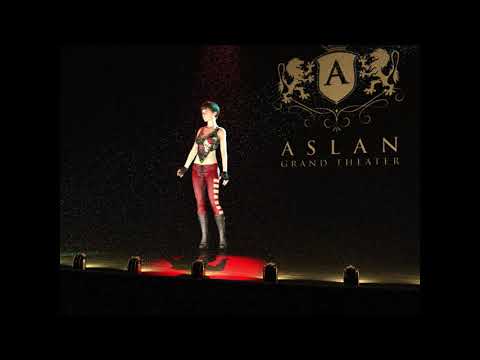
This is a soothsayer saying soothe. This deserves its own topic.
I'm doing an animation now for a music video that is mainly a dream sequence, much of it using retro scenery and costume, and I've been turning my "noise problem" into an artistic tool to create the exact retro look I wanted, coupled with some bloom and fog filters in FCPX.
Also, having the camera pan or zoom or dolly in an animation, even a little bit, covers up a multitude of "noise" sins, while your characters or props remain the focal point of attention.
And of course your overarching point is of fundamental and magnificent magnitude: Be telling a compelling story and the audience will not see 1/1000th of the "problems" that you are keenly and painfully aware of.
What I do often is look for a package that includes a setting, poses, and lighting - in this case it would be a cabaret, stripper club, or night-club, or rock concert. Then keep the lighting as-is, and replace everything else.
Go to the other content website and search the word Sally. You'll get a pre-lighted cabaret.
Take a look at this lighting https://www.daz3d.com/render-studio-20--volumetric-plus
And there are these HDRI lights which (I assume take very little resources when rendering) that give you backgrounds and infinite lighting possibilities when you rotate the dome. They are also very theatrical looking, The come in 3 separate sets too https://www.daz3d.com/orestes-glamour-portrait-bundle
A properly exposed photograph will not be grainy, but there are exceptions which can get technical. We are used to noise because consumer grade photographs are not high quality. It's also a function of the printing process. Cheap newsprint paper has a bit of noise to it and we accept that. You can paint artwork on textured paper which distorts the work but we call it "art." In the end, it's really up to you. It boils down to this: If an image is grainy because you haven't mastered whatever technique (or be someone like me and cheats in post-processing), then it's bad. If you produce something that is grainy on purpose, then it's good. Most circles aren't going to buy the argument that this is is sloppy, it's the best I can do, but I still like it. On a side note, there is nothing that says you have to produce a "pure" render. Most of my artwork is composites done in Photoshop where I mix real photographs with Daz renders and then post-process beyond that. Fauvist above me posted some artwork links. Compare the foggy and fuzzy images to yours. 3D rendering software is a tool, it is not a rigid set of must-be-done-this-way rules so it doesn't matter how you achieve your final result. They say there are no rules in art but that's not true, buyers and editors and critics are going to tell you to fix the noise because it's breaking a rule. If you're happy with your renders then you're done. If you aim to get to a level of pleasing buyers, editors, and critics, welcome to the world of professional art. Hopefully the skin on your back is thick.
I'm not sure what point you are trying to make commenting on 10 minute renders, or in the case of the animations, 30 second renders, meant to demonstrate lighting effects.
I got that, but you're saying YOU like it and asked the question to the effect of what's wrong with it.
No, I asked what's wrong with using the nature of the medium to tell a story. I didn't say I'd put that picture in my gallery. There's an idea that only once you have hidden all the technique you can create something worth looking at. I don't believe that.
I would be happy to hear more about your experience in the world of professional art, though.
"Properly exposed" according to whom? Sorry, but for years I had to cover events for a monthly magazine with a workhorse Pentax SLR camera, and often the lighting conditions were abysmal, but I had to capture action on stage and in the audience, without flash. (And while stage lighting often looks bright to the human eye, it can cause all kinds of exposure problems with a camera, but that's another story.) I would sometimes push, e.g., 200 ISO B&W film two stops to 800, or even three to 1600, and have to develop it all myself overnight. Would print the **grainy** photos on big paper, then photostat them way down with a fairly fine screen to fit the page layout. Got some fabulous "impossible" shots that way, and they came out looking great in the mag.
As for the animation I'm working on currently, the "grain" is lending some retro quality that is such a "happy accident" that I'm utterly pleased with it, and so is the client. And the only people in the world who can say what is "properly exposed" for this are the client and me.
There are floods of hidden "standards" out there in the world, that aren't "standards" at all, but merely some arbitrary ideal that someone decreed to be a "standard." Standards that really are standards are great—right up to the moment they become chains.
I would definitely render till the cows came home a still "glamour" shot to grace a full-page color ad in a slick periodical. Each artist has the responsibility—and the freedom—to determine what is "right" for a given project or assignment. In my experience, technical perfection is a harsh, and very elusive, mistress. YMMV.
So........this went an unexpected direction. I was not trying to imply that the renders not were done well, I was really aiming the comment to the demands Iray places on a system. As I said I only have a 1080 and I hoped that there would be vast improvements if I moved up to a 2080ti. Sevrin, I really love the composition of the last video you shared. How did you manage to keep the character's skin tone pale with what looks like a red spotlight on her? Judging by the shadows the spots are only from above but she is fully illuminated. I love the way the foot lamps cast light upwards too, but is that what illuminated the character?
The biggest problem I am having issues with, is the Night Club environment as a whole. I can manage the direct lights on the character, but setting lights to bring out the ambience of the surrounding parts of the club such as the front of the stage base, the curtains, the floor, tables and maybe a few people in the audience. I'm not sure how First Bastion got the ambient areas in his club scene to have just enoght light to show tables and people in the background without casting that light onto the stage area. Unless I use flat lighting directed towards the whole stage there is not much refected light radiating back towards the audience. Maybe a few can lights in the ceiling or wall sconces or even candles on the tables could provide some atmosphere.
I like the ambience of the scene that Fishtales posted and he said the he used a starfield HDRI, so I am wondering if I should incorporate an HDRI. How would that effect the rendering times?
By the way Fauvist I do have Render Studio 2.0 and it has some very cool features but atmosphers just takes too long for animation. I mean I can only devote a max of about 20 seconds per frame or else the noise will kill the picture. Emissive too, even the few panes I added in my pics above really maves the noise unreasonable. Honestly if I could acheive some type effects like the one in the video link here. That would be amazing.
https://www.nicovideo.jp/watch/sm36231212
Of course this was don in Iclone.
The HDRI doesn't add to the lighting in my image. It is there to give a dark background behind the curtain as there was no back wall :)
Just out of curiosity to see what type of scene somebody could come up with. I attached the BVH and facial motion DUF I was working with. I'm pretty sure I can't attach the music but if you search for "Lipstick" you should be able to find it. The BVH is for G8, don't forget to turn off all limits and unlock nodes, (selected and Pose) while you have all selected. The facial you need to drag and drop onto a G1 figure and the use Mcasul's Trans Express script to transfer to G8. Then you can save the face data to an aniblock making sure that you put a check in the Morphs/Values block. I hope somebody trys to experiment with this and posts their creation.
@kwannie: Given what you've described, I think you could get some good ideas from this video done by our own (Daz Forums) Parmy Baddhan:
Daz Studio Indoor Lighting
It isn't a be-all and end-all to the exact situation you have, but it addresses conceptually many of fundamental issues you are dealing with and shows realistic methods of overcoming them, including creating ambient light in an enclosed space that doesn't overwhelm your "hero" lighting.
It's one of his weekly series of videos in this thread:
Daz Studio Beginner Tutorials (UPDATED EVERY SUNDAY)
As for the overheads and/or spots for your stage, this article on angles for stage lighting is very worthwhile:
What Angles are Best for Stage Lighting?
For the "front wash" with Daz lights, you need the effect of "can" lights overhead, probably four or six—and as Sevrin said upthread, give them some color. The front wash light (including footlights, if you use them) need to be soft, not hard-edged. You can effect this by using geometry for your spotlights, either discs or rectangles—not points!—and making the discs or rectangles fairly large. That requires some experimentation to get the shadows soft, and I think Parmy covers it at least somewhat in the video above. Good luck with it!
About this clip. Other than the light rig, there's no scenery, and there's light affecting the figure from every direction. There's not even a ground plane. There's some metal pipes and spotlights and the figure with hair and clothes. She may not even be wearing shoes. I don't know about iClone, but unless there are some particle effects avaiable, those were added in post. You can make very clean, very fast renders that way. Once you start adding a stage with curtains, and blocking lighting, all that changes. A lot.
N-E-WAY, against my better judgment, I gave this a whirl. So importing the BVH took ages, so I didn't bother with the face animations, or even look for a prop microphone. It had gotten REALLY LATE. I set up a few quick lights, along with a neutralish HDRI, and a few prop tables just to have a little background, since I don't own a lighting rig like that. Unless I do. Somewhere. I didn't even look at the whole animation, otherwise I would have realized that the first 4 seconds were static. But since I rendered them, you get them.
So this is what 20 seconds per image buys you on a 2080ti with that kind of scene.
Have you ever looked at Papertiger's HDRI camera? It's very handy in some circumstances where you have your scene including walls and props in the viewport but want the HDRI to be exposed everywhere outside the viewport. It's basically a camera with a bunch of Iray planes strategically placed on the camera and parented so you always get the HDRI affecting your scene and everything outside the viewport cutoff by the plane on the sides and top/bottom.
I did not know, that Matte Fog could look so nice. Need to experiment with it more.
Once again Sevrin, your composition looks incredible. I do need to clarify though. I liked the atmosphere effects and the lighting flares that can be acheived in Iclone, wishing there was some way to do that in DS. You were spot on with the look of the background. I still want to make a semi realistic style environment. I do like noire feel that your atmospheric renders provided, but my favorites were your Jazz Spot and the video of the character in the Asian Theater set.
I'm not sure if you searched for a video of "Lipstick" which is what the BVH was from, but you can tell it is a retro "Torch Singer Style" . For some reason a scene in that genre seems to evade my skills for lghts camera placement, props and composition. For example if I do camera angle where it shows a few of the tables and the stage, the character seems rather small and I have a tendacy to want to zoom in to get the character up close. With a stage is it better to show it looking up at the character or show the camera looking down on the stage. Should it be a series of camera pans or sudden close ups and wide angles. I know this willl all depend on the creators particular tastes , but that is why put a call for those who have an actual artistic eye such as all of you that have contributed to this thread thus far. I have gotten several fantastic ideas such as the suggestion of placing some interest behind the character while on stage.
This is why I was hoping someone would take the BVH and lip motion I attached and run with it, to make some type of swanky night club video that would have all kinds of great ideas.
Sevrin, I do love how you try to take on the challenge, and there are many other elements I am curious about being able to acheive in DS more effects in the stage setting, such as incorporating GOBO lighting (I'll try to find a vid of what I mean), a mirror ball with accurate lighting effects, and maybe some laser fans in the background, and so forth. All of course if it is possible to do in animation (with reasonable picture quality and render times)
I think what might look OK on my stage, the on in the picture I posted would be some IES profiles cast onto the backdrop, and maybe placing curtains in the background as well.......................ohhh but the rendering times, LOL.
I couldn't find any Lipstick that looks like the animation. There are a bunch of Lipstick videos on Youtube and the first one was Middle Eastern. I don't know why you don't just provide a link.
Anyway, I ended up finishing the animation with the DUF file, added a microphone and some camera movement. The issue is that rendering the whole thing would take more than a day even at 20 seconds a frame, and once you add all the stuff you are talking about, 20 second renders wouldn't look very good and it would take a few days to do it properly.
My bad Sevrin, you are right. Link is below. I got the motion file from MMD so obviously the video source will usually be MMD also. I could not find a live real person version of the song.
https://www.youtube.com/watch?v=g15_Gn0y2jI
That is definitely not a "Torch Song". It's a J-Pop song. A torch song is a sad, usually slow jazz or blues influenced song about romantic longing, lost love or an unhappy relationship. Stay by Rihanna is a modern torch song.
Anyway, here's what this looks like scaled down right now. I'm rendering an HDRI that might be an okay background, but it won't look like your stage.