external hard drive
 edla
Posts: 16
edla
Posts: 16
in The Commons
Can someone suggest a good external hard drive for archiving?

Daz 3D is part of 
Connect
DAZ Productions, Inc.
7533 S Center View Ct #4664
West Jordan, UT 84084
Licensing Agreement | Terms of Service | Privacy Policy | EULA
© 2026 Daz Productions Inc. All Rights Reserved.
Comments
I've got a couple of Western Digital My Passport, small USB powered externals, I've had no problems with mine, apart from filling the 1TB one so added a 4TB one for content, I'm sure other will chime in but most branded drives are pretty good, for an archive I wouldn't skimp and buy cheap.
I use a WD MyBook for backups. So far, so good.
I've had multiple WD's fail and I've had WD's survive for some time. Sadly the only brand that never failed on me was bought up by WD and discontinued, which still pisses me off.
It's a lottery - there's always a percentage that fail and some may get more of these than others. And some fail because of external causes (overheating, power surges etc.). I've bought over 50 WD disks over the years (never use anything else) and I think some 12-15% have failed within 3 years, the rest, which I still have and which have been working for years, are still fine.
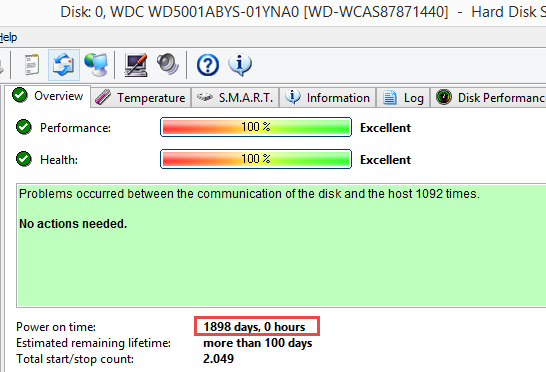
Here's the status of the system disk in this computer, it has a power-on time (the total time it has been spinning) of 5.2 years. The communication problem was caused by a bad SATA cable a couple of years ago, otherwise no problems. The other 3 WD disks in the machine each have a power-on time of 1079, 1227 and 1356 days, and also in perfect health.
I went through a period of angst trying to decide which new hard drive(s) to buy to replace my collection of external too small drives. Every brand has its negative reviews. Some reviews screaming "DO NOT BUY". Then I tried to believe that not buying on sale would be prudent but gave that up because I started seeing questionable reviews about the goodness in the particular drives. Then I started thinking "just buy the expensive top grade models", but gave that up when I saw how expensive they were and yes, even they had screaming disasterous reviews. I truely believe that many of the negative reviews come from people with an agenda or who don't know what the duck they're doing.
Arghhh..., It's a freakin' religious battle as bad or worse than which browser or which antivirus to use. I finally gave up and being a firm believer in the "mama bear philosophy" I just started buying reasonably priced, moderately high capacity, known brand drives, on sale and prepared myself for a failure and the hassle of returning it. I've bought four new drives at least 4 or 6 terabytes in size in the last 6 months and all are working just fine. Are they used in gaming machines grinding the hell out of them all day long in super hot environments. NO. Are they even turned on all day long. NO. Am I using them strictly for backup a couple times a week on rotation? YES. So far, so good. None have failed. Your mileage may vary.
Do I keep all my eggs in one basket? NO. I've dropped my basket before and know that it sucks royal swamp water. That's why I have multiple backups used in rotation. It's all about manageing risk.
Do I have enough backup drives? NO. I have two major desktops and a laptop and a large library of permanently archived data. But I have at least two backup methods on each of the three machines, as well as the permanent archives.
I've had external powered drives from both Seagate and WD fail on me; these are internal 3.5 inch SATA drives in an enclosure with a USB interface.
I now use non-powered external USB drives from WD, Toshiba, and Seagate - they're cheaper, they take less power, and for me they last longer. I currently have (counts ...) six 2 TB and six 4 TB drives spread over two desktop systems and my laptop. I get them at Costco - the 2 TB go on sale at $79 from time to time, and the 4 (now 5) TB drives end up on sale around $149. They are cheap enough that I have spare drives of both sizes on the shelf - not that I've needed them; several of the 4 TB have power on times in excess of six years.
The old IBM/Hitachi drives were pretty reliable and had good reviews. Mine were great. I was sad when I couldn't find new ones. ebay has some Hitachi Ultrastar drives refurbished.
For the record: Hitachi was what I was refering to before.
...I have an actively cooled external drive enclosure with a 4 TB drive for backup. Not thrilled by the passive cooled ones.
The USB externals are all running at 32 to 38 C - which matches my internal drives. I did hit 50 C on one 4 TB drive once (alert from crystal diskinfo) but that was because I had stuff stacked on it
I've used various brands and haven't had any really bad experience with any of them. One or two started to make weird noises after a few years of use but I was able to transfer my data before they failed completely.
I do replace my hard drives from time to time, though, usually because they get too small. Whichever brand you choose, don't forget to back up your data. Hard drive failure isn't the only way to lose data and having a backup is always a good idea.
Seagate Backup Plus, i believe they go up to 12Tb, i have a 6Tb and it has not been powered down for 2 years.......hoping to get a new 8Tb for extra storage at end of next month( just bought a 4Tb internal for my new rig build )
..yeah I tend to err on the cautious side.
An external drive isn't much book for archival or backup purposes. Unless you're running multiple drives in a RAID config, you're just as vulnerable to data loss as if you had gone with another internal drive. Anyone who has data they wish to preserve should set up a NAS.
If your PC is hit by a lightning an internal backup drive will likely be killed also, an external drive or NAS which is only connected and powered during backup is safer in that context (personally I use both internal and external backup drives plus online backup).
Back up to a cloud service, and use 2 external hard drives as storage.
I have an external 3TB Seagate Backup Plus along with a 4TB WD Caviar Black internal...Acronis runs two backups, one to each. On top of that, because if there is a fire or something else, an online backup is essential and that is done by Carbonite. No complaints about Carbonite...it has saved my bum bum numerous times. I've debated dropping Carbonite and just paying more for Acronis to get their full online support, but I love that Carbonite is "smart" about backing up rando stuff you wouldn't think is important when it really is.
I can't add any more to the best drive discussion, like others I've used pertty much all hte major brands. i'd agree it's luck of the draw. With prices going down, I'd add the advice I got here on another thread:
3-2-1 for backups. At least 3 copies on at least 2 types of media and 1 copy stored off site.
..I'd never put my projects and WIPs on someone else's server.
RAID requires the drives to be installed in the case. If the PSU goes poof it can take everything with it.
I'll stick to an external that can be disconnected between backup sessions.
The only decent and cost effective media for bulk backups is another drive. DVD's don't have anywhere near the capacity of an HDD/SSD and they can degrade over time (had that happen to several of my DVD backups). Large flash drives (128 GB or higher) have slow transfer rates.
The rub is that if your house burns down, then you lose everything. I'll stick with putting my stuff on an encrypted backup server. Never had any problems. Of course, I'd only stick with the well-known names in online backup, and unfortunately, that's not cheap.
...that's another point. particularly if you are on a fixed income like I am
If I need to, I can swap out an updated secondary backup to my safe deposit box each week so it's "offsite" and "offline".
Fortunately I don't live in one of those slapped together wood frame & particle board cookie cutter apartment complexes that you usually hear about going up in flames in the news.
I can pull all the external USB drives and get them in my bug-out bag in just over a minute. They're all configured with 'quick removal', so I can just rip & run.
I only have one reasonable exit for a 70+ year old, overweight man. But everything I value is near the door. Grab the briefcase with critical documents, grab the wallet, yank the external hard drives into a grocery bag, and out the door. HOWEVER, if the fire is in front of the door, I'm crap out of luck and will have to climb over my office computer table piled high with equipment or my storage boxes and high tabletop display of my stone critter collection out into the enclosed porch through the top half of the window and then out the front of the house. Or make my way back upstairs squeeze through a very narrow window and shinny off the edge of the high porch roof. In either case it won't be graceful.
...need a chainsaw.
Nope, no chains in my house, so won't need to saw through any of them.
Rip and run also doesn't work if the fire happens when you're not home. I may not leave the house much, especially not these days, but I do go out from time to time and that's always one of my biggest fears...behind the animals. Having an online backup aleviates at least that one fear.
I use Crashplan, everything is being encrypted with your own local password before being uploaded meaning no one can access your data without that password.
Crashplan offers unlimited backup for $10/month per computer including external drives. I wouldn't call that expensive. Though unlimited is, as always, not really true, but 10-15 TB is no problem I've heard.
I'm not so much worried about my cloud stored data being peeked at, but more worried that my cloud stored data could someday just go poof, gone, when the company makes a major screw up in business or technical operations. Not impossible. And I'm sure I could make a conspiracy out of it if I'm paranoid enough.
But realisticly, there's nothing in my vast collection of data that is essential to myself or the world. My archives have been untouched archives for all of this century (so far). Would I be dismayed that some of my archives or backups "poofed"? Sure, but not enough to get tinfoil hat worried about it, and make yet another automatic monthly deduction from my bank account. $5 here, $10 there, every freakin' month in perpetuity. Soon, you're talking about real money. Compared to a $10/month rental fee, a purchased hard drive for $80 is paid for by August and a downright bargain by December. Then in two or three (or four or five) years, I get another one.
Stuff like that adds up when you have a number of different things that ping you with monthly/yearly costs. I have Carbonite and that runs me $60 a year. And Acronis which is another $60 a year. That's just backups. Norton is ~$40 a year. Photoshop is $10 a month. Microsoft Office is $10 a month. Adobe Stock is $30 a month. That's just computer stuff not even counting entertainment subscriptions (I play a couple different MMO's and Spotify is a must have for me). So yeah, yet another "it's just $10 a month" might look cheap up front, but it all adds up, especially for someone who might be on a more limited income. I don't even want to think about streaming platforms that all have their own "it's just $10 a month" dings that all add up to having cable again, lol.