• Daz 3D
  • Shop
  • 3D Software
    • Daz Studio Premier
    • Daz Studio
    • Install Manager
    • Partnerships
    • AI Training data
    • Exporters
    • Daz to Roblox
    • Daz to Maya
    • Daz to Blender
    • Daz to Unreal
    • Daz to Unity
    • Daz to 3ds Max
    • Daz to Cinema 4D
  • 3D Models
    • Genesis 9
    • Genesis 8.1
    • Free 3D Models
  • Community
    • Gallery
    • Forums
    • Blog
    • Press
    • Help
  • Memberships
    • Daz Premier
    • Daz Plus
    • Daz Base
    • Compare
  • Download Studio
ADVANCED SEARCH
  • Menu
  • Daz 3D
ADVANCED SEARCH
Add image
  • Shop
  • 3d Software
    • Daz Studio Premier
    • Daz Studio
    • Install Manager
    • Partnerships
    • AI Training data
    • Exporters
    • Daz to Roblox
    • Daz to Maya
    • Daz to Blender
    • Daz to Unreal
    • Daz to Unity
    • Daz to 3ds Max
    • Daz to Cinema 4D
  • 3D Models
    • Genesis 9
    • Genesis 8.1
    • Free 3D Models
  • Community
    • Our Community
    • Gallery
    • Forums
    • Blog
    • Press
    • Help
  • Memberships
    • Daz Premier
    • Daz Plus
    • Daz Base
    • Compare

Notifications

You currently have no notifications.

Loading...
    • Categories
    • Recent Discussions
Daz 3D Forums > 3rd Party Software > Unity Discussion

Daz-Unity clipping clothes at every animation

wolfgangmamiwolfgangmami Posts: 7
April 2020 edited October 2020 in Unity Discussion

Hi Problem simple as in title. In daz looking great I tried with poses but in the unity with animations. Clothing clipping through how can I fix this 
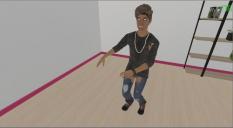
Clipping.jpg
734 x 403 - 39K
Post edited by DAZ_Rawb on October 2020

Comments

  • ArtiniArtini Posts: 10,300
    October 2020

    Just hide underlying body parts, that are covered by clothes and check "No hidden" under export.


  • ArtiniArtini Posts: 10,300
    October 2020 edited October 2020

    I have changed the material on Legs in Unity to Daz3D/Invisible and it looks better.

    There are still some pokethrough on the hips, but it belongs to Torso material, that I could not make invisible.

    image

    image

    pic01.jpg
    1233 x 1175 - 156K
    pic02.jpg
    1171 x 1163 - 145K
    Post edited by Artini on October 2020
  • DAZ_jesseDAZ_jesse Posts: 30
    October 2020

    Here is a modification to the original skin shader you can use that utilizes a depth offset: https://drive.google.com/file/d/1jtD-f559YOPPAz9jEiu0jiWhRV4Z5GNy/view?usp=sharing

    This lets you fix problems like this (I exaggerated this on purpose):


    To this:

    Change your skin material from using the regular skin shader to the one called "Daz3D/IrayUberSkinOffset" and then on the bottom of the material properties set the depth to a small positive value such as 0.001

  • ArtiniArtini Posts: 10,300
    October 2020

    Wow, that looks very useful. Thanks for the tip.

  • ArtiniArtini Posts: 10,300
    October 2020 edited October 2020

    But I could not find it - where it is located?

    Sorry, forgotten to download the modified shader.

    image

    exp01a.jpg
    444 x 364 - 42K
    Post edited by Artini on October 2020
  • DAZ_jesseDAZ_jesse Posts: 30
    October 2020
    Artini said:

    But I could not find it - where it is located?

    Download the file on the google drive link here: https://drive.google.com/file/d/1jtD-f559YOPPAz9jEiu0jiWhRV4Z5GNy/view?usp=sharing

    Copy the shadergraph file into your project folder and place it in Assets/Daz3D/Shaders

    Then you should see it in your material shader dropdown.

  • ArtiniArtini Posts: 10,300
    October 2020 edited October 2020
    DAZ_jesse said:
    Artini said:

    But I could not find it - where it is located?

    Download the file on the google drive link here: https://drive.google.com/file/d/1jtD-f559YOPPAz9jEiu0jiWhRV4Z5GNy/view?usp=sharing

    Copy the shadergraph file into your project folder and place it in Assets/Daz3D/Shaders

    Then you should see it in your material shader dropdown.hhat

    Yes, thank you, I have found it.

    Do you think, you could make the other 2 shaders that way (IrayUberMetal and IrayUberSpec)?

    Maybe that could help with pokethrough when clothes overlays each other.

    Post edited by Artini on October 2020
Sign In or Register to comment.
Adding to Cart…

Daz 3D is part of Tafi

Connect

DAZ Productions, Inc.
7533 S Center View Ct #4664
West Jordan, UT 84084

HELP

Contact Us

Tutorials

Help Center

Sell Your 3D Content

Affiliate Program

Documentation Center

Open Source

Consent Preferences

JOIN DAZ

Memberships

Blog

About Us

Press

Careers

Bridges

Community

In the Studio

Gallery

Forum

DAZ STORE

Shop

Freebies

Published Artists

Licensing Agreement | Terms of Service | Privacy Policy | EULA

© 2025 Daz Productions Inc. All Rights Reserved.
