Riot Girl hair fix?
 ValKyrie
Posts: 137
ValKyrie
Posts: 137
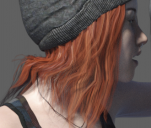
Is there a way to fix this hair to make it fall more realistically? Normally I would just switch it up with another product, but this was designed to conform to the hat, and I haven't had any luck flattening any of the other hair products I own enough no mattter how much I play with sliders. Note the sharp angles to the hair in various places.
hair.jpg
1320 x 1118 - 319K
Post edited by ValKyrie on

Daz 3D is part of 
Connect
DAZ Productions, Inc.
7533 S Center View Ct #4664
West Jordan, UT 84084
Licensing Agreement | Terms of Service | Privacy Policy | EULA
© 2026 Daz Productions Inc. All Rights Reserved.
Comments
Try adding subdivision on the hair. That will at least reduce, if not completely remove, any visible sharp angles. I don't see any movement morphs anywhere, though.
Thanks for the suggestion. Would there need to be movement morphs to add subdivisions? Sorry, I have yet play with any of those features in DS yet. :)
No, subdivision works with the mesh, but does not depend on morphs. Morphs physically move the vertices and adding subdivision allows for more interpolation points to help keep the surfaces smooth and/or add detail (like for HD morphs). Sounds contradictory, but you need the higher resolution to add those intermediate points.
In case you haven't found how to add subdivision, select the hair in the scene, the from the menu select Edit -> Figure -> Geometry -> Convert to SubD. In the parameters tab, General -> Mesh Resolution to adjust various parameters. View SubD Level is for the viewport, Render SubD is for the final product.
OMG, that's like magic. What a difference. Thank you so much!!