Win 10: Can't view files when opening or saving
 N-RArts
Posts: 1,609
N-RArts
Posts: 1,609
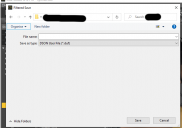
[Win 10: Can't view files when opening or saving] Basically what the title says. I've attached an image to give you a better idea of what is happening.
It's not just happening in Daz Studio. If I've changed a setting, I don't remember doing so.
Thanks for any help.
Untitled.png
697 x 491 - 23K
Post edited by Richard Haseltine on

Daz 3D is part of 
Connect
DAZ Productions, Inc.
7533 S Center View Ct #4664
West Jordan, UT 84084
Licensing Agreement | Terms of Service | Privacy Policy | EULA
© 2026 Daz Productions Inc. All Rights Reserved.
Comments
I've never seen anything like that. Are you running any disc utilities, beyond the basics that come with Windows?
Last time I heard of someone having this issue, it was related to the antivirus software quarenteening stuff and putting it elsewhere.
Use "Everything" to find your files that you recently saved - https://www.voidtools.com/
None that I'm aware of. Plus, I wouldn't know what to look for.
I've been working on the computer this evening, and all of my files are saving to where I want them to be saved. It's just that they're not appearing in the save as/open window/pane. Regardless, I've downloaded "Everything", and I can't find anything out of place/suspicious.
Try launching Windows File Explorer by itself. (Windows key > Windows System > File Explorer). It doesn't matter where it points. Go to View > Options and then select Restore Defaults. That might get you back to something useable. Then go and change your particular favorites. I always recommend unchecking Hide Extensions for Known File Types, which is most irritating. You might also need to navigate to the folder where you save Daz files, and do RMB > Properties > Customize and set it to Documents, or Pictures, whichever you prefer.
See the 'hide folders' option? Click it.
See the 'hide folders' option? Click it.
Edit - you resized the folder view. See the two grey areas, one lighter than the other, the light one having organize and new folder. Click and drag the 'line' between the grey areas.
Complaint: First in many days. Arghhh..., it's snowing again, hard! And it's sticking. Yesterday it was in the 60sF. Daffodills are budded, almost ready to bloom.
I don't think theres anything in the file options to cover this problem.
Never heard the expression "file a complaint"?
That complaint needs to be round-filed!
Oh...... dear.... I really don't remember doing/causing that. Oh well, another reason to stick my (stupid) head in the sand. Again.
Thanks everyone for the help, and replies