Water is missing from MS Water Plane
 Cat_Dancing
Posts: 535
Cat_Dancing
Posts: 535
Hello. Can anyone help with this problem please? I am using Moutainscapes Backdrops MS01 Large and the accompanying Water Plane but the water plain appears only as a pale blue plane, no water. I've even tried to 'light' the scene with the outdoor lighting cube at 200% but no luck.
Anyone tell me how to use this water pane please?
Thank you
(Pic Attached)
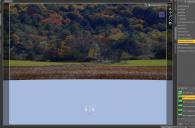
Water Plane.JPG
1456 x 957 - 161K

Daz 3D is part of 
Connect
DAZ Productions, Inc.
7533 S Center View Ct #4664
West Jordan, UT 84084
Licensing Agreement | Terms of Service | Privacy Policy | EULA
© 2026 Daz Productions Inc. All Rights Reserved.
Comments
Looks like normal viewport.
Unless you are in Nvidia Iray preview mode, the water won't look like water.
Try hitting the render button and you'll see the difference.
Also, unless i miss my guess, it appears your viewport is in cartoon shaded.
You can change view mode with the drop down next to the View selection box in the upper right of the Viewport.
Thanks DMP, certainly gives me something to consider. I'll have a go. How the h*** I got into cartoon mode I have no idea, what should it be? but thanks for the heads up.
Hi again DMP. Did as you suggested and I'm now in the correct view, I also loaded the water plane and hit render, almost like rendering blind, the result is a bit weird. Any comments you have would be of excellent value.
Textured shaded is the "default".
I switch between the different styles depending on what i'm doing.
Try changing the tiling, Horizontal/Vertical tiles under shader settings.
You can also try adjusting the normal map strength.
it'll also might look better at different angles or with other stuff in the image.
The first image is default, the second is cutting the normal map down and increasing tiling.
The brown in the first water is due to a plane i put under the water with a brown shader.
Hi again DMP - Once again, thanks for your input. Seems I have some learning and experimenting to do. Thank you for your support.