Need help with imported obj into Daz Studio
 Daventaki
Posts: 1,624
Daventaki
Posts: 1,624
This is my first time trying to import a complex object into Daz Studio. So if you don't mind please be descriptive on any information to fix this, I have only been working with studio for about a year. I tried to watch a couple of videos but just got confused cause they were using outside applications which I don't have. I do have Blender but to be honest I barily know how to open the app.
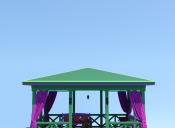
So I purchased a 3D Max made object from TurboSquid it came with a .max/ .fbx/ .obj file with it. See the picture below this is what I get when I import. The mtl file doesn't actually link to any of the jpg files that came with the product. Not a big deal as I can add the textures myself. My problem is I can't move the object at all, none of the translate dials work! Camera zoom in and out doesn't work! I can rotate the object so I can spin it around in circles. The image attached is where the object lands with it rotated around to face front like its suppose to, but since I cant translate it's cut off the bottom. I also tried importing the fbx file and it comes in but then its all broke into pieces (see second image).


Daz 3D is part of 
Connect
DAZ Productions, Inc.
7533 S Center View Ct #4664
West Jordan, UT 84084
Licensing Agreement | Terms of Service | Privacy Policy | EULA
© 2026 Daz Productions Inc. All Rights Reserved.
Comments
I am a fairly new DS user. I'm still feeling my way around. But I have discovered a couple things about importing objects from other sites into DS. So, for what it's worth...
• The Autodesk .fbx file format seems to import with fewer problems than the other file formats, so I now usually try that one first if it is available. There are some file formats that cannot be converted (and thus cannot be imported into DS). I think Cinema4d files might be in this category (I can't remember offhand which one it was).
• If the item is rigged and the rigging is asymmetric DS usually throws up an error message and you often get shattered geometry when it imports. This is especially true if the objects have animation features. I haven't dealt with rigging yet, so I don't know if this is something that can be adjusted in an application that is good for rigging (for adding the bones). Then perhaps the edited object can be re-imported (I would be interested in know if anyone has tried this and if it works).
I wish I could offer more, but I have had only partial success with .fbx files (usually the ones with no rigging or very simple rigging and no animation) and I have had very litte success importing .obj files from other sites because DS ghosts them and won't let you import them (this has been reported by other users as well). Sometimes I can get them into Hexagon (which I don't like, it's full of bugs and doesn't reset internal flags, so it tends to get "stuck" in certain modes) and from there into DS. This is a three-step process because first you have to send something from DS to Hexagon (and then delete it), then import the item, modify it and send it to DS instead of the original "dummy" item. If you don't do it this way, if you OPEN FILE in Hexagon and edit the object, sometimes it refuses to send the Hexagon-imported item to DS, so send some random simple thing to Hexagon first, then the Hex to DS bridge works pretty reliably.
One of the common ways an .obj import into DAZ|Studio can fail is that the .mtl file contains hardcoded folder paths to the textures that exist only on the object creator's computer. Open the .mtl file (it's just plain text, any text editor will do) and see if the folder paths there agree with wherever you actually put the files. It's also possible that the folder paths conform with how 3DS MAX does things.
Also note that the first non-comment line of the .obj file is usually a link pointing to the .mtl file. If this is hardcoded as well, D|S might not be able to find the .mtl file at all.
I suspect that it loaded in VERY large, right? Can you see the floor/grid?
If not, on the Parameters Tab scale it down very much, maybe 10%.
If you can get it small enough and then to land it on the floor {Edit > object > move to floor} - export it out at Carrara settings, clear the scene, import in that recent export. Should now be landing at a good size.
If that doesn't work out, then open Hexagon and import in the original .obj. Resize it down and 0,0,0 the position, then either export out another .obj or shoot it over the bridge to D/S.
Thanks, I just unchecked the texture import. The mtl file is not right but thats not my problem I can retexture the object. I probably should have just left all that out of the post, to much information and all that.
My issues are not being able to manipulate the object in the space. I can rotate the object but thats it. I can't zoom or translate either the camera or the object once it imports. If I do the fbx file everything works but it comes in exploded. Yes I could put it back together but thats alot of pieces to put together.
@Catherine3678ab Will try that maybe it will fix the navigation issues also.
Exactly.
Ok so I tried what Catherine3678ab said and while it did help I was still having issues. So I watched a video on importing into blender and using her tips I was able to get a working copy. I imported the fbx file into blender it has better naming of the pieces of the pavilion so I went with that one. I might still play around with it some more but at least now I have a working copy and do not need to return the product. I had to redo it a couple of times to get it right in Daz Studio as far as size wise (I still had to scale it up to 130%) and now I got to figure out what I need to do about texturing and see what kind of uv maps this thing might have.
Thank you for those who have offered help! I do appreciate it and if anyone wants to throw 2 more cents in here I'll gladly take any information I can get.
Here is the working model in DS with some things colored otherwise default iray shader thus the extreme glossyness!
This is using some of the textures supplied and also some shaders I have. Starting to look good! I did realize with this import I can't move anything it loaded in as one whole object, will have to readdress that later maybe im just glad to have a working copy!!
Glad ya got it more or less sorted. It's a journey.
I've been taking Daz assets into Lightwave for some years now & the issues are pretty much the same. You're a bit at the mercy of the importers/exporters between the packages involved as you've found, but eventually there's a path.
What I've found is that FBX has issues with parenting and instances. The FBX export can't do anything w/o adding a null to it it seems & that sometimes & that really clouds the issue with complex hierarchies. But, you get Wt. maps and morphs. In short, I use that for characters. All else, use OBJ. It'll dd hours to your life with each project.
OBJ exports are much more reliable with positioning but you do loose wt maps & morphs unfortunately.
You'll have to retexture for PBR in either case; it's just nice if the mtl works as it should but sometimes juditious text editing can correct that. I really haven't run into that; my workflow I guess.
Boy it sure is a journey! This time I exported the FBX that I imported into Blender (it doesn't help that I don't know diddly about Blender) and exported as a dae file. Im beginning to think there is something wonky with the obj file. It worked! Now I have all the individual peices that I can turn on and off and has more options because each of the pillows are selectable separately. Now to figure out how to rename things because pavilion01, 02 etc.. is not very intuitive (figured it out now feel dumb ) and then figure out how to save it. When I save it as a prop it saves as all one object, makes sense I guess so I have saved as a Scene asset so im thinking this is my option. (Think I might have just answered my own question)