Shoe fitting issue
 Philippi_Child
Posts: 687
Philippi_Child
Posts: 687
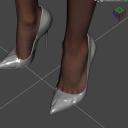
I have a couple of figures that seem to have issues with footwear but only certian footwear on certian G8 Femals characters. When I add a pair of shoes the come all crinked up or don't even fit at all. This is the female character Josephene 8 and the shoes were made for G8 females (Spike heels by idler). This happens on another figure too it's like the auto fit is trying to match the shape and details of the feet but as you see there is an issue. Does this happened to other and is there a work around?
Thanks

Daz 3D is part of 
Connect
DAZ Productions, Inc.
7533 S Center View Ct #4664
West Jordan, UT 84084
Licensing Agreement | Terms of Service | Privacy Policy | EULA
© 2026 Daz Productions Inc. All Rights Reserved.
Comments
Load them as props and parent to feet. Pose the feet into the shoes.
If you go into the Parameters Tab and click on the "Show Hidden" in the menu you can click on the Currently Used section on the left side of the Parameters tab to show all the hidden morphs that are actually dialed up on the shoes. Try zero'ing out the character morph on the shoes and then scaling the foot/main toe bone as needed to resolve any pokethrough. You can also try adding a smoothing modifier to the shoes (Edit/Figure/Geometry/Add Smoothing Modifier) this will set a smoothing modifier on the shoes with Base Shape Matching and Iterations of 2, sometimes for shoes 2 is too much so I would suggest dropping it to 1, you can also try the smoothing with the Generic instead of Base Shape Matching as well.
Hope this helps!
Elli
Phillipi_Child,
Two possibilities:
Do the shoes have their own a "Josephine 8" morph? If not, then you might ask the person who created the shoes to add a "Josephine 8" morph. Sometimes they might accomodate you. The feet of G8 characters vary considerably - Consider the G8 foot shape vs that of V8. There are times that I asked the creator to add a V8 morph to their shoes and they obliged me, so try that first.
Are you using some "foot detail" morphs on your character? If so, these morphs are likely getting copied to the shoes by auto-fit. As Elliandra has told you - Select the shoes, then show the hidden morphs that are being copied. Zero all of the "foot detail" morphs. Use the smoothing modifier to resolve poke-thru and further smooth the shoes.