Surface window texture doesn't display properly
 DH6602636-
Posts: 22
DH6602636-
Posts: 22
in The Commons
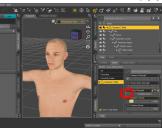
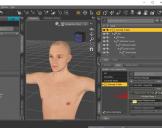
I'm sorry my English is not very good, I loaded after any default, surface texture can't display in the window
1.jpg
865 x 684 - 326K
2.jpg
865 x 684 - 324K

Daz 3D is part of 
Connect
DAZ Productions, Inc.
7533 S Center View Ct #4664
West Jordan, UT 84084
Licensing Agreement | Terms of Service | Privacy Policy | EULA
© 2026 Daz Productions Inc. All Rights Reserved.
Comments
You need to click on 'Genesis 3 Male' on the left side to expand and then select one surface. There are multiple surfaces on a character, and therefor you need to select a single surface to see the values for that.
Hello, thank you for your suggestion, but my problem is not the way, when I open the window surface, can't locate texture characters, shown as a blank, you can watch I upload pictures, I use Windows 10
Ohhh!!! I'm sorry is I was too stupid, thank you for your advice!!!!!!!!!!!!!!!!!!! thank you
This problem has been solved, I was too stupit