Disappearing Body Parts
 mr clam
Posts: 707
mr clam
Posts: 707
I just got Rayvn Clothing and it has a weird issue. When I try to set the opacity of some surfaces to zero, it also gets rid of some body parts. What's the deal? Can it be fixed?
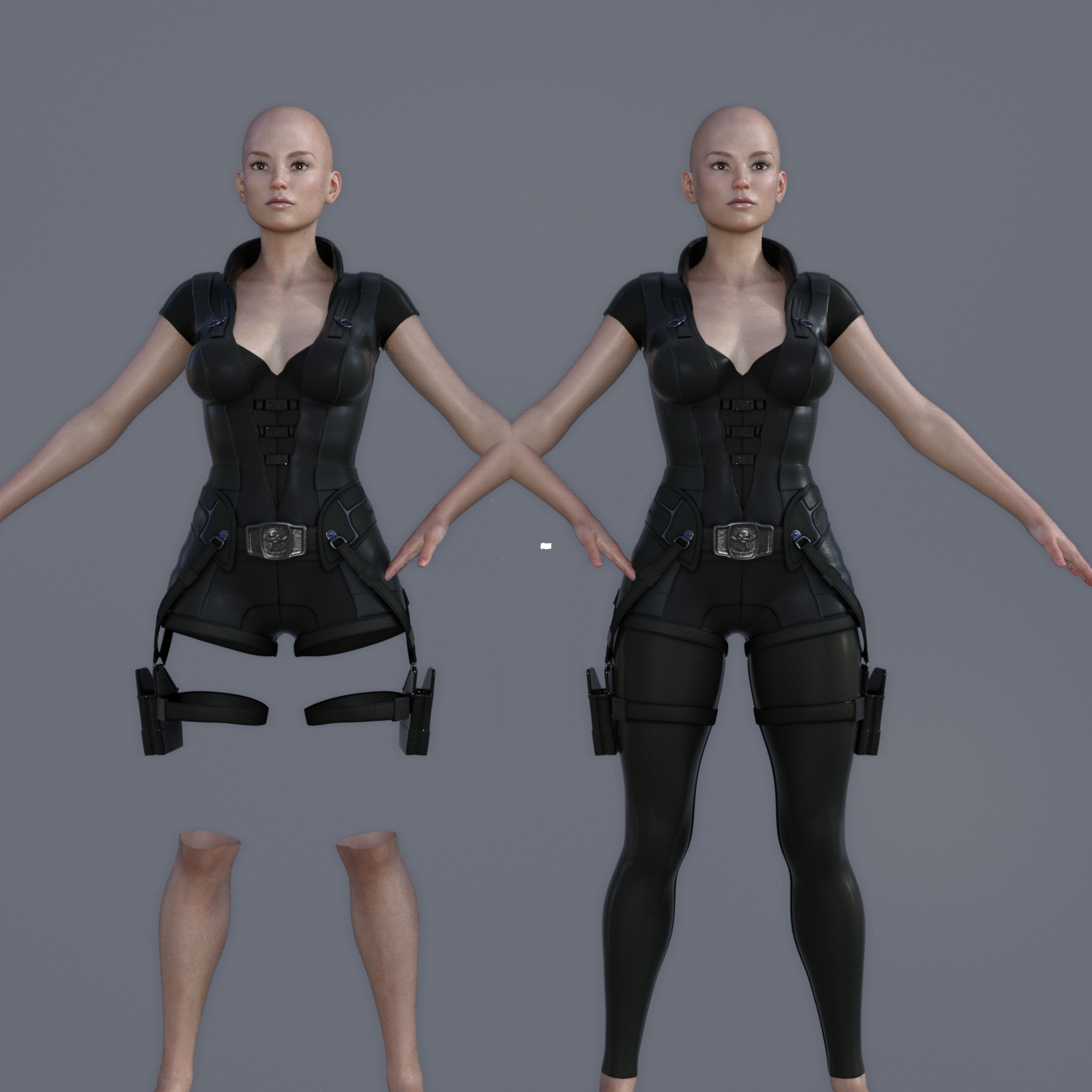
ravyn outfit.png
1650 x 1650 - 3M
Post edited by mr clam on

Daz 3D is part of 
Connect
DAZ Productions, Inc.
7533 S Center View Ct #4664
West Jordan, UT 84084
Licensing Agreement | Terms of Service | Privacy Policy | EULA
© 2026 Daz Productions Inc. All Rights Reserved.
Comments
It's a "feature" of the clothing to prevent the parts from causing poke-through. I think there is a way to get around it, but I don't know what it is.
The clothing iss etup as a GeoGraft, if you want to keep the clothign but hide parts you need to use the Geoemtry Editor to chnage what is hidden - activate hat tool, then click on an area of the base figure that doesn't matter (to select one polygon - you may want to hide the pants first). Next, right-click in the viewport and select Geoemtry Assignment>Create Auto-Hide Group for Fitted Item (I can't recall the exact wording) and pick the pants in the dialogue that pops up. If you now switch back o the regular psing tool the legs should be there, bar the polygon you picked.
I love 3D Universe's clothing and hair, because it looks good on adult figures, too, but the clothing is pretty weird to work with when hiding it for posing in heavy scene.
Nikisatez shared a solution to this via editing the duf file which you can check here. My recommendation would be to create a copy of the duf file and edit that one so you have both and simply load whichever one fits your needs.
Thanks, everyone!I think editing the duf is the sensible way to go, but I found an inelegant workaround that might be useful to people who don't want to mess with the code. I just loaded up two versions of the same charcter and posed them the same. It worked.
In that case, what you'd want to do is pose the character, do all your clothing, make-up, etc, and then Edit>Duplicate>Duplicate Node and hide every bodypart except for the ones you need to show. I tried it with a node instance, but the instance's body parts disappeared with the original character's.