Why does this happen to nails?
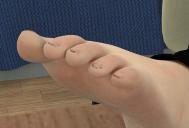
Hello guys, sorry to bother you all once more with noob questions. In the attached pic you'll see what happens to nails (in this case toenails) when I apply a displacement map to the feet (not the nails). How do I stop that from happening? A few important pieces of information: I'm working with a G2F model (Aiko, if I remember well, I haven't worked in Daz since forever!) and I didn't apply any morphs to toes, of any kind. This happens with every displacement map/G2F figure I use. The Strenght is 100% and the Max/Min values are +0.1 and -0.1. Does anyone have any clues? Am I missing something? Thank you all in advance :)

Daz 3D is part of 
Connect
DAZ Productions, Inc.
7533 S Center View Ct #4664
West Jordan, UT 84084
Licensing Agreement | Terms of Service | Privacy Policy | EULA
© 2026 Daz Productions Inc. All Rights Reserved.
Comments
Wow, dial down the displacement! Try around 10% or less.
Whoops. A zero slipped in there... I meant 10% displacement strenght *facepalm* But yeah, it keeps happening even with less strenght :(
I wondered lol ... okay.
Displacement does actually displace the mesh. So all one can do there is adjust settings and/or turn it off for close-ups. It may or not help to have the same displacement settings for both the fingernails and the hands ... but anywhere there are seams, if the settings don't match, the seams will show. Depending upon the model it can even appear to separate the sections!
Using Bump without using Displacement can often enough produce satisfactory results [depending upon one's goals perhaps]. Using both can be overkill. Also this fascination many have for using Normals can make for major overkill. Either use Bump, Displacement OR Normals ... see what happens, adjust as desired.
I shall try that and report back here whenever I can :) Thank you!
Do the same displacement on all the surfaces the same or they will all look like that.
I tried that before and, well, unfortunately it doesn't do much... It's like the nails have been shrunk for some reason.