Help with weight map please
 alex86fire
Posts: 1,130
alex86fire
Posts: 1,130
Hi all,
I wanted to do something that I thought would be simple but it turned out to be more complicated than I can handle without help.
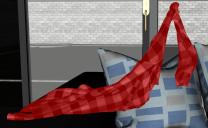
I have the https://www.daz3d.com/dforce-urban-casual-outfit-for-genesis-8-females product. I wanted to drape the waist shirt over a couch. As if my character took it off and put it on the couch.
Should have been pretty easy. I put it in the scene, palce it over the couch, hit simulation. The waist line remained in the air.
I though that the weight map might be a problem since the waist is supposed to stay there. All good, I created a dForce Modifier Weight Node, entered the Node weight map brush and tried to paint everything red.
Now, I don't know if I can really paint all the polygons red or what happens but some of it still remains in the air and screws up the simulation.
I don't know what do do next. Can I somehow delete the previously created weight map ? Is there maybe another setting that forces the shirt to drape so badly?
Thank you

Daz 3D is part of 
Connect
DAZ Productions, Inc.
7533 S Center View Ct #4664
West Jordan, UT 84084
Licensing Agreement | Terms of Service | Privacy Policy | EULA
© 2026 Daz Productions Inc. All Rights Reserved.
Comments
What you can do is remove dForce Modifier and then reapply it. Then all of the clothing should be dForce enabled.
But there might be a risk of explossion if the knot somehow contains too many polygons, so it can't distribute the energy.
Great idea, thanks!
Unfortunately it didn't fully work.
I think it fixed the weight map problem but the knot is still falling down slower than the rest of the shirt. Any ideas why and if there is any way to fix it?
As a workaround I pushed it lower than the rest with mesh grabber and it kind of worked ok but I would love if I could fix it completely from the simulation.
You will sometimes see that a part of clothing can move upwards during simulation.
My assumption is that there is too much energy in that area, and my guess is it might be the same you are seeing.
Suggestions.
You can increase time range; it won't make it fall faster but gives time to fall all the way.
Or you could try increase number of iterations or subframes. More calculations might give a better flow.
@alex86fire,
I have that set so I could open it up and take a look, but my guess is the shirt has a separate material zone for the knot and that zone has the strength set to 0.00.
Now try your simulation again.
ETA: I just loaded the shirt, and I see there is only the one material zone, and the weight map is controlling the influence. My info above may be helpful in another situation, but not yours. I'm tinkering now. I'll let you know what I find.
After trying a few ideas, I've come to the conclusion this is not the best shirt for draping over furniture. I did try leaving the shirt where it was loaded and moving the furniture in place, (simulating with the Animated Timeline.) The density of the mesh at the knot and sleeves is problematic. The rest of the shirt drapes as expected, which you already know.
How set are you on using this particular shirt? If it's just for background messiness, I'd recommend trying another shirt. If you already have it, one of the shirts/tops from dForce Laundry should work very nicely. I haven't tried what you're doing with it, but I suspect the shirt from this set will do what you want, as well. I'm sure there are many others that will drape as you need the shirt to, but those two products came to mind immediately.
Thank you so much for giving it a try as well L'Adair.
I need it to be this shirt or something very similar (same texture) as in one scene is around her back and the next is on the couch. So there's a continuity issue.
The good thing is though that it isn't the main part of the scene, I tinkered with the camera so that in the end I have 2 versions.
In one version I just deleted the problematic polygons and draped it like it was. A part of it came undone, but that wasn't in the camera.
My second try was pulling the knot area with the mesh grabber a lot closer to the furniture so that the rest catches up and they kind of drape together.
Both versions have good angles and bad angles.
I am sure that if I really needed it to be the main focus of the scene I could do it with mesh grabber and the timeline combined.
The part about the material zones is good information. I remembered there was some other setting that can influence the simualtion but I couldn't remember what it was, now I have it written for future cases.