OOT Safyana Hair
 !green_9dd09f3341
Posts: 78
!green_9dd09f3341
Posts: 78
OK, here I am with anotheer mess . . .
#1 I could not get the wreath to load , , ,
my Own mess:
I downloaded my Safyand Hair again and was pleased it is now for DAZ, but only for Gen 2
I wanted to use it on Gen 3 child, sooooooooooo,
Loaded it and fit to Gen 2 and was ALMOST perfect . . .
I found the action to move the tail forward and only other problem was I needed to raise the hair a mite so the front part would close up
I have trouble seeing the list of morphs because of the colors and size, but I finally found the forehead depth and set it to 100 and it was perfect!
should have saved right there!
on to add the wreath and it would not load! After several tries, I thought to load from the Poser Format of V4 . . . big mistake!
it loaded the wreath but it replaced my perfectly morphed hair with the V4 hair . . . I deleted the V4 hair and poor thing was bald again
No matter what I tried, I could not get back to the child with perfect hair, so I started over . . . but it will not work.
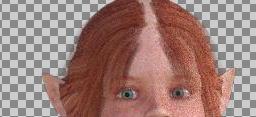
I only made two changes in the morphs for the first try to get it to perfect, so I tried that again and it just plain won't close the gaping gap this time.
Have worked myself into a roaring headache . . . hope to have some insight when I get back up. Thank you,
PS: changing head size made it worse.

Daz 3D is part of 
Connect
DAZ Productions, Inc.
7533 S Center View Ct #4664
West Jordan, UT 84084
Licensing Agreement | Terms of Service | Privacy Policy | EULA
© 2026 Daz Productions Inc. All Rights Reserved.
Comments
Unsuccessfully tried more morphs; did successfully get the wreath loaded and found and moved it to where I think it should be. I found no list of settings for the DAZ but did find the settings for the prop hair on the product page (I am a firm believer that these things should be in a list of a readme and included in the zip file).but they look like the same morphs listed in the daz hair.
What's Included and Features
.................................................................................................................................................
I would love to have a fit for all the daz ladies, but lucky for all that I won't be the one making them. BTW, how do you save a fit for a character so I don't repeat the problem next time?
As you can see by the new image, I need to raise the hair a little off the head but can't seem to move it and the Adjust Forehead Depth that worked for me the first time, definitely did not work for me this time. But will save where I am in case someon knows how to rectify the problem.
How about just scaling it and parenting the hair?
You could try adding a smoothing modifier to the hair and set the character as the collision target.