Is There A Stonemason City Blocks Layout Key or Map?

Hello, 

I've been using Daz on and off for a really long time, close to 15 years I think, but I'm nowhere near an expert, it also doesn't help that I take up to two years in between using it based on what project I'm doing at the time.

Anyway, I've bought tons and tons of Stonemason content over the years, but I've purchased their city blocks bundle on a number of occasions, but I can't really use them how I want because when you put them together the streets never line up. I mean they look like there might be a way to connect them so that they do, but I'm not seeing it....no real pattern, which I am normally great with patterns...it's just odd, it doesn't matter if it's a 20-something block bundle or a 6 block bundle, it doesn't seem like any of the streets line up, and if I move a block to line up with one, it doesn't line up with the other blocks, and I'm thinking they had to have had a layout when they designed them, and I'm just not able to see the design.....does anyone know of a map, or a layout key that shows how they line up?

Anything, even if maybe someone laid them out once and it looked good enough, they could share the images.......it just frustrating because on a half dozen occasions I've bought bundles, some for a decent amount of money and I've never been able to use them once.

I don't know where to post this, I was thinking the Product Suggestions area, but it doesn't quite seem right there.

Thanks in advance and sorry if this is the wrong place to post this.
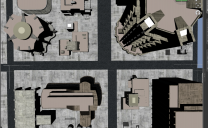
Screen Shot 2020-03-11 at 2.17.50 AM.png
1594 x 980 - 637K

Comments

  • FirstBastionFirstBastion Posts: 8,055

    The five blocks in Urban Sprawl 3  will all fit together in whatever pattern you choose.  Just have to line up the roads.

    https://www.daz3d.com/urban-sprawl-3

    This image has a few of the lined up.


  • xyer0xyer0 Posts: 6,406
    edited March 2020

    EDIT: I'm giving you instructions for Urban Sprawl 3. But YOU didn't ACTUALLY SAY THAT WAS THE PRODUCT. I went from FirstBastion's images. If you are trying to line up DIFFERENT Stonemason products, then I wish you well. Below are instructions for Urban Sprawl 3:

    Each block loads in the center. Choose the block that you would like to remain at world center, For example Block 04. Do not move it (I lock the xyz translate on that block just in case). Now move the other blocks by 9500 units; say, Block 01 to X 9500, Block 02 to X -9500, Block 03 to Z -9500, Block 05 to Z -19000. I'm pretty sure it's 9500 units, but this is from memory, and my internal drive sometimes deletes files that are not used regularly.wink

    Post edited by xyer0 on
  • memcneil70memcneil70 Posts: 5,640

    Also, cities grow organically often and streets do not line up at times. The shift from older streets that were for horse and buggy, cart, or foot traffic, and have historic buildings that can't be demolished to accomodate four - six lane boulevards and then have to match up to newer areas where the 'horseless carriage' and 'trams' were being handled, then later heavy vehicle traffic and planned city construction, it can get crazy.

    Having driven in England, Greece, Germany, and various areas of the United States, I have seen all these conditions. And sometimes when I am driving in a new area, and the roads go wonky, I have to guess where to stop at a stop sign, especially when there is a four-way stop and someone blows through it. Don't get me started on street name changes.

  • sunnyjeisunnyjei Posts: 502

    I don't have all of his cities so can't test this idea- but have you tried not lining them up by their edges? What I mean is if you move them slightly over to the left or right so that the streets mainly line up and maybe double up on the same blocks but turn them will give you other ways to make it fit?

  • SevrinSevrin Posts: 6,314

    What specific product is causing this issue?  

  • CybersoxCybersox Posts: 9,556

    Also, cities grow organically often and streets do not line up at times. The shift from older streets that were for horse and buggy, cart, or foot traffic, and have historic buildings that can't be demolished to accomodate four - six lane boulevards and then have to match up to newer areas where the 'horseless carriage' and 'trams' were being handled, then later heavy vehicle traffic and planned city construction, it can get crazy.

    Having driven in England, Greece, Germany, and various areas of the United States, I have seen all these conditions. And sometimes when I am driving in a new area, and the roads go wonky, I have to guess where to stop at a stop sign, especially when there is a four-way stop and someone blows through it. Don't get me started on street name changes.

    Yep.  Washington DC's layout was specifically designed to foil a land invasion in the days of horse and cart, and there are so many historical landmarks that they can't knock much down effectively.  End result - a rat maze of one way streets with intermittent roundabouts.  And let's not even get into the parking issues...    

  • CybersoxCybersox Posts: 9,556
    edited March 2020

    Hello, 

    I've been using Daz on and off for a really long time, close to 15 years I think, but I'm nowhere near an expert, it also doesn't help that I take up to two years in between using it based on what project I'm doing at the time.

    I own multiple city sets by multiple vendors and, on the occasions when I actually need to see that kind of long street all at once or have a multi-street layout, I've generally found that it's much easier to just take the ground layouts from one, remove all the buildings, duplicate the bases, then add the building from other sets to fit. It also tends to look more visually unique and interesting. 

    Post edited by Cybersox on
  • IvyIvy Posts: 7,165
    Cybersox said:

    Hello, 

    I've been using Daz on and off for a really long time, close to 15 years I think, but I'm nowhere near an expert, it also doesn't help that I take up to two years in between using it based on what project I'm doing at the time.

    I own multiple city sets by multiple vendors and, on the occasions when I actually need to see that kind of long street all at once or have a multi-street layout, I've generally found that it's much easier to just take the ground layouts from one, remove all the buildings, duplicate the bases, then add the building from other sets to fit. It also tends to look more visually unique and interesting. 

    Yup I kit bash city blocks sets like that too. yes

    plus you can added a city bill board props like these https://www.daz3d.com/cityscapes-backdrops-volume-2  for back drops to cut resouces

  • WendyLuvsCatzWendyLuvsCatz Posts: 40,564

    Stonemason is also a New Zealander and I am guessing as an Aussie from very square laid out Adelaide their cities are probably very similar 

  • CybersoxCybersox Posts: 9,556

    Stonemason is also a New Zealander and I am guessing as an Aussie from very square laid out Adelaide their cities are probably very similar 

    Nope.  NZ is pure volcanic country, so the town/cities have to match the landscape.  Wellington is kind of similar to San Francisco and Sydney in design with a pretty nifty tram, while Auckland's arbitarily spackled across a couple of land and water masses, with a downtown area that always seems to be going up a hill no matter where you're heading.  Beautiful, beautiful country, though what the locals do for fun can be pretty crazy. 

  • edited March 2020
    The Dystopia City Blocks? They don't sell those any more. They don't even have the freebies either. I should have bought them while I could but didn't have money at the time. I wasn't expecting Daz to get rid of them from the store. Who made them? Was it Stonemason or maybe The Ant Farm? Probably Francesco (moebius87). They were so much fun to play with and learn from. You are very fortunate to get those bundles while you could.

    Artists feel some of their work is dated but may not realize that we the other artists want to do something from that time period. I understand though that it takes up space and they feel that it doesn't reflect well on their quality now. But they are still perfect for comics and cartoons. Then there is their other stuff that works well for real life blending.

    Well when I go out in real life (I have one?) I do notice that streets don't always line up or there are dead ends. In my renders below from years ago, I mushed some of the buildings together to make new buildings or to make it more crowded.

    int-dystopia-news-station---day_730_auto.png
    730 x 410 - 429K
    int-art-dept-at-dystopia-university---day_730_auto.png
    730 x 410 - 448K
    ext-dystopia-check-point---evening_730_auto.png
    730 x 410 - 315K
    ext-dystopia-city---evening_730_auto.png
    730 x 410 - 315K
    ext-dystopia-financial-district---day_730_auto.png
    730 x 410 - 358K
    ext-dystopia-city---day_730_auto copy.png
    730 x 410 - 354K
    dystopia-invades-daz3d_730_auto.png
    730 x 410 - 369K
    after-the-storm-flooding_730_auto.png
    730 x 410 - 315K
    urban-sprawl_730_auto.png
    730 x 410 - 435K
    ext-dystopia-city---day_730_auto.png
    730 x 410 - 373K
    Post edited by Barefoot Upto My Soul on
  • AlmightyQUESTAlmightyQUEST Posts: 2,006
    If you mean the Greeble City Blocks (since you mentioned buying sets, Dystopia city blocks was a different vendor - Moebius87 - though I believe those sizes are somewhat more regular), you are right that they are not all the same size. As far as using them, I think that's why they tend to be for slightly more distant shots. When I've needed a bird's eye view, I've picked out a handful of similar sized blocks, or I adjust the scaling of the blocks to fit a grid. In a more overhead shot, any texture stretching from scaling is pretty hard to notice.

    If it's other things like Urban Sprawl, those should load with them for together as far as I remember. Fitting them with other sets requires more work like what people already described in the thread.
  • CybersoxCybersox Posts: 9,556
    The Dystopia City Blocks? They don't sell those any more. They don't even have the freebies either. I should have bought them while I could but didn't have money at the time. I wasn't expecting Daz to get rid of them from the store. Who made them? Was it Stonemason or maybe The Ant Farm? Probably Francesco (moebius87). They were so much fun to play with and learn from. You are very fortunate to get those bundles while you could.


    Artists feel some of their work is dated but may not realize that we the other artists want to do something from that time period. I understand though that it takes up space and they feel that it doesn't reflect well on their quality now. But they are still perfect for comics and cartoons. Then there is their other stuff that works well for real life blending.

    The Dystopia series was a collborative project by Team Dystopia, a collaboration of several artists, mainly Ajax, billy home, Moebius87 and, I think, NIghtshift 3D. Most of it disappeared when Ajax left the store two years ago during one of the big PA prunings DAZ has been going through recently... IIRC, if a product is by two vendors and one of them leaves the store, the product generally gets pulled unless specific arrangements are made otherwise..  Some Dystopia items used to be available at Renderosity and other sites, but I don't see any of it on line anymore.

  • StonemasonStonemason Posts: 1,240

    Hi, "Urban Sprawl 3" is the only one of my sets where the streets of each block were designed to connect with each other.

    mjdoubledcom ,The blocks in the image you posted weren't made by me


    Cheers

    Stefan

  • xyer0xyer0 Posts: 6,406
    edited March 2020
    Cybersox said:

    Also, cities grow organically often and streets do not line up at times. The shift from older streets that were for horse and buggy, cart, or foot traffic, and have historic buildings that can't be demolished to accomodate four - six lane boulevards and then have to match up to newer areas where the 'horseless carriage' and 'trams' were being handled, then later heavy vehicle traffic and planned city construction, it can get crazy.

    Having driven in England, Greece, Germany, and various areas of the United States, I have seen all these conditions. And sometimes when I am driving in a new area, and the roads go wonky, I have to guess where to stop at a stop sign, especially when there is a four-way stop and someone blows through it. Don't get me started on street name changes.

    Yep.  Washington DC's layout was specifically designed to foil a land invasion in the days of horse and cart, and there are so many historical landmarks that they can't knock much down effectively.  End result - a rat maze of one way streets with intermittent roundabouts.  And let's not even get into the parking issues...    

    Washington DC's street maze around the seats of government is also due to the planners desire to emulate a pentagram---with the White House as the head/tail.

    Screen Shot 2020-03-12 at 12.25.03 AM.png
    337 x 216 - 162K
    Post edited by xyer0 on
  • Cybersox said:
    The Dystopia City Blocks? They don't sell those any more. They don't even have the freebies either. I should have bought them while I could but didn't have money at the time. I wasn't expecting Daz to get rid of them from the store. Who made them? Was it Stonemason or maybe The Ant Farm? Probably Francesco (moebius87). They were so much fun to play with and learn from. You are very fortunate to get those bundles while you could.


    Artists feel some of their work is dated but may not realize that we the other artists want to do something from that time period. I understand though that it takes up space and they feel that it doesn't reflect well on their quality now. But they are still perfect for comics and cartoons. Then there is their other stuff that works well for real life blending.

    The Dystopia series was a collborative project by Team Dystopia, a collaboration of several artists, mainly Ajax, billy home, Moebius87 and, I think, NIghtshift 3D. Most of it disappeared when Ajax left the store two years ago during one of the big PA prunings DAZ has been going through recently... IIRC, if a product is by two vendors and one of them leaves the store, the product generally gets pulled unless specific arrangements are made otherwise..  Some Dystopia items used to be available at Renderosity and other sites, but I don't see any of it on line anymore.

    Oh wow, I had been away from the Daz store for so long. I didn't realize that Moebius87 isn't listed here anymore. No more Feng's Noodle Restaurant. I did get that and the freebie Dystopia City Blocks which still show up in my Product Library but javascript to the store is 0. Well at least Nightshift 3D and Stonemason are still here to collect.

    GetGalleryItem.png
    1920 x 1080 - 1M
  • CybersoxCybersox Posts: 9,556
    Cybersox said:
    The Dystopia City Blocks? They don't sell those any more. They don't even have the freebies either. I should have bought them while I could but didn't have money at the time. I wasn't expecting Daz to get rid of them from the store. Who made them? Was it Stonemason or maybe The Ant Farm? Probably Francesco (moebius87). They were so much fun to play with and learn from. You are very fortunate to get those bundles while you could.


    Artists feel some of their work is dated but may not realize that we the other artists want to do something from that time period. I understand though that it takes up space and they feel that it doesn't reflect well on their quality now. But they are still perfect for comics and cartoons. Then there is their other stuff that works well for real life blending.

    The Dystopia series was a collborative project by Team Dystopia, a collaboration of several artists, mainly Ajax, billy home, Moebius87 and, I think, NIghtshift 3D. Most of it disappeared when Ajax left the store two years ago during one of the big PA prunings DAZ has been going through recently... IIRC, if a product is by two vendors and one of them leaves the store, the product generally gets pulled unless specific arrangements are made otherwise..  Some Dystopia items used to be available at Renderosity and other sites, but I don't see any of it on line anymore.

    Oh wow, I had been away from the Daz store for so long. I didn't realize that Moebius87 isn't listed here anymore. No more Feng's Noodle Restaurant. I did get that and the freebie Dystopia City Blocks which still show up in my Product Library but javascript to the store is 0. Well at least Nightshift 3D and Stonemason are still here to collect.

    Though it should be noted that Stonemason has already removed a bunch of his older products, including the original Urban Sprawl, and I think some of Nightshift's also got lost when DAZ bought up a lot of his older catalog out as DAZ Originals.  One way or another, the DAZ store iseems to be pushing out a lot of older products, so if there's an oldie that you've had in your wish list for a few years... you might want to consider buying it soon.

  • CybersoxCybersox Posts: 9,556
    Ivy said:
    Cybersox said:

    Hello, 

    I've been using Daz on and off for a really long time, close to 15 years I think, but I'm nowhere near an expert, it also doesn't help that I take up to two years in between using it based on what project I'm doing at the time.

    I own multiple city sets by multiple vendors and, on the occasions when I actually need to see that kind of long street all at once or have a multi-street layout, I've generally found that it's much easier to just take the ground layouts from one, remove all the buildings, duplicate the bases, then add the building from other sets to fit. It also tends to look more visually unique and interesting. 

    Yup I kit bash city blocks sets like that too. yes

    plus you can added a city bill board props like these https://www.daz3d.com/cityscapes-backdrops-volume-2  for back drops to cut resouces

    I have those, but mainly use the nighttime ones as the fixed lighting in the daytime photos can look really wonky if it doesn't match everything else. Of course, you can can always make you own billboards with perfectly matching lighting, or render in layers, when resources do become an issue.  I've also got a bunch of older city sets from the P4/5 days that are barely more than primatives with a building texture slapped on them that work really well for the same purpose, and using a few iray section planes to vanish anything that's not actually visible on camera is another huge saver.  A lot of what you see in movies these days are just 2D images mapped onto geometry, so I'm really surpised that more vendors don't make sets of building facades that are just three sided figures so you get basic lighting effects and minimal geometry. 

  • CybersoxCybersox Posts: 9,556
    xyer0 said:
    Cybersox said:

    Also, cities grow organically often and streets do not line up at times. The shift from older streets that were for horse and buggy, cart, or foot traffic, and have historic buildings that can't be demolished to accomodate four - six lane boulevards and then have to match up to newer areas where the 'horseless carriage' and 'trams' were being handled, then later heavy vehicle traffic and planned city construction, it can get crazy.

    Having driven in England, Greece, Germany, and various areas of the United States, I have seen all these conditions. And sometimes when I am driving in a new area, and the roads go wonky, I have to guess where to stop at a stop sign, especially when there is a four-way stop and someone blows through it. Don't get me started on street name changes.

    Yep.  Washington DC's layout was specifically designed to foil a land invasion in the days of horse and cart, and there are so many historical landmarks that they can't knock much down effectively.  End result - a rat maze of one way streets with intermittent roundabouts.  And let's not even get into the parking issues...    

    Washington DC's street maze around the seats of government is also due to the planners desire to emulate a pentagram---with the White House as the head/tail.

    Knock knock!

    Who's there?

    Illuminatti.

    Illuminati who?

    Illuminati says "Shhh!  Don't tell people about the big you-know-what!". 

Sign In or Register to comment.

