best way to fix this clothing problem?
 Drekkan
Posts: 460
Drekkan
Posts: 460
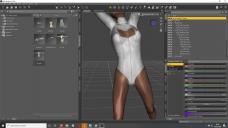
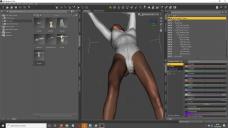
I'm trying to add a V4 body suit clothing item onto a G3 model and it appears to work fine but underneath the costume it seems to go wrong (pics). I tried playing round with the sliders but nothing seems to work to adjust this weird looking smudge of the outfit goes wide under her body. Oh ya when it asks for what outfit it was meant for when I put it on G3, I say 'V4' and what type is it I select full 'full body'.
Any suggestions? I am lost at how to correct it.

Daz 3D is part of 
Connect
DAZ Productions, Inc.
7533 S Center View Ct #4664
West Jordan, UT 84084
Licensing Agreement | Terms of Service | Privacy Policy | EULA
© 2026 Daz Productions Inc. All Rights Reserved.
Comments
This is typical for V4 autofits to other genesis figures. I haven't tried this product, but it might help https://www.renderosity.com/mod/bcs/cloth-helper-for-g3f-and-g3m/128856/
Auto-fit has its limits, of which this is one.. Auto-fit just copies mesh weights from nearby on the figure's surface, as well as destroying any corrective JCMs on the clothing - so where the mesh usually ends up along the inside of the legs, it copies weights from them and follows their movement.
The cloth helper that FSMCDesigns links can help, as can some use of mesh smoothing, but it's not perfect. Long story short, clothing designed for one generation will never work as well on any other generation, unless you put in the effort to fix the weight painting yourself (and maybe even create your own JCMs).
You could just paint the sking weights afterwards with node weight map tool. Select the joint (this case prolly pelvis) and then paint the new weight.