Keep the headlamp ON
 MegaGothmog
Posts: 9
MegaGothmog
Posts: 9
I'm relatively new to Daz and so i have to figure out a lot of stuff still.
One of the things that annoys the hell out of me is that the main headlamp turns off as soon as a lightsource enters the scene.
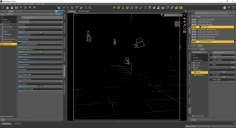
This becomes a real pain when you've loaded an enclosed space, like an appartment. It causes me to not be able to see anything in smooth shaded/texture shaded view (see attachment... that is the actual view i get), and so i can't place my figures properly in the right location with the right pose.
Is there a way for the headlamp to always be turned on, unless i select otherwise? I've seen the button that causes the headlamp to either be turned on 'Never/when no other lightsources exist'.
I prefer it to be on at all times, regardless of lightsources. When i am happy with the scene, then'i'll turn it off :)

Daz 3D is part of 
Connect
DAZ Productions, Inc.
7533 S Center View Ct #4664
West Jordan, UT 84084
Licensing Agreement | Terms of Service | Privacy Policy | EULA
© 2026 Daz Productions Inc. All Rights Reserved.
Comments
You want the headlamp off most times. It causes issues with some figures I've noticed. Weird shadows and such.
Some of my favorite light sets come with a headlamp blocker. This actually prevents what you're seeing. I actually added one to my default scene. You can also go to the menus and turn off light previews, this will allow you to see but you won't be able to see how the lights will look in the final render.
No, no, no.. Better safe than sorry, and keep them turned off. What you need for setting up your scene are the Preview Lights. Press Ctrl-L to enable or disable them. I had the same annoyance you had for ages, which got even worse when the preview lights were removed from the default menu bar, but, gladly, they're still available, and ctrl-L is the shortcut.
you can also add a new camera ..keep its headlight on until you ready to render. you will probably have to go into its headlight settings and change from Auto to On.
Think of the camera headlamp as that teeny built-in flash on your cell phone camera. Bad juju. Unless you want your scene to look like it was taken with a cell phone. If you want to be able to see your scene in texture shaded, just hit Ctrl-L to enable the preview lights.
Preview Lights is a verb phrase - show a preview of the lights - not a noun - a special set of lighting called preview lights. It is on by default, turning it off gives a headlight effect in preview that isn't used in rendering.
Once upon a time headlamp was my default light or always on. Nowadays I prefer it always off. Though I am still learning.
Solution is already provided
Ctrl+L
Preview lights have never been "on" as a default for me. I always have to hit Ctrl+L. I wish they were on by default because that would make sense, but I suppose there must be those who prefer to work in the dark.
Headlamp and preview light both are different thing. Right? Headlamp affect final render and preview light nothing to do with render.
Agreed. I didn't discover preview lights till last year. Ctrl+L has been a game changer for me.
Most of the light sets I use come with a headlamp blocker which made it very dark while working on the scene
Which is On - Off gives you a headlamp so the scene isn't dark because it isn't previewing the lights.
Headlamp renders, and Preview Lights shows an attempt at the lights that will render. Turning Preview Lights off gives a headlamp-like ilumination which doesn't render.
DING DING DING DING DING DING DING!
Thank you for explaining that clearly for me, Sir Richard. Your previous explanation delving into arcane parts of speech failed to bring it home for me. Deep bow.
Would be nice with a setting that forced cameras always to load with headlamp Off, instead of Auto.
Turn it off in Render Settings.
_ and Interesting Topics _
Thanks, that seems to work yes.
I thought the one in the render settings referred to perspective view.
It also overwrite the cameras headlamps? That would be nice as even if I have it on off in the render settings I also put it to off on any and all cameras I use.
It only overrides if the cameras are set to Auto - not if they're set to On. So you can still turn on the headlamp of a camera if you want, which is handy.