hi please can someone help me with this in daz studio
 lasagnaman
Posts: 1,001
lasagnaman
Posts: 1,001
in The Commons
ok this is what happens every time i use a diferent pose in marvelous designer other then t pose this when i use the transfer utility can somone please help me
with this thanks so much
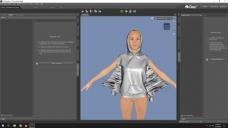
stretch.jpg
1920 x 1080 - 245K

Daz 3D is part of 
Connect
DAZ Productions, Inc.
7533 S Center View Ct #4664
West Jordan, UT 84084
Licensing Agreement | Terms of Service | Privacy Policy | EULA
© 2026 Daz Productions Inc. All Rights Reserved.
Comments
What shape is it actually being imported into DS in, and what settings are being used for item shape (for both the target and source objects) in the Transfer Utility?
the item shape is on default
I will assume that applies to both items, which is probably not the correct settings - that appears to be Genesis 3 (based on the default 3DL materials), so you do NOT want the source figure to be using its default pose/shape for the transfer if the clothing is not in T-pose.
However, I can't say that for certain, as that's only one of the questions I asked. Can you please show us what shape the item is imported in?
In any case, it's probably best practice to create the clothing for the default pose of the figure.
how do i show you what shape
these the settings i use
G3 default shape is T pose. You are using A pose in this image. I think that is your mismatch.
yeah but what should i have the settings on
It *may* work if you set the Source Item Shape to "Current", but really, best practice is to create the clothing in the base pose in the first place.
i tried both no luck
ok here’s another problem g8 female now have the arms down but i want to raise tha arms a little so i can. make baggy jacket or sweatshirt but when i do the same thing happened like g3 i don’t understand why this is happening maybe someone can walk me through a tutorial thanks so much
Here's a better solution that might work for you:
1) Get your Genesis figure into default pose
2) Open up the timeline tab
3) Go to 30th frame and apply the final pose
4) Export the animation as FBX (or .mdd if you have animate2)
5) Get it to Marvelous Designer
6) draft the cloth/go to animation tab and do record animation
7) Instead of exporting the enitre track as OBJ sequence you could stop the animation on the last frame and export only that frame as OBJ
8) Bring it back to Daz3D, import the OBJ. If any clipping occurs just use opacity maps/hide limbs or use geometry editor to hide clipping geometry from Genesis figure.
If the figure is in a different pose or shape than default when you do an asset transfer, you'll have to change the "Item Shape" dropdown under G3F to "current". Then under options choose "Reverse Source Shape From Target"
willl this also work for g3 and g8 female
Yes, anytime the figure you transfer from is anything other than base figure in base pose, you'll need to use "current" and "reverse source shape from target"
hi still no luck still doing the same thing i dont understand