
Daz 3D is part of 
Connect
DAZ Productions, Inc.
7533 S Center View Ct #4664
West Jordan, UT 84084
Licensing Agreement | Terms of Service | Privacy Policy | EULA
© 2026 Daz Productions Inc. All Rights Reserved.
Comments
that's true as well
Thank you for the comments!
I got very invested in the advanced challenge pose. I even adapted their bodies with shaping to match more to the original picture.
My initial setup was the pose picture as the background to try to match it as much as possible in the viewport. After I got very close, thanks to your tips as well I decided I should not look at it anymore but try to make the pose as natural as possible because as you noted, the original seemed photoshoped.
Here is the final version for the beginner challenge.
There was a combination of a weird camera tilt + some ground tilting as well.
Hello,
here are my last minute changes. Thank you again for the critique @Linwelly. "Romanovance" V3 for
the Beginner's challenge.
Edit: Oh, forgot to give the reference again: https://themarcus.com/getmedia/ab93b124-3e5c-4e76-85d2-377f682514ab/5550R3.jpg?width=1300
Best regards,
This challenge has given me a whole new level of appreciation for PAs who create pose packs!!
My entry for the intermediate challenge. Click for full size, and see below if you want to read an (extensive) description of my experiences with this month's challenge.
I picked what I thought was a relatively simple pose for reference (see attached, from Pixabay), since I decided to try out the Active Pose tool, and I wanted to focus on learning a new skillset.
At first, I really liked using Active Pose. It put the model in much more organic-looking positions, and I didn't have to worry about keeping bones aligned. The parameter/dial systems drives me more than a little nuts with that.
The frustration with ActivePose set in when I started trying to fine tune my rough positioning to match my reference. Figuring out which bones to pin (not to mention finding them in the heirarchy!) was frustrating. I lost track of how many times I'd pin the hip bones only to find both legs were still moving because I hadn't pinned the rotation on the pelvis, or I'd inadvertantly move the model along an axis, or ... well, you get the idea.
Then I tried using PowerPose. Again, I really liked it at first. My biggest problems were remembering which mouse button to push, and tending to move the mouse at an angle instead of purely side-side or up-down. But again, fine-tuning was an issue (although ActivePose was harder). I had the most trouble with her arms and her neck. Trying to figure out which "joints" to move in the collar/shoulder area was tough, and getting that area to play nicely with the shoulders was a problem. This is where I started to have a lot of trouble figuring out what issues stemmed from the tool's limitations, what stemmed from my limitations, and what was due to the pose. After a lot of wrestling, I got her in what I thought was more or less the same pose as my reference. Then I rendered the image and found that her pose somehow made her look like a bobblehead toy. The image is attached below, if anyone's morbidly curious.
Ultimately, I took advantage of participating in the intermediate challenge to modify the pose into something that didn't end up looking like it was straight out of a funhouse mirror, and I'm reasonably happy with the result. I can definately see areas I wish I could tweak, but I'm really happy with it overall. I'm particularly proud of the way her shoulder curves - I had a lot of trouble getting that right while not rotating her arm in such a way that her hand went through her face.
This challenge was a great learning experience for me. Personally, I find that posing is one of the most difficult skills to master, so being able to use more posing tools can only help. I plan to keep practicing with both tools, that's for sure, and I'm looking forward to figuring out how to combine the different tools for the best results!
Welcome to posing!
I like your final pose. Especially the expression, the smile looks pretty nice.
Funnily enough it has become really fast one of my favorite pasttimes in Daz.
I actually enjoy figuring out what bone to move.
What I can share from my experience:
1. Whichever tool you use (powerpose, activepose, pupeteer and so on) use it to get a rough position of what you want fast
2. For fine tuning individual bones are still the way to go, it gives you so much control
3. If sometimes it's hard to figure out which bone to move (expecially in the arms) try doing the pose with your own body. Try understanding the mechanics behind the movement you do and see what bones you move/rotate.
4. There are additional tools created by PAs which come to help you out with posing. https://www.daz3d.com/ultimate-pose-master is one and is very good to get the hands and feet into the position you want without. It's kind of like active pose but without having to figure out what to pin. A second one is https://www.daz3d.com/pose-architect-for-genesis-8-females with the add-on. This is not a tool per say but a collection of dialable poses. They are very good as in shifting the bodyweight if the character stands on one leg and so on. They are so good they could easily be used for animations as well.
5. Keep at it and you will succeed in the end. Sometimes a break is necesary to give you some clarity and a new perspective but perseverance just like you displayed will go a long way.
I hope I didn't ramble too much and what I wrote above helps at least somewhat.
Happy rendering!
I like to participate in the Beginner's Challenge. I had a lot of trouble with this picture. Posing was quite ok with "power pose" and fine adjusting with the bars, but it's still not perfect. My main goal was to get close to the original pose picture as much as possible. But you see it isn't. The girl has strange hidden bending somewhere at her hips and waist. The ice cone is, well its ... I don't want to talk about. ;) My tries to make a passable shirt ended in to many errors. But I might test it later again. Maybe in another challenge. I thought i have more time since corona, but noooo ... less. This challenge was full of tries and errors for me.
The pose picture:
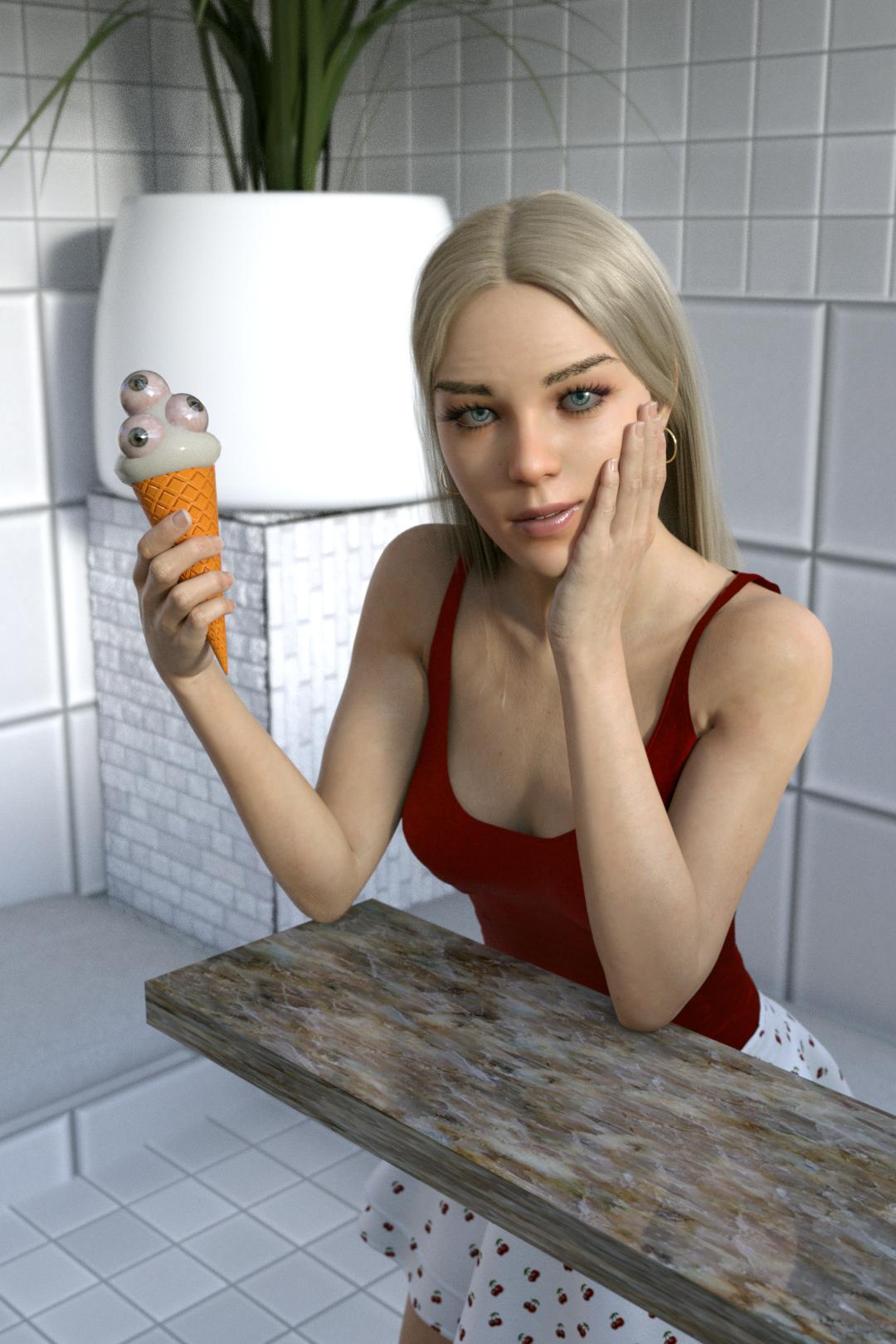
https://www.pexels.com/photo/woman-in-red-spaghetti-strap-top-holding-orange-icecream-3469226/
Pas de Deux. Pose picture.
oops sorry
This challenge is now closed!
Thanks a lot for participating, everybody and see you in April challenge (no fooling)
One of my try and error:
XD
the classic dforce explosion... usually my computer decides to take a leave at that
Oh wow, really? Maybe my computer has more humor than he should have.
I got this in a simulation with 35 frames. On Frame 30 the right Pose, on Frame 35 that nice 4 dimentional shirt.
Cloth was very stiff, very shrink and a little bit less strech( i think). Just like a cardboard. xD
March 2020
Showcased Participants for the March Beginners Posing Challenge
Smoerebroet
cloth1975
dennisgray41
Showcased Participants for the March Intermediate Posing II Challenge
alex86fire
imissmylung
ariochsnowpaw
New User Welcome
wmiller314
zaid_pixelpro32_10c9fe201f
congrats everyone! well done!
Congratulations to all and thank you!
Great images from everyone. Congrats all!
Congrats all!!!! :)
Awesome images - congrats!
*Oi* I didn't expect to be choosen with that picture. Thank you and congratulations to everyone too!