AoA Advanced light Bundle can't be installed in 4.12?
 FrankTheTank
Posts: 1,632
FrankTheTank
Posts: 1,632
in The Commons
I just bought the AOA advanced light bundle, but when I try to install any of the 3 lighting components,it does not work. So this can no longer be used then with 4.12? What is the last version of DS that works with them? I really don't want to downgrade because I like some of the new features of 4.12.
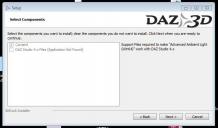
cant install.JPG
682 x 400 - 40K

Daz 3D is part of 
Connect
DAZ Productions, Inc.
7533 S Center View Ct #4664
West Jordan, UT 84084
Licensing Agreement | Terms of Service | Privacy Policy | EULA
© 2026 Daz Productions Inc. All Rights Reserved.
Comments
Are you able to download and install through DIM? They should work then.
Did you nstall DS through DIM? If so the file that tells the stand-alone installers where to find DS may not exist, hence the error.
I usually do manual install, as my PC runs Win7 with no virus protection or anything, so I keep it offline and just download my DIMs on my laptop and then install offline on the desktop.. The installers were those stupid bitlocker exes. Are there different installer files if I use DIM to do the whole installation?
Yes, DIM uses zip files, not the bitrock exes.
You can use DIM on your laptop to download the zips, then copy them onto your offline PC and run DIM there completely offline - this is exactly what I do, because like you I keep my Win7 desktop PC isolated from the internet.
If you decide to go this way, then after installing DIM on your laptop you need to open it offline (i.e. without entering your password - there's a checkbox on the signon screen to do this) and check that the flags are not set to automatically download and install everything from your account, otherwise it will go ahead and install everything on your laptop. You also need to check where it is downloading files to suits you. Then log on to DIM and just downoad the AoA light files. When you have the files, you can copy them onto your other PC and either manually install (if you are confident about where to place the files, some of which need to go into the Program Files DAZ Studio libraries) or install DIM there too, start DIM in offline mode, point it at the location where you copied the AoA lights installers to and let it intall.
Ok, thank you @MelanieL. I"ll have to try that. Usually the DIM files are available for manual download, so I haven't had to rely on your method before now. Will give it a try.
I finally got these installed. It was a real PITA. I had to reinstall DAZ Studio to do it. Now where are the user guides? The html links provided within DS do not work. Are there some PDFs somewhere?