Strange shadows - bug? Please help
 dream-weaver
Posts: 155
dream-weaver
Posts: 155
I am setting up a scene and was trying to get the right lighting into the room (via rotating the hdri, no other light source present).
Then I noticed weird shadows on the floor. So tried to eliminate the culprit, but after switching off every other object in the scene, these shadows are still present.
I this a bug?
The floor is a flat plane with texture.
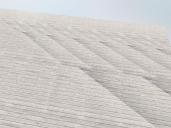
shadows.jpg
800 x 600 - 410K

Daz 3D is part of 
Connect
DAZ Productions, Inc.
7533 S Center View Ct #4664
West Jordan, UT 84084
Licensing Agreement | Terms of Service | Privacy Policy | EULA
© 2026 Daz Productions Inc. All Rights Reserved.
Comments
No it's not a bug. It's more likely a uvmap/tiling issue.
If you select the olane, then go into the Surfaces tab and select the surfaces offthe object in the Edtor tab what is the Snoothing Angle?
The angle was at default 89.90. I just tried other values, like 90 or 0 or switching Smooth off, but the shadows remain.
But the shadows don't repeat with the tiling. They only appear in specific areas, like in the attachement.
I reset all the tiling options to default, but the shadows still remain. See:
And this is without any textures at all. No difference.
In the Render Settings tab> Enviroment sub menu, what is the 'Gound Position Mode' set to? If it's set to manual, change it to Auto.
Ground Position is set to Manual. I switched it to Auto, but the shadows still remain.
Anyway, I just created a new plane with the exact same setting in the surface tab. And that seem to work fine.
The attachement shows the old and the new one together. Ground Position is at Auto.
Oh, and I just found the reason.
The original plane had Y-Rotation slightly off -90°, it was at -90.23°.
Setting it to -90° solves the shadow problem.
Sorry for the fuss.
But thanks for the help!