How to fix this Morph? deform, push mod, etc or hexagon?
 jimmyzpop
Posts: 118
jimmyzpop
Posts: 118
Hello,
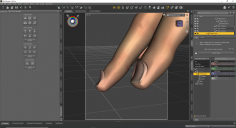
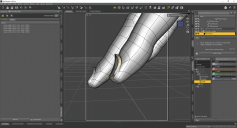
I purchased a figure from another site and the character morph at 100% from the base G8F distorts the finger nails. This is very bothersome since the rest of the morph look wonderful. Can some one walk me through the simplest solution / steps to fix this issue. TBH if I could just scale down / blend the raised ridges of the mesh I would be happy. I was hoping to be able to use a deformer to just scale it down. However, if I use the deformer it scales the full index finger area not the the small few surfaces thats needed. I also tried the send to hexagon and was able to scale the ridges down, by selecting the faces and scale manipulator. However I do not know how to get the changes back into daz. When I the click "send to daz" it creates a morph that scales the entire hands to nibs or a horrific long claw shape. I never use hexagon till the last few days trying to fix this issue, so my knowledge is limited. Any help or guidance would be much appreciated.
-Jimmy


Daz 3D is part of 
Connect
DAZ Productions, Inc.
7533 S Center View Ct #4664
West Jordan, UT 84084
Licensing Agreement | Terms of Service | Privacy Policy | EULA
© 2026 Daz Productions Inc. All Rights Reserved.
Comments
Those look horrible.
If you know Blender I could try to guide you to creating a morph there. Unfortunately I am not familiar with Hexagon.
Another option would be to contact the creator of the product. This looks like a bug and they should fix it without too much hassle.
The simplest solution might be Mesh Grabber, either that or fixing in Blender (or your preferred modeller). I'd definitely raise it as a bug.
It also might be worth finding out if anyone else with the character experiences the same issue.
@alex86fire and @nicstt thank you for your responses. I was able to contact the vender like you both suggested. Lucky the vender was very responsive and they are working on a fix.