G8F face is melting
 echristopherclark
Posts: 290
echristopherclark
Posts: 290
has anyone seen anything even remotely like this when re-opening a saved file? or even when making a small change in the middle of working on a file? i don't know why this is happening, i'm on a deadline, and i can't figure out how to fix it.
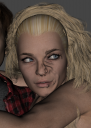
Screen Shot 2020-01-30 at 6.32.01 PM.png
1176 x 1656 - 1M

Daz 3D is part of 
Connect
DAZ Productions, Inc.
7533 S Center View Ct #4664
West Jordan, UT 84084
Licensing Agreement | Terms of Service | Privacy Policy | EULA
© 2026 Daz Productions Inc. All Rights Reserved.
Comments
Looks like the work of Meshgrabber?
Who or what is Meshgrabber?
Hmm. I'm testing a render right now, and it looks like the issue doesn't come through in the render. So maybe something in Draw Settings is messed up?
Looks like the result of autofit and the male character & his clothing seems to be causing the female model's surface to change to try to conform to it.
Also things like influence fields for dFormers will cause such changes seamingly out of nowhere until you click on the dFormer gizmo itself and see it.
Thanks for the tips. Not using any dFormers, so that's not it. Interesting notion about the autofit. Will have to check that out.
P.S. I was wrong about the distortion not coming through in the renders. It's still there. Can't figure this out. Crushed, since it seems entirely unpredictable and I just lost another 4 hours of work after I thought I'd figured out the problem. I'd go back and re-create it all again, but there's no guarantee it won't do the same thing again.
a) Select the Head in viewport or scene tab.
b) In the Scene Tab, right click, select all children
c) DS Menu - Edit - Figure - Restore - Restore Selected Items (can also to the same thing by typing Control-E in DS with the Head & it's children selected)
d) Reapply any morphs, materials, & poses to get same scene sans bug back.
e) Does it work? Yes. Render. No. Delete the character. Save the scene. Exit DAZ. Start DAZ. Open the Scene. Add back in the character.
I hope you weren't animating because such bugs essentially ruin your animation timeline.
f) Also, since you're using AFE dial the 2 AFE morph dials under Head to 0%