HeadShop on 4K monitors (Fix)
 info_b3470fa520
Posts: 901
info_b3470fa520
Posts: 901
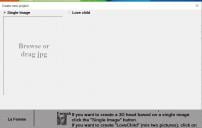
There have been reports that dialog boxes are distorted on high-res monitors (see Pict 1).
We are working on a permanent fix, but for now there is a quick easy fix.
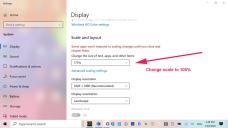
1. Right click on the desktop and ask for Dispaly Manager.
2. Change scale to 100%.
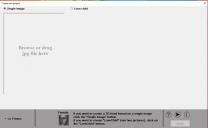
3. Restart HeadShop. Your screen should look right:
cropp.jpg
1116 x 708 - 118K
Scale.jpg
1920 x 1080 - 271K
display.jpg
1116 x 686 - 96K
Post edited by info_b3470fa520 on

Daz 3D is part of 
Connect
DAZ Productions, Inc.
7533 S Center View Ct #4664
West Jordan, UT 84084
Licensing Agreement | Terms of Service | Privacy Policy | EULA
© 2026 Daz Productions Inc. All Rights Reserved.