Display issue
 Guptatsg
Posts: 52
Guptatsg
Posts: 52
in The Commons
When I open DAZ3D the screen looks like this, what could be the Issue. Your help is mucg appreciated
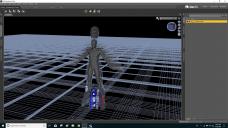
DAZ3D-1.jpg
1920 x 1080 - 755K

Daz 3D is part of 
Connect
DAZ Productions, Inc.
7533 S Center View Ct #4664
West Jordan, UT 84084
Licensing Agreement | Terms of Service | Privacy Policy | EULA
© 2026 Daz Productions Inc. All Rights Reserved.
Comments
Have you updated your graphics drivers recently? Because that looks like a driver issue. If so, shut down all apps and reinstall.
Might be a good idea to post your system specs: CPU, GPU, RAM, OS and whichever version of graphics drivers you are using.
i7, 7700HQ, Win10 64bit, Ram 32GB, Nvedia GTX1050ti, Dell Laptop
Not updated drivers recently
I am by no means a computer specialist, but that pic frightens me. Back up your data. That way, if it turns out to be nothing, youll still have a backup. If it turns out to be something bad, you will at least have backed up your data. Prove that your backup is functional. Sorry I cant be more help than that. Good Luck.
Your CPU has a GPU (video card), as well as the stand-alone GTX1050Ti. I am pretty sure that DS is currently using the GPu on the CPU. Open the nVidia Control Panel (right-click on the desktop) and you should find options to say which GPU eac application should use - make sure DS is set to use the 1050Ti.
Thank you all and Ricgard Haseltine
After changing setting in Nvedia control panel, Now works well