iRays Dev Team answer about too dark indoor scenes
 Hurdy3D
Posts: 1,113
Hurdy3D
Posts: 1,113
Anonymous asked: I use DAZ3D with iray. The light bouncing for rendering in-door not optimal. In-door scenes are much to dark, even if the sun goes directly through a window. And figures skins get quickly much too dark, too. The workaround is to work with a lot of ghost lights, but these consumes a lot of time. Are there any plans to improve light bouncing for indoor rendering?
iray actually was and is used for architectural visualization a lot, one huge example being the NVIDIA headquarter itself (see https://developer.nvidia.com/iray-sdk) where it was also validated and compared to other professional light simulations in the process (see same page).
So the only explanation i can give you for your problem is that simply the sun/environment that you use is way too dark. Even if it might “look” correct when directly looking at it, the actual physical values for the sun might be way off, something that is unfortunately very very common for a lot of available HDR environments.
Source: https://blog.irayrender.com/post/190121876706/i-use-daz3d-with-iray-the-light-bouncing-for

Daz 3D is part of 
Connect
DAZ Productions, Inc.
7533 S Center View Ct #4664
West Jordan, UT 84084
Licensing Agreement | Terms of Service | Privacy Policy | EULA
© 2026 Daz Productions Inc. All Rights Reserved.
Comments
Not meaning to be rude, but...what’s your point?
that they donˋt see or understand the issue. So we will probably get no better light bouncing and are doomed for all eternity to use ghost lights
But the issue with light bouncing is inherent to path tracing - you wait for enough light bounces from the real source or you add extra sources. It isn't even just true of path-tracing, it's an issue photographers using physical cameras have (and meet with additional lights and reflectors).
And/or adjusting the appropriate tone mapping settings (ISO, f-stop, shutter speed).
I attached a demonstration. Just a simple room with a sun node, two windows and a g8m figure.
On the head and the feet it's much too dark. I would expect that there's a better light bouncing from walls of the room and the skin, which would make that dark eares of the g8m much lighter.
IMHO, the "problem" is the light is doing exactly what is expected, and what happens in the real world. If you want more light in those areas, you need to add it with additional light (or light reflectors), just as a photographer would in a similar situation. I think what you are asking for is to have Iray to automatically add more ambient light, which is a common "cheat" with more highly biased render engines. If this is what you are looking for, 3Delight might be a better option (but not a simple one).
They absolutely see and understand the issue. However, the problem is that the issue fundamentally lies with the assets - the surfaces involved having been set by the authors to not reflect enough light (because they think it's more aesthetically pleasing for the surface to not be completely whited out), the HDRI environment having an insufficiently bright sun, etc - and fixing that with changes to the engine isn't really feasible. Firstly, it's not a consistent problem, so they can't compensate for it, and secondly, it would require compromising the fundamental principle of an unbiased rendering engine.
Essentially, the problem is that the models, materials and environments we're using are seldom that accurate, but an artist saying "oh, that looks close enough".
And saying "come up with an engine that can accurately guess how badly the artist got it wrong" is basically impossible.
okay thank you for all the answers.
First of all, I don't use HDRI enviroments. I usually use the Sun-Sky-Only mode, because I was never satified from the lightling from HDRI envs. Also I have more control about the lightling, if I use a camera as a sun-node.
However, so the problem is not the light bouncing from the iray render engine, it's the iray shaders from the artists?
Is there something I can tweak on the skin shaders not to get a grey skin as soon there's just a little less light?
I always thought, if I would switch on Blender and use Cycles that grey skin issue would be gone, because I hoped Cycles would have a better light bouncing. So, that's not the case, right?
Have you ever taken a photo? Ambient light indoors is essentially always inadequte. This isn't new to PBR render engines. Complaining because iRay works properly is just nonsensical.
Hmmm, I think I side with Gordig here. I've used Iray and gotten AMAZING indoor results and also horrible results. 10 times out of 10 if I try another light setup it can be corrected. Iray can do amazing things, but it cannot compensate for a poor render setup. <shrug>
yeah... I spend a lot of time with ghost lighting to get good results and even more time with postwork ;)
I'm inclined to disagree to an extent; it seems you want Iray to know what results you want?
I agree given a room, with two pieces of furniture, that are very close in size and textures-type, I would expect them to behave the same with the same shader. Herein's the rub, shaders are never identical. Which I for one am grateful for.
You can go out and buy two pieces of furniture (in the real world), put them in a room, and they will reflect and interact light differently. Because their 'shaders' are not the same, and incidentally, neither are their 'textures'.
... However, for correct lighting, one needs path tracing to be fully implemented on the 20 series RTX cards. How are we doing with that. We have no idea if the OP was using an RTX card, and if his setup was able to utilise said card if he had one - and if the required RTX functionality is available (I don't know as I don't have a card purported to use this raytracing).
I wasn't actually making any kind of kind of a statement; I just genuinely didn’t understand what the OP wanted us to take away from that post. Were they disagreeing with the statement? Did they expect someone at Daz to take action in some way? Were they just trying to start a conversation? If so, about what, exactly?
I use Ghost Lighting too, quite a bit actually. But I have also used things as light reflectors. You can change the color of the reflecting object to more accurately see the effects of the bounced light (in that color in your scene, make it a CRAZY color to really see the result - HA HA!). This works in some types of scenes and not so great in others. If you place Ghost Lighting in the right positions it can easily augment light and give you just that little bit more light that you crave.
If you are in to photography you will know how shutter speed, aperture and, in 3D, gamma settings effect light. Lighting in real world, AND 3D, is CRAZY complex. I know you said you don't use HDRI, but you can use Environment Intensity to take things up a notch. Maybe you should look into HDRI again. I recommend Dimension Theory's iRadiance sets.
Keep at at it!
I think the problem is indoors is actually darker than outdoors. But doesn't look that way because our eyes are adjusting for the lower light while we are indoors. So it will look too dark in a render because our eyes are adjusting for the real light in our room instead of the light in our render window.
Not sure I understand what you mean? Apply IRay Uber to two pieces of furniture, they will have identical shaders but the shader settings may vary.
Wowie's solution to the problem with 3DL pathtracing was to implement adaptive sampling to the aweSurface shader. With awe, ray/specular/reflection bounce depth, as well as SS- and shadow samples can be set per surface. So for problematic areas you just raise the values. The adaptive sampling will shoot additional rays in those areas with little render time penalty.
I agree, but I think that's only part of people's issues. @Dustrider mentioned a piece of it. I think the people having interior lighting problems have a menal picture of what their eyes would see. However what you get from Iray in Studio is closer to what a camera would see.
@gerster
Do you really believe that the Iray development team doesn't understand the Iray Engine? Seriously?
But I always thought Nvidia where the ones who develop Iray not Daz ? correct me if I'm wrong.
So is it a Daz problem or Nvidia ?
Technically, it isn't a problem with either; it is the artist not using an optimal solution. If you have ever visited a movie set or a photography studio, the first thing you will notice is the number of lights and reflectors. As mentioned above, cameras tell an honest story while our eyes do a certain amount of editing to bring things into acceptable dynamic range. What photographers and film mkers do is to light the scene and then darken it in post. Stanley kubrick made a beautiful if slow movie called Barry Lyndon which featured a scene lit by candle light. They used very expensive custom fast lenses, fast film (which added a bit of grain), and got a beautiful effect that was very different than what we would see in a candle lit room. The movie scenes had islands of amber light which illuminated parts of faces but faded very quickly off to black. Our eyes in the same situation would "paint" in a few lower levels so we would dimly perceive vague things in the shadows.... Ironically, 3delight does a lot of that perceptual non realistic lighting.
Wow very good explanation thanks !
When i was a teen, I continued a tradition of seeing a Stanley Kubrick movie on its opening day; I saw the movie and then returned to see it the next day. Unfortunately, Barry Lyndon doesn't have the furious pace of 2001 and the first dialogue doesn't happen until 22 min into the movie... Nonetheless, here is a link to the famous and beautiful scene which is apropos to the topic of this thread: https://www.criterion.com/current/posts/5059-kubrick-s-candle-tricks-in-barry-lyndon and discusses the need to add ambient light in dark scenes to fake the effects that our eyes synthesize.
No, but after the iray engien is meant for architecture rendering I had the rectified assumption that the iRay developers don't know the needs of us.
I'm a software developer and I know that software developers often don't the the needs of their customers.
I did an other image to show the issue which I see.
There are two G8Ms. One in the shadow and one in the sun. I think the skin of the one in the shadow is much too dark/grey.
I'm do much photos with my smartphone, but I don't remmeber that there's such a big difference in the lightning in real life.
Just take a look on these photo which I found on the internet:
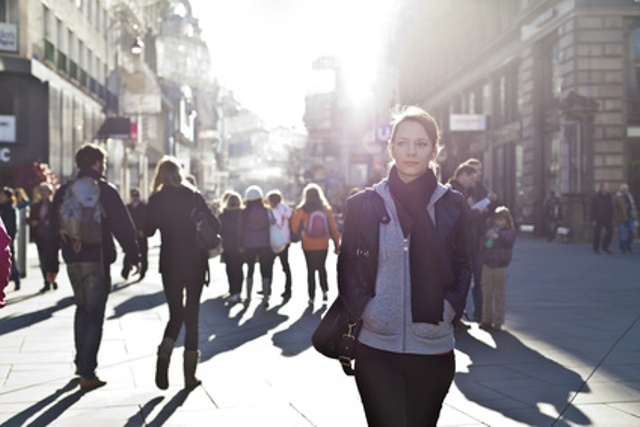
Just compare the girl in the front and the two people in the show on the right. There not such a big difference in their skin, compared to my render.
Or here's an other example.
An indoor scene in the iray Sun-Sky-Only mode, with a Sun node and Exposure Value adjusted to 12.
The light comes directly through the windows. In real life I would expect that the whohle rooms is bright, but in iray it's way too dark. I always thought that's because of the poor light bouncing in iRay.
So you say that's not the case and it's phsically correct that I need ghost lights to bring the room to the level of brightness I would expect from these scene in real life?
The thread is about Iray rendering not 3dl so I don't really understand the relevance of this post and it could be rather confusing to the OP.
You don't need any ghost lights, just drop the Exposure Value lower. Easy.
if I do so the exterior will be much too bright, even if my camera is in the opposite direction of the sun
True enough, it's the settings that get changed, not the shader. The results are effectively the same though - a different look.
There isn't enough light getting onto the figure in the shade; that could be for a variety of reasons. All the demonstrations i've seen relating to the RTX nvidia introduced showed how this will be more accurately implemented. Presuming you can't take advantage of said RTX, you need to fake it in some way, or adjust settings if that will do what you want.
The eyes have developed over millions of years; cameras and other tech has had a few years less and is still under development. As previously explained by nemesis10, the brain and the eyes work together to create the images we see. That information simply can NOT be placed on an image (photo/render) for them to interpret, but has to created by the artist: so how it looks is down to the artist to decide.
Even after the image has been created, you as the artist have no idea if the viewer will see what you see. Now presuming that you both have decent vision, so the eyes are not going to significantly affect it in any way, you still have to consider the setup being used to view the image.
Are the displays of decent quality, AND able to display the image accurately?
Have the displays been calibrated to display the necessary colour gamut?
Are they being viewed in optimal conditions (too bright/too dark an environment) ?
I have a question about the photo you use; did you look for ones that supported your argument? Did you find any that offered an alternative view/result?
Problem for the OP is that iRay is acting like a camera instead of human eyes. Human eyes will adjust and the light will seem much brighter.
You'll get results like what your eyes adjust to give by doing things like hiding the roof of the room. Of course then you'll likely have new Sun - Sky shadow patterns inside but if the roof isn't visible where you see the sky you'll get away with it because the lighting looks natural.
Not sure this is a fair comparison. From the direction of the shadows, it is clear that the sun is behind the main figure, so her face is effectively in shadow, in the same way as the characters on the right are in the building's shadow. In your render the light is coming from the side, and so brightly lights up part of the front of the figure not in the building's shadow.