I really need dForce help! -SOLVED
 Starkdog
Posts: 176
Starkdog
Posts: 176
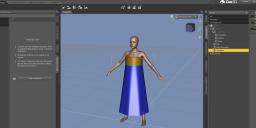
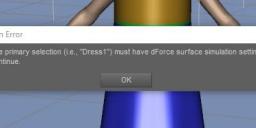
I'm losing my mind trying to follow RGcincy's tutorial for creating a gathered dress. I made the "tube" in Hexagon, created surfaces, and UVs, and then sent it to Daz Studio. I loaded G8F, and everything is fine. I select the dress, go to Edit/Object/Geometry/Add dForce Modifier: Dynamic Surface. In the Parameters tab, I see a property group labeled simulation. However, in the Surfaces tab, I DO NOT SEE simulation... What the heck? I right click on the material go to dForce Surface Adjuster, and I get " The primary selection ("Dress1") must have dForce surface simulation settings to continue." What is going on, and how do I fix this?
Thanks, -David

Daz 3D is part of 
Connect
DAZ Productions, Inc.
7533 S Center View Ct #4664
West Jordan, UT 84084
Licensing Agreement | Terms of Service | Privacy Policy | EULA
© 2026 Daz Productions Inc. All Rights Reserved.
Comments
Something sounds off.
If you create a Daz primitive, e.g. a plane, and you do the same actions, i.e. Add DForce Dynamic, and right-click the plane.
Does the same then happen?
Hello Felis,
I tried a plane primitive, and it worked- which made me think that I need an obj file, and not sent via Hexagon/D|S bridge. I exported the obj in Hexagon, imported in D|S, and added the dForce dynamic modifier. In the Surfaces tab, I now have the dynamic settings as shown. Thank you for the suggestion!
LESSON LEARNED - If using Hexagon to make dForce clothing or objects, DO NOT use the bridge back to D|S. Instead, export the mesh as OBJ, and in D|S import the OBJ.