Is the normal map creating this in the brows?
 wscottart
Posts: 447
wscottart
Posts: 447
1. Just began rendering 4k size images.
2. No bump map in the head. Is this casused by the normal map? Its looks fine at smaller resolution or should I say not noticable.
3. How would you fix the normal map? Is this why people prefer fiber brows?
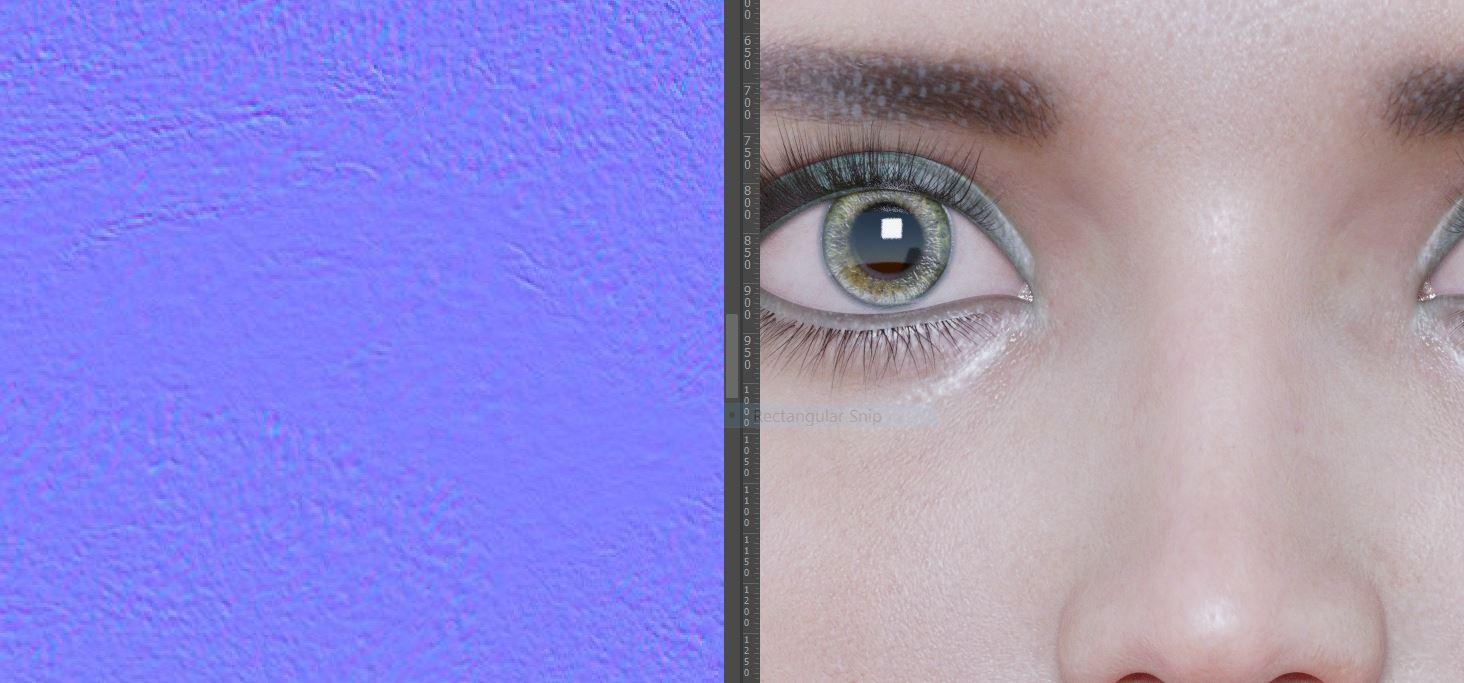

no bump.JPG
1464 x 683 - 125K
Post edited by wscottart on

Daz 3D is part of 
Connect
DAZ Productions, Inc.
7533 S Center View Ct #4664
West Jordan, UT 84084
Licensing Agreement | Terms of Service | Privacy Policy | EULA
© 2026 Daz Productions Inc. All Rights Reserved.
Comments
As I see it, I wouldn't have expected that it was the normal map creating that.
A normal map creates an illusion of depth/heigth, and this look more like a color effect, from maybe an overlay or gloss.
Although the normal map looks neither like what I would have expected of a face normal map.
But you can easily test it, if you remove the normal map and re-render.
Regarding why many prefer fiber mesh, there is several arguments.
You can color it the tone you like, and it is actual geometry, so it can both generate shadows and especially if seen from an angle.
Well I am zoomed in on thge normal, but I am getting this same look even with the normal map off. Is this mayby my light set-up?
It would make most sense if you had zoomed in on the normal map so it was corresponding to the image. But ioverall the normal map you have shown looks more like a noise texture.
And my prime focus would be to go through the other maps in the face surface.
Is this a standard character?
For getting a general impression, I will suggest using an HDRI as ligth-source.
Its definetly in my light rig somehow. I loaded her into a new scene with a different light set up and do not have the same problem. But I am keeping that file and will try to localize the problem.
Are the brows part of the face texture or are they applied with L.I.E. or Diffuse Overlay?
In the face surface, when I pull up the L.I.E editor the eyeliner is being applied. I will now see if that could be causing the distortion.
Looks like it might be the specular map, looking at he skin it has a similar pattern of shiny/matt mottling.
L.I.E. can give strange looks if other channels like translucancy, gloss or subsurface scattering is not also altered.
Looks like a gloss map to me. That is what I would be looking at. I would add a fiber mesh brow on top of this. One shaped to follow the texture would be great. IMO that works better than texture only or fiber mesh only. The combination of the two helps overcome their respective drawbacks.
the dual lode specular weight was set at 1.580 I set theis back dow around .400 and that cleared up teh mottled look. Thank you.