How to export G2 to Unreal so Daz bone rotations would match?
 yaruuvva
Posts: 33
yaruuvva
Posts: 33
Hello,
I exported Genesis 2 model as FBX, then imported it to UE 4.22 but I can't understand how to match bones rotations values between Daz Studio and Unreal...
Here's how to reproduce a problem:
1) I looked at model definition file ( Genesis2Female.dsf ) and saw that rotation_order for lThigh is YZX.
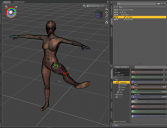
I typed these rotation values in Daz Studio: X -90, Y 75, Z 45 and model looks good - like on screenshot.
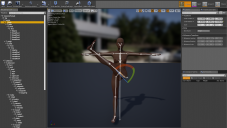
Then I typed the same values in Unreal Bone Editor (in YZX order - first I typed Y value, then Z, then X) and model looks incorrectly (see screenshot).
What is causing this problem and how to fix it?

Daz 3D is part of 
Connect
DAZ Productions, Inc.
7533 S Center View Ct #4664
West Jordan, UT 84084
Licensing Agreement | Terms of Service | Privacy Policy | EULA
© 2026 Daz Productions Inc. All Rights Reserved.
Comments
Here's a great video for Genesis 8 to Unreal, which yields perfect results. I haven't tried Genesis 2 (I always used Mixamo to port G1 & G2 previously), but I'm sure it would be a similar process.
https://www.youtube.com/watch?v=BkDakjwPd7o
Thanks for that link
I have had no success with Genesis 8, I can retarget genesis 3 but not always
there seems to be a number of factors that affect it possibly scaling in various characters, I have yet to discover what I do wrong when it fails
I think the secret is the second part in the video, where he changes everyything to 'skeleton', then a couple of items to animation or animation scaled. I've used that method to import things such as B-bot, which has very few bones, and got animations working well (with a little trial and error).
yes I noticed that and have never seeen that shown before, will try it next time