Genesis 8 Female face messed up?
 rahat123
Posts: 13
rahat123
Posts: 13
I've been loading some G8F characters and noticed they looked barely like the product images. I can understand that lighting etc can contribute but I decided to load up base G8F and the face looks weird. I've attached an image with G8 on the right and G3 on the left. Is it supposed to look like that. It seems like the bottom of the face is kinda scrunched up. I've tried uninstalling G8F and redownloading but it still looks the same so I'm not sure.
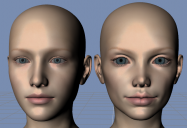
Screenshot_5.png
669 x 457 - 448K
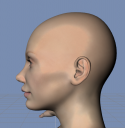
Screenshot_6.png
607 x 624 - 359K

Daz 3D is part of 
Connect
DAZ Productions, Inc.
7533 S Center View Ct #4664
West Jordan, UT 84084
Licensing Agreement | Terms of Service | Privacy Policy | EULA
© 2026 Daz Productions Inc. All Rights Reserved.
Comments
You almost certainly have a character isntalled which has a non-zero default value for its morph (or one of them). If you look in the Currently Used group of the Parameters pane with a freshly loaded base figure selected the cuplrit should be fairly obvious.
I've already tried that, this is all there is.
Load your character, select the character, on the Parameter Tab > Currently Used, look for anything dialed in, zero those values. save figure.
OK, try with Show Hidden Proerpties enabled - the lined button to the left of the button labelled Genesis 8 Female in your screen shot. (That assumes the figure in yoru scene there is showing the behaviour.)
The "fit to" gives a clue. Those are the eyelashes. Needed to select the main figure.
I've just tried something. Realised you can zero the figure, did that and now, under the Currently Used tab, it's showing Erevan Airy Head and Demona head as 0%. G8F looks fine now. When I crank both of those sliders to 100%, they no longer show under currently used and the face is messed up again so that means daz thinks 100% is their default. How do I change the default for these sliders?
The eyelashes are parented to the G8 figure so when you select the figure, it also selects the eyelashes. You can clearly see in my screenshot that there are two selections, the figure and the lashes. I've solved the problem, anyway. Set the default for those morphs in my previous comment to 0 and then saved the modified assets. G8F now loads fine.