Holy Dual RTX, Batman! - Solved
 Gogger
Posts: 2,535
Gogger
Posts: 2,535
Okay, so much for the Scientific Method, but HOLY MOLY!!
I recently upgraded from my 7 year old Alienware R4 desktop to a spec-cranked R8 and the RTX2080Ti I bought to replace the RTX2060 it came with wouldn't fit in the new case so I ordered a shorter (size) RTX2080Ti from Dell and have been running it on just that new RTX2080Ti for a week or two now. Well last night I FINALLY got around to installing DAZ Studio on the new machine and ran a test render. Then I installed the RTX2060 alongside the RTX2080Ti and fired 'er back up. <SIGH> Only the RTX2060 was showing in Nvidia and DAZ Studio wouldn't run, complaining about OpenGL drivers so I updated from v431 Nvidia Drivers to 441 released Nov 4. I rebooted and ran DAZ Studio just fine, reloaded the exact same file I rendered before. OH! EM! GEE!
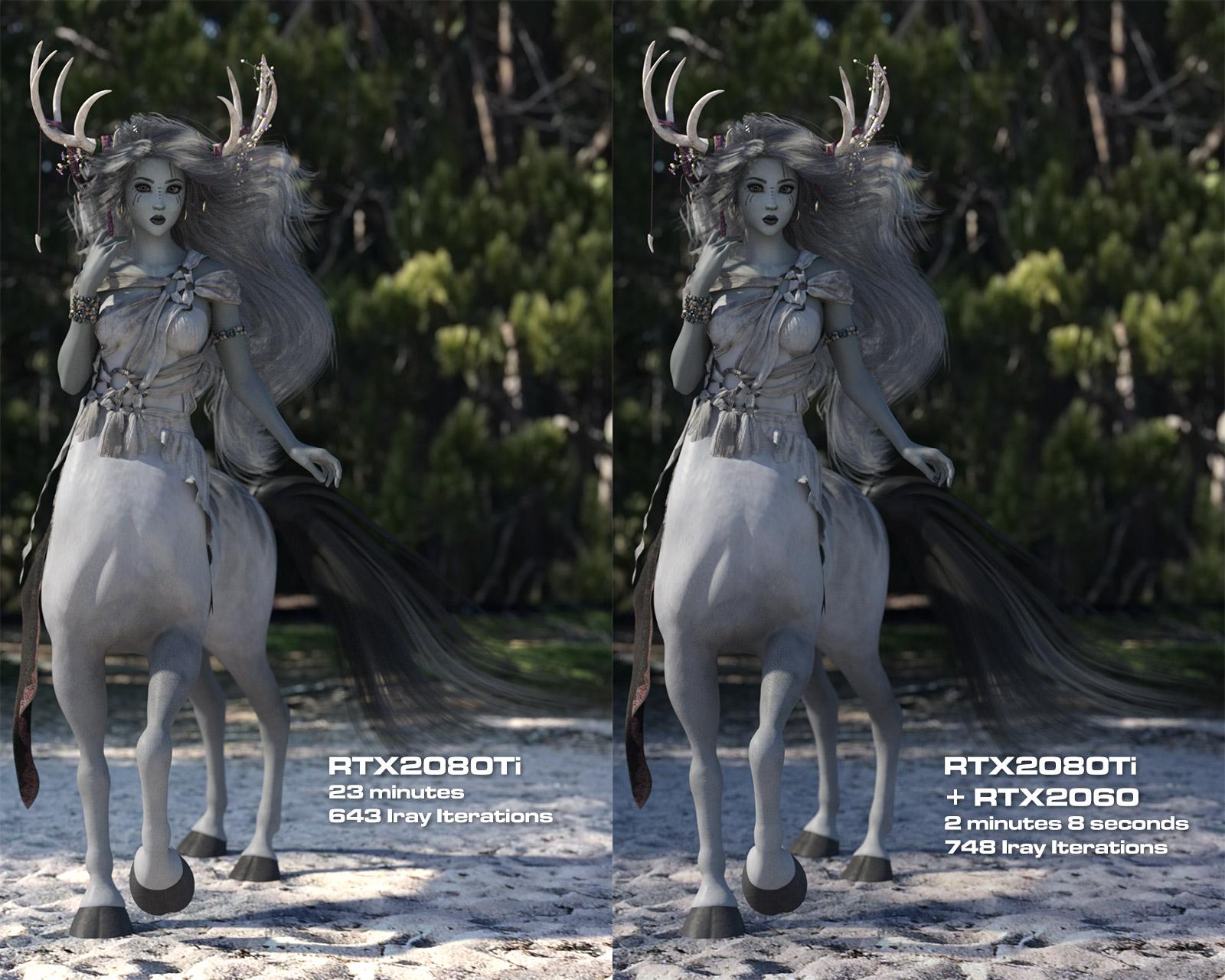
The same file rendered on just the RTX2080Ti on Driver 431.60 took 23 minutes to get to 643 Iray iterations. [EDIT: Verified now - scene had fallen back to a CPU render]
And this next bit made the whole upgrade cost and hassle SO WORTH IT!
Rebooted, with Driver 441.12 and ran the same scene in, I kid you not, 2 minutes and 8 seconds at 748 Iray iterations!!!! [EDIT: Still crazy happy with these results!]
HOLY CROW! That is way above and beyond my wildest hopes! I was skeptical so changed her fingernail color and rendered again, same insane results.
And since someone will ask here are the new machine specs:
DAZ Studio v4.12.1.16 Pro BETA
Alienware R8 Desktop
i9-9900K CPU @ 3.60GHz
2 TB SSD C drive
6 TB Seagate HDD D drive
64.0 GB RAM
Windows 10 Pro
Nvidia Driver 441.12 DCH
RTX 2080Ti with 11GB GDDR6 VRAM and 4352 CUDA Cores
RTX 2060 with 6GB GDDR6 VRAM and 1920 CUDA Cores
Oaklyn_Centaur_007a_First_Dual_RTX_Render.png 1200w x 1920h
Unretouched images (except for text) as rendered:
And the final with postwork in Photoshop:



Daz 3D is part of 
Connect
DAZ Productions, Inc.
7533 S Center View Ct #4664
West Jordan, UT 84084
Licensing Agreement | Terms of Service | Privacy Policy | EULA
© 2026 Daz Productions Inc. All Rights Reserved.
Comments
I have some interest in a similar setup. I already have the 2060 Super, since I didn't think I needed the 2080 when I bought the system. I had read that 2060s can't be linked with other GPUs though, so I hadn't really looked further into it. I guess the driver update must have changed that.
@Cedworth
Iray rendering doesn't need or want linked GPUs.
@Gogger
I wonder if the driver update made most of the difference. It's hard to believe that 44% more cores cut time by an order of magnitude. No one has seen that kind of render time improvement before even when doubling cores.
I suspect that the RTX features are working with the new driver, but not with the older one. You've changed two variables in your test so hard to draw a solid conclusion.
It looks like the 2080ti+2060 combo render with the new driver is using some sort of AI shortcuts and shared memory to greatly reduce render times. The contrast change in your two renders is noticed and higher in the 2080TI+2060 combo render. It looks better to me.
I'm a big fan of the Alienware laptops (check my current specs in the sig). Talk like this is making me think about upgrading the external graphics card in my Alienware Graphics Amplifier (an external case that has a dedicated power supply and a graphics card).
I've been using a 1080ti and 2070 for quite a while and test each seperately and together when I update my drivers, or DS releases a new version, and have never seen such an enormous uplift.
Was it definalely using the GPU on the first render? Sounds to me like it was CPU (maybe due to the driver version?)
Now that I think about it, 23 minutes seems like a long time for a RTX render of that kind of scene. Jack may be right.
Yeah, got to be honest - assuming that the background is an HDRI, I would expect even my barely passable GTX 1050 Ti card to be able to render a single character with an HDRI background to a few hundred samples at 1200x1920 in 23 minutes. I'd agree that it probably wasn't using the card at all, because the 2060 shouldn't be making anything like that much difference when added to the far more powerful 2080 Ti.
Well 700 iterations is a lot in 23 minutes is not typical for my 7 year old i7-3630QM with 16 GB RAM. I typically do 1920x1080 FHD though. However, at 1280x720 many scenes I can CPU render and get 700 iterations in 23 minutes.
Jack for the WIN! I checked my logs and found that it did, indeed, fall back to CPU, maybe I trashed memory with all the fiddling about and live Iray viewport checks I do. Regardless, I am still very impressed by, and happy with, the 2 minute renders!
LOG:
2019-11-11 06:17:28.021 WARNING: ..\..\..\..\..\src\pluginsource\DzIrayRender\dzneuraymgr.cpp(304): Iray [WARNING] - TRIT:GEOMETRY :: 1.0 TRIT geo warn : Object DS_shape_45b8_56332: the parametric approximation level is set to 1. The original value of 2 would produce too much geometry in a single mesh.
2019-11-11 06:17:29.482 Iray [INFO] - IRAY:RENDER :: 1.0 IRAY rend info : Initializing local rendering.
2019-11-11 06:17:29.482 Iray [INFO] - IRAY:RENDER :: 1.0 IRAY rend info : CPU: using 16 cores for rendering
2019-11-11 06:17:29.482 Iray [INFO] - IRAY:RENDER :: 1.0 IRAY rend info : Rendering with 1 device(s):
2019-11-11 06:17:29.482 Iray [INFO] - IRAY:RENDER :: 1.0 IRAY rend info : CPU
2019-11-11 06:17:30.133 Iray [VERBOSE] - IRAY:RENDER :: 1.4 IRAY rend stat : Native CPU code generated in 0.198s
2019-11-11 06:17:30.133 Iray [INFO] - IRAY:RENDER :: 1.2 IRAY rend info : CPU: Scene processed in 0.656s
2019-11-11 06:17:30.149 Iray [INFO] - IRAY:RENDER :: 1.2 IRAY rend info : CPU: Allocated 52.735 MiB for frame buffer
2019-11-11 06:40:22.138 Iray [INFO] - IRAY:RENDER :: 1.0 IRAY rend info : Convergence threshold reached.
2019-11-11 06:40:33.074 Saved image: C:\Users\misc\AppData\Roaming\DAZ 3D\Studio4 Public Build\temp\render\r.png
2019-11-11 06:40:33.090 Finished Rendering
2019-11-11 06:40:33.121 Total Rendering Time: 23 minutes 9.93 seconds
I've checked the logs and verified that it did fall back to a CPU render so that explains the crazy time difference. I normally like to be very much more rigid in testing parameters (i.e. one change at a time, test, repeat), but there was NO WAY I was going to dismantle after finally getting it all working.
Sorry for the crazy claim everyone - I was at the tail end of staying up a day and a half working on this HA HA! I am still very happy with my two minute renders!
Strange, wonder it why it rendered to CPU there. I thought that time was high.
Anyway, if you like, there is a benchmark thread with a scene you can download so all tests are equal. It should just take about 5 minutes for you. If you don't mind, I would be interested in seeing 3 tests, the 2080ti alone, the 2060 alone, and finally the two together. Then you can see where you stack up compared to others, and I am curious how a 2080ti+2060 do as that is a combo not tested before. There is also only one 2060 bench listed, so another would be nice.
https://www.daz3d.com/forums/discussion/341041/daz-studio-iray-rendering-hardware-benchmarking/p1
if your cpu fan starts revving up and you can barely do anything on your computer you know it fell back to cpu...
I'll look into running the tests as soon as I can - but for clarity, when you say 'just the 2080Ti' or 'just the 2060' you mean by checking the boxes in DAZ Studio to use one, the other, or both, NOT a hardware de-installation, right?
I've been there, done that! But not for a while now. Man, THAT is agonizing when it happens though!
Indeed, there is no need to reinstall everything.