So I'm trying to use the long Goth Jacket for M4
 comixfana
Posts: 278
comixfana
Posts: 278
in The Commons
https://www.daz3d.com/gothic-long-leather-jacket-m4
With the Genesis 8 male figure. I got it to fit, but the l & r T controls show in the render even when I uese the "eye" icon in the scene tab...they even show in the render, is there a way around this?
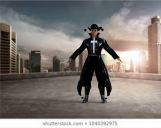
The Reverend.png
1067 x 849 - 732K

Daz 3D is part of 
Connect
DAZ Productions, Inc.
7533 S Center View Ct #4664
West Jordan, UT 84084
Licensing Agreement | Terms of Service | Privacy Policy | EULA
© 2026 Daz Productions Inc. All Rights Reserved.
Comments
There's probably a material zone for the handles, so you can set them transparent in the surfaces tab.
If there's no separate surface you can use the geometry editor to create one or directly hide the polygons corresponding to the handles.
Okay, so keeping in mind that I'm not an advanced user, what would it look like and is tere a tutorial somewhere showing how to use the geometry editor? Thanks!
Found it! Thanks for pointing me the right direction, I'm a slow learner, but the geometry editor was the ticket. With a bit of research. I found out the Ctrl* shortcut to make sure all the polygons in the Control spheres are rendered transparent. It would be great if said transparency could be saved as a preset, but at least, the ctrl* shortcut makes the process much quicker! :)