ds won't let me save a support morph to a clothing item
 Mistara
Posts: 38,675
Mistara
Posts: 38,675
in The Commons
i made a morph for these bikini bottoms for a character shape.
morphing is working okay
but it won't let me save a morph asset.
it's telling me to save as a product first.
i want to save this morph to the original product.
what am i doing wrong?
thanks
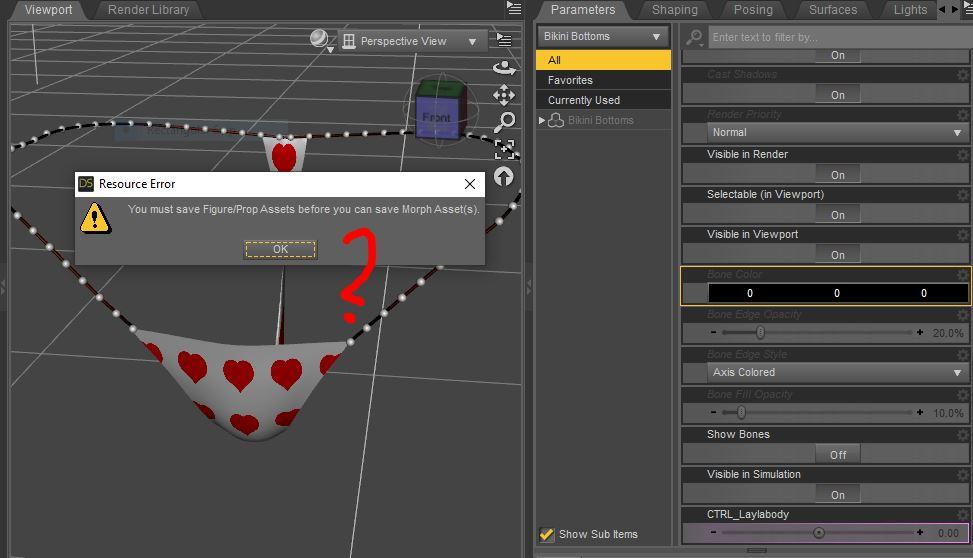
ds support morph.JPG
973 x 558 - 78K

Daz 3D is part of 
Connect
DAZ Productions, Inc.
7533 S Center View Ct #4664
West Jordan, UT 84084
Licensing Agreement | Terms of Service | Privacy Policy | EULA
© 2026 Daz Productions Inc. All Rights Reserved.
Comments
Which figure is that item for?
g8f with the layla character dialed up. has a bunch of erc
i've saved several morph assets for g8f. worked ok.
this my first wearable morph asset. dont understand why it is different?
Is the bikini a G8F item originally, or is that an item for another figure you autofitted? The message makes it look like the bikini has not been saved as an asset before, which would explain why you can't save a morph for it.
Is the clothing a Genesis 8 Female set? If you AutoFitted it from another figure you will need to save the m,odified version as a Figure/Prop Asset first, then save the morph.
thanks
is originally for g8
is this one https://www.daz3d.com/pw-string-bikini-for-genesis-8-female-s
i don't understand cause the bikini bottom is already a product.
the morph supports needs to work on the original product.
don't, like, the morphs has an attribute to match the name of the figure id it is meant for?
making an add on batch of support body shape morphs for it
doing a batch for the basic wear, too.
And the body chains. https://www.daz3d.com/body-chains-for-genesis-3-and-genesis-8-female-s
saving it as a product made ds crash. 3 times in a row.
suspecting mebbe cause i don't have the cms installed?
cuuld that cause a crash? saving a product with no cms installed?
crash message was something about an access violation.
i saved it as a scene subset to test it in carrara.
If you want it on the original figure then you need to trasnfer it to, or create it on, that - of course you probably don't want to export the morph on the AutoFitted version, since that will include shape changes from the conversion too.
i used morph loader pro to import the morph target to the original bottom kini
when i did the same steps for g8f morphs
had no problem saving those asset morphs.
trying again with the top, see if it errors or crashed on me