Problem with Dynamic Clothing and Animate 2
 j.tyson
Posts: 0
j.tyson
Posts: 0
Is it a waste of time trying to get dynamic clothing to work with animate 2?
I have been trying for several days to achieve what in other software is a simple animation:
a dynamically clothed genesis figure walks into view, turns to face the camera and stops.
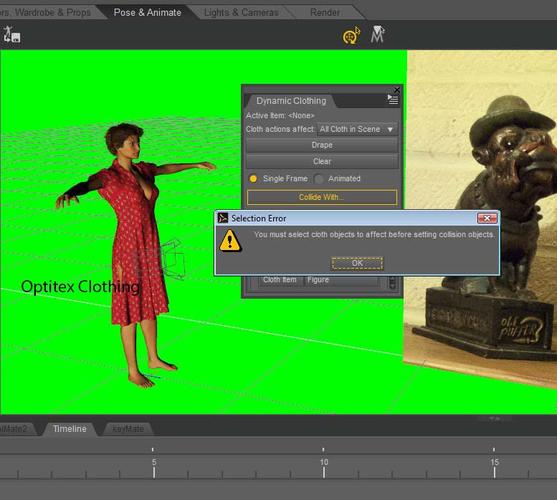
I can't list all the weird and wonderful errors I have had en route to complete failure, the most bizarre of which is the sudden inability of the dynamic plugin to detect clothing (downloaded from the site which sells the plugin: "You must select cloth objects to affect before you can choose collision objects" - What? Your cloth garment is in the scene and your plugin cannot detect it!)
Various things I have tried all result in failure:
1) draping on zero pose at origin, then grouping genesis and garment,translating and rotating to the point where I want the animation to start. Setting an aniblocks animation, baking to timeline. Ungroup figure and garment. Try animated draping from keyframe after first drape (in the hope it would follow the animation): result "you must select cloth objects to affect.." The garment is no longer recognised as "dynamic cloth".
2)positioning and posing the figure where I want it to start, adding the dynamic clothing (which loads at the origin, irrespective of where the figure is). Draping gets nowhere near the figure.
3)positioning and posing the figure where I want it to start, adding the dynamic clothing and then aligning it to to x,y,z position of the figure. Single frame drape is hopeless. Animated drape loses the plot completely.
So how do I do this? I hope I am making some basic mistake - otherwise this draping/animation software is useless unless you want to animate from the origin.

Daz 3D is part of 
Connect
DAZ Productions, Inc.
7533 S Center View Ct #4664
West Jordan, UT 84084
Licensing Agreement | Terms of Service | Privacy Policy | EULA
© 2026 Daz Productions Inc. All Rights Reserved.
Comments
Dynamic cloth in D|S isn't quite like any other object in your scene. Look closely at the Scene tab when you have dynamic stuff loaded — notice how the column of arrow-with-tick changes to arrow-with-X on the dynamic objects? I'm not sure why it's set that way, but these items are not selectable directly from the Viewport, they must be selected in the Scene tab. Only when it's selected can you use many of the Dynamic Clothing tab functions such as setting collisions. That's the way D|S dynamics have always worked. I've never used it for animations, only single frames, but I've seen what people have done with it, and it can look really good.
A part of the issue may be that Optitex dynamic clothing is not a mesh. The clothing is literally pieces that are stitched together to form the clothing item using the free player module that was added to DS way back in late DS2.
This is the primary difference between DS cloth dynamics and Poser's cloth room.
Thanks. At some point in my animation fiddling (workflow) the dynamic clothing turns into a mesh. I have no idea how or why.
However- I was trying to do this with a genesis figure,& it turns out the garment was made for Victoria 4.
By substituting a genesis figure for a Victoria 4 figure, the draping works much better.
Not perfect, but then ....
Is the dynamic clothing you were using for Genesis or V4? DS dynamic clothing is pretty figure oriented. If the dynamics are made for V4, they work best for V4.
"Works best" is true, but it is possible to work around a figure mismatch. I have a bunch of A3-based characters that can wear V4 dynamics with some fiddling, and most Genesis figures and V4 dynamics (and vice-versa) can be made to fit. There are limits; any more than a minor difference in scale makes the fitting tricky or outright impossible, and with an extreme Genesis shape like a weird critter you might be better off using conforming rather than dynamic clothes. It helps a lot if you have the full Dynamic Cloth Control plugin, not just the free version, as this gives extra control options to tweak the dynamic cloth piece by piece.
I've been able to use DS cloth for V4 on a V3 without too much trouble. Genesis is another factor which makes me wonder how much the legacy rig vs the Triax rig comes into play. I understand and have looked at the Python code for the old Clothes Creator plugin for P5 that used very basic patterns and depth maps to create cloth in P5. It's fairly simple compared to the Optitex patten pieces to cloth thing.
Thanks for all comments.
For the time being I have to give up on dynamic clothing animation since I'm on a deadline & an animation with ordinary conforming clothing doesn't look too bad. (though it lacks the wow factor)
I'm still puzzled as to why a dynamic clothing drape on a genesis figure works once, but then turns into an ordinary mesh.
I'll look into this and post anything I find out.
you freeze it so it will stay on the model and you can save the animation - but you can't drape it again - thats how the plugin works
if you save the animation with out freeze then you have to drape again
I'm going to chime in here and I hope I am understanding what is being said. J.tyson, I believe you are saying that you can't get the dynamics to work in Animate2, correct? The dynamic plugin does not work with Animate. It will only work in the Daz timeline. If use aniblocks, they have to be baked to the timeline, then it works perfectly. Also, it doesn't matter where the cloth is selected, as long as it is selected in the plugin window. Even if you select the part in the dropdown that says "all cloth in scene", you still have to select the cloth. I am working on a music video right now where all characters are wearing dynamic cloth so I am very familiar with the process. And yeah, if I change something in the animation relating to the clothing, I have to re-drape the whole thing!
hi
i'm newer for Dynamic Clothing Animation in Daz Studio! now!!
i'm try to use Dynamic Clothing Animation in Daz Studio! for Genesis 8's wareable or dress or etc..
when i was select Dynamic Clothing Animation in Daz Studio! Tab, in Garmet title tab not show anything. i can't do anything , what is problem?
somebody help me
The OptiTex system, which is what the Dynamic Clothing pane is for, uses special content. If the item you haven't isn't for the OptiTex system it can't be used - if it's a dForce item you need the Simulation Settings pane.