Help! I developed a Mess...somehow?
 roberthutchinson
Posts: 309
roberthutchinson
Posts: 309
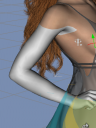
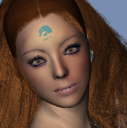
Ok, I have been working on a model using the free face transfer. I saved the image and went on to purchase the face transfer with a discount coupon. I enterd the serial number into the plugin for the face transfer and was told I had to restart Studio for the plugin to take effect. I saved my model, again, before restarting Studio. After restarting and loading my model, I get a model who is missing sin color in certain areas of her body. I did get messages while loading that there were some files missing. I also tried to save the face transfer before I restrted Studio, but there was no save button. I have attached pictures of my mess. Does anyone know how to fix it without having to start all over? I have spent so much time on her face. The body is just Genesis8. I wish I could just cut off her head with hair and glue it onto a new Genesis8 model. Arms , ears, hands and lower legs thighs down are white with no color.


Daz 3D is part of 
Connect
DAZ Productions, Inc.
7533 S Center View Ct #4664
West Jordan, UT 84084
Licensing Agreement | Terms of Service | Privacy Policy | EULA
© 2026 Daz Productions Inc. All Rights Reserved.
Comments
What skin are you using with the figure? You should be able to reapply them.
^It's a face-transfer skin, and it might've been (mostly it seems) deleted from the temp folder when DS was closed. You can always apply a new skin (or reapply the same photo to a new G8F, save that as a materials preset now you've got the paid plugin, and apply that new preset to this model). (NB: The save button is in a separate tab from the 'generate' button)