YETI Sightings! (and dForce Hair Question)
 algovincian
Posts: 2,696
algovincian
Posts: 2,696
Bumbles actually exists!
https://www.daz3d.com/yeti-hd-for-genesis-8-male
Please, if you happen to come across one, for heaven's sake - get a picture! (and post it here)
Here's one from when I first ran into one yesterday:
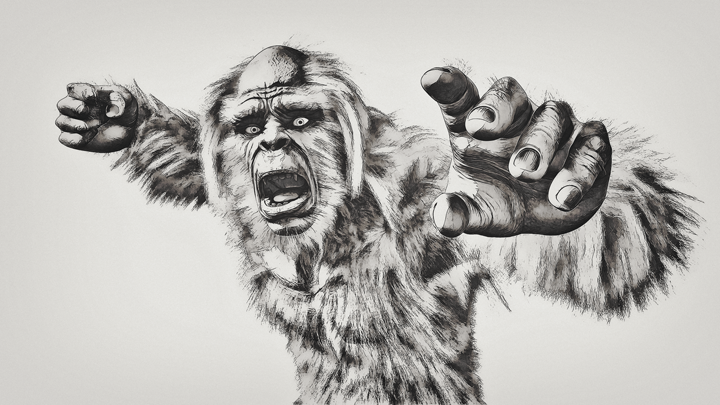
Looks like he was more surprised than me when we bumped into each other!
I found the dForce/SBH to be so much easier to work with than previous hair solutions, and the sculpting is fantastic - such an expressive figure!
- Greg
yeti-720.png
720 x 405 - 438K
Post edited by algovincian on

Daz 3D is part of 
Connect
DAZ Productions, Inc.
7533 S Center View Ct #4664
West Jordan, UT 84084
Licensing Agreement | Terms of Service | Privacy Policy | EULA
© 2026 Daz Productions Inc. All Rights Reserved.
Comments
I was going to post a picture of a YETI cooler, but the forums won’t let me post images from my iPad.
So now that I've purchased a few dForce Hair assets, it's time to do some simple animation tests. Here is Yeti doing the Funky Monkey:
All that I did in DS is:
1. load up the Yeti
2. load the Funky Monkey aniblock
3. bake the keyframes
4. set Frames to Simulate to Animated (Use Timeline Play Range)
5. Render the frames out in intermediate OpenGL
Is this a bug with dForce hair that anybody else has noticed? Is there some setting I can change to stop it from happening?
I also picked up the Gorilla, so I will perform the same simple test to see if it's asset dependent later today when I have more time.
- Greg
Upon closer inspection, it seems that the issue may have been caused by his feet intersecting. I've got to hit the road, but I'll edit the animation and try again ASAP.
It did not explode, though, which seems to be a step in the right direction. I wonder if this behavior for dForce hair could be duplicated for regular dForce?
Sticky > Explodey
- Greg
OK so here's the updated animation after creating subtracks for a couple of joints to adjust the aniblock in order to eliminate intersection:
This was my first time adjusting an aniblock using subtracks in Animate 2 - worked pretty slick:
https://www.daz3d.com/animate2
(wasn't trying to keep the feet planted, but rather just avoid sticky hairs).The motion of the dForce hair looks pretty good, eh?
- Greg
And the same anim rendered in Iray: