Predatron Goblin Cleric
 xavierator
Posts: 161
xavierator
Posts: 161
Dear,
I'm playing with Predatron Goblin Cleric: https://www.daz3d.com/goblin-cleric
Some content are in "smart Content" tab and other content are in "Content Library" tab.
I have found almost everything I need except:
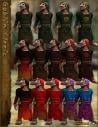
- the different materials for robes, color and/or dirty, see the 1st attached image.
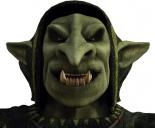
- the ears cross the hood, see the 2nd attached image
Where can I change or resolve this issues ?
Thanks a lot, Xavi
PredatronRobes.jpg
500 x 650 - 124K
PredatronEars.jpg
1219 x 1004 - 243K

Daz 3D is part of 
Connect
DAZ Productions, Inc.
7533 S Center View Ct #4664
West Jordan, UT 84084
Licensing Agreement | Terms of Service | Privacy Policy | EULA
© 2026 Daz Productions Inc. All Rights Reserved.
Comments
The different materials are in the Content Library, in the Poser Formats section under Poses/P3DA_GoblinCleric. You can locate assets in DIM by selecting the product and using the right-click -> Show Installed Files... You can see the full path of all the files that were installed. Or, you can browse the product archive to find it much the same way.
About the ears, you actually have a choice. You can make the hood fit over the ears, or hide the ears. Select the Robes hood, or the Goblin Cleric head, and look for the approriate morph in the Parameters tab.
I'm surprised that you have Smart Content for the Goblin Cleric, it has no metadata, unless you added it. The base Goblin figure has metadata, but nothing you are looking for is in there.
Perfect, robes materials found
Perfect, ears hide, the slider is "Ears Gone"
Thanks and kind regards, Xavi