DS version number AND graphics card question [Resolved]
 Worlds_Edge
Posts: 2,153
Worlds_Edge
Posts: 2,153
Question 1
My DS has slowed down a lot and I am in the process of trying to figure out what might be wrong and whether it is settings etc. I noticed that the desktop icon says I am using DS4.9, however when I open DS, it says version 4.11 pro. I update versions via DIM.
Does anyone know why my icon isn't matching my version, how to make it match, and whether this might have anything to do with the slow down I am experiencing?
Question 2
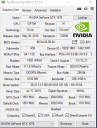
What graphics card would you recommend that I upgrade to. I don't have much knowledge about computer guts lol I would likely get a store to do the card swap or whatever is needed. My specs are attached.

Daz 3D is part of 
Connect
DAZ Productions, Inc.
7533 S Center View Ct #4664
West Jordan, UT 84084
Licensing Agreement | Terms of Service | Privacy Policy | EULA
© 2026 Daz Productions Inc. All Rights Reserved.
Comments
The icon is irrelevant. If you're truly paranoid uninstall DS and reinstall.
The 1070 is a very capable card, You could upgrade to something like a 2070 Super, 2080 Super or a 2080ti but I doubt it is a problem with the card unless it is physically failing.
Thank you @kenshaw011267 I may do the upgrade to the 2080ti in a few months. I really don't understand why I have the extreme slow down (compared to months ago) when trying to look at things in the viewport in iray mode or using render throttle (I do switch back and forth from texture shaded when moving around). I'm not talking big scenes either, I'm talking a single character and trying to see the character with different expressions, or changing the hair etc.
Maybe I will put in a ticket and see if someone at DS can help me pin point the slow down issue..
Edit to add - not only is there a DS slowdown, but with DS open it slows down all my other computer programs - whether I am in word, or using skype chat, or just surfing. That didn't happen before. It only happened if I used something like photoshop at the same time as DS, which I understand.
Regarding the slow-down, have you updated Windows lately?
If you allowed Windows to update, it is possible Windows replaced your drivers with their own. Even if that's not the case, you may still need to update your graphics card drivers with 4.11. (I was using 418.x without issue. Some other folks had better results using 419.x. Or you could try the most recent drivers, 431.60.)
Just change the title of the icon of it bothers you. If you have limited RAM, check if your virtual drive is getting full.
I did update both L'adair, so I don't think that is the problem. The slow down started maybe 3 months ago, but I haven't had much time to play with DS so I didn't get around to trying to do something about it.
I have 32 ram and 8 on the graphics card - if I'm understanding the question. I don't know how to check whether the virtual drive is full - is it by looking at the info in task manager? And if so, do I look when I have DS open or does it matter?
Also, thanks for the tip on changing the icon name. It wasn't bothering me that much, I just didn't know whether it is "an issue." I did change the name now :)
32 gb should be plenty, with that much you probably won't be having that issue with RAM dumping to pagefile on a hard drive.
I urge you to try the beta 4.12. The viewport is much faster than any previous version of Daz by a pretty significant margin. The beta does not over write your existing Pro install, they can even run side by side. You can use all your save files across either version. Load times are much improved all around, how quickly a scene starts to render is much faster, and the viewport is far more responsive and quicker. It is all round better.
The 1070 is already a decent card. But you have options. Instead of replacing the 1070, you can add a second card instead. If this card has at least 8GB of VRAM then all off your current saved scenes will run using both cards allowing their CUDA cores to combine. This would offer the best bang for the buck performance increase for you no matter what GPU you buy. You just have to be sure your power supply has the capacity and that your case can fit the card. Make sure the card is 2 slots, so there is enough space between the cards. Some cards can be monsters and take up too much space.
If you upgraded to a 2080, that alone would be roughly twice as fast as the 1070. But you could combine the 2080 and 1070 and go even faster. Then there are new ray tracing cores that RTX has, the new beta supports them while the full Pro version does not. That is like a free performance boost.
You're right @outrider42 the beta version is faster. I had the old beta 4.11, and because that icon too did not change to 4.12, I didn't think I had the newest beta. I tried it, and it is much better.
Thank you for your advice on the graphics card.