All my G8F Characters faces have changed.
 AnonTurtle
Posts: 31
AnonTurtle
Posts: 31
Hello, I had an issue like this previously where I had installed a product which was bugged and it changed all of my characters because that newly installed character automatically set itself to 100% morph for all of my characters. This was discovered through the Currently Used section and I deleted the product and it fine. Now, there seems to be another morph that I cannot seem to find and it affects all of my characters. No matter what I change on the currently used it cannot fix it.
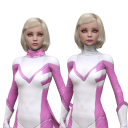
The only way I have fixed it is to Reset Shape on the character and reapply everything to the exact same morphs then I will get it back to the image on the left. The image on the right is the messed up one. There seems to be some sort of invisible morph that is affecting all aspects of the head. How can I attempt to figure out which product is messing with all of my G8F characters?

Daz 3D is part of 
Connect
DAZ Productions, Inc.
7533 S Center View Ct #4664
West Jordan, UT 84084
Licensing Agreement | Terms of Service | Privacy Policy | EULA
© 2026 Daz Productions Inc. All Rights Reserved.
Comments
It is usually a full character that causes this, so until someone can direct you to some log file or something to track the product messing you up, look for the most noticable differences:
The right side character is taller than the left character, so it's an adult figure that has its morphs added. There's also a noticable cleft in the lower lip, which should help narrow down the cause even further. The eyes are morphed even wider, suggesting an anime style or alien character, with the outer corners pointing a little bit downwards.
Did you recently install Kanade and characters for her? Since those are the most recent Anime style characters, that's where I'd start looking, uninstalling, testing, and maybe re-installing those.
from the picture, i dont think its just the head that is being affected.
given that reset shape fixes it, and re applying the morphs results in a correct shape, maybe there is a morph that is loading in dialled to greater than 100%, or the limit applied to that morph not working.
try a test with g8 base, it will narrow down the amount of morphs that may be the issue. Also try to re-save the character after you have fixed it using the reset shape method, and load it in again from the re-saved character
Could it change your G8F Base? You could try to reinstall G8F
Have you set the Parameters section options to Show Hidden before conducting the search? If it's a morph you can't find, there's a fair chance that's where it is,
In the Scene tab, click on the figure. In the Shaping tab, click on the "Currently Used" option and see what shows up.
so a new product can ruin all your saved work?
didnt know that could happen. how do you prevent such a thing?
how does that happen, unless an existing morph was changed?
a new jcm mebbe being triggered?
Ya I had this happen before. It was my understanding all products are tested extensively before they hit the market, but I no longer believe that.
It happens a lot these days.its a morph which has been improperly saved. Most likely a new character Check your recent installs and uninstall them if you have only a few. Otherwise you can show hidden and view morphs which are activated on the character.
Did you purchase Maia? There was an issue with her morphs being applied to every G8F
The saved files haven't been changed, it's just a new morph loading on top of the existing characters when the scene is loaded. Once that morph is discovered and nuked, then the characters will load up correctly again.
Most likely, this is correct. Specifically, a morph's default is set to 100% (or something) instead of 0%. It could also be that you might have saved a morph from from a character preset if you adjusted it, which would default it to 100%. It's an easy overlook in testing and a quick fix. Select G8, then on the parameters pane, click on currently used. This should show you what morphs are dialed in on the character. Then be sure to file a help desk ticket if it isn't one of your morphs. While you are waiting for that to be fixed, you can click on the little gear icon and go into the morph parameters, and go into the field labeled "Default" and put it to 0. Then you can resave the morph asset.
I think people misunderstood the issue. I created a custom character with portions of other characters — 60% of person A, 25% of person B, 15% of person C, etc.
after saving the character, all those percentages were set to 100% EACH. this either happened during the save or the load back in.
I never had this happen before.
I don't think so, unless you stubbornly place it in your Daz product folder instead of where products from other sites should go. Products from other sites should go to the My Library folder, and nowhere else for that very reason, so they can't touch your start up files in any way. Even script files installed in your My Library folder do not start automatically on Daz start up, but need to be activated manually, unless you somehow *manually* include them in your preferences.
If a shape ha a non-zero default then the location of the file, as long as it's in the correct relative position, is not relevant - it will load already in effect.
Although in general use, you probably won't have problems with putting Renderosity content into the same folder as your Daz store content, file organisation is still good practice. Amongst other things, it allows you to isolate content libraries as part of diagnosing (or even fixing) issues with bad content or file conflicts.
While it's not very practical advice to someone who's been installing terabytes of content for years, I would still recommend it, particularly to newcomers.
Wait... are you the OP? Your names/avatars are different.
But either way... did you save a character preset or a figure? Did you do an erc freeze and save the morph asset? Did you load in a base G8F to do your work on, or did you load in a character? Basically, what steps did you take to help us help you troubleshoot :D
If it's affecting all of your G8F characters, you can select the character then go to the Shaping Tab and scroll down the list of morphs to identify which ones are dialled in that shouldn't be. Once you identify which morphs are in there at a setting other than 0% that shouldn't be you can choose what to do from there - either just dial out the "wrong" morphs, or if it's a morph you purchased you can uninstall the character/morph. If it's a purchased character and the "Default" in the character's "Parameters Settings" is set to something other than 0 it will load up with G8F automatically. If that's the case I recommend putting in a support ticket for the character.