Need a reminder - Eyes rendering issue
 JOdel
Posts: 6,322
JOdel
Posts: 6,322
Okay, I need to build a character for an illustration. I'm just in the setup stage, and ended up applying a different texture to the base that I was using. Then I needed to change the eyes to match the description. So far, so good.
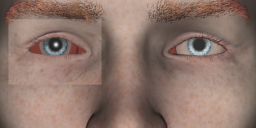
So then I tried a spot render to test tings and, surprise! the sclera doesnt seem to render at all.
Trying different eye textures doesn't change anything. So it isn't the eye texture itself (Landon 8, 3DL version)
It's a workfile with just 1 Distant light, At resent I'm just applying textures as they come. I'll adjust for 3DL or Iray when I'm farther along and have stomped this particular bug. Spot render on the left (obviously).

Daz 3D is part of 
Connect
DAZ Productions, Inc.
7533 S Center View Ct #4664
West Jordan, UT 84084
Licensing Agreement | Terms of Service | Privacy Policy | EULA
© 2026 Daz Productions Inc. All Rights Reserved.
Comments
Hmm, whenever I have eye rendering issues, I move the char/scene closer to origin. However, I don't use 3dl.
I've had that bug before & I think the only way I could get rid of it was to apply one of the material presets for Lucas 8's iRay eyes to it. I think it has something to so with how an image map is added to show glossiness/teariness for the lacrimals on certain products in the DAZ Studio for G8M.
It doesn't seem to happen in Iray. I switched to that just to check. It's still 3DL materials on the eyes though.
Aw hell, I'l, leave it with Iray. I dislike those noisy renders though.
Would still like to know what is causing it.