Genesis 8 Wet Body Iray strange result when not in the center
 jan_8b323741
Posts: 15
jan_8b323741
Posts: 15
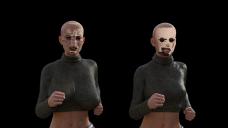
I have bought Genesis 8 Wet Body Iray, and have some provblems with it. After a lot of experimenting, it seems like the issue is where the figure is placed. I have saved the figures (who are both Victoria 8) as a scene preset and merged them into a new scene without environment.
It seems that when I render the scene, they turn out ugly. The figure on the right has a "DPS face sweat" preset. The figure on the left has individual drops added. Look at the first picture.
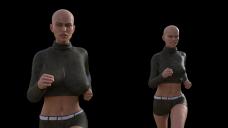
In the second picture, all I have done, is to move both of the figures to the center of the world. And now it looks fine. Or at least acceptable.
Can anyone explain this. I am new to Daz and 3D, so I may miss something obvious.
Thank you for your help.

Daz 3D is part of 
Connect
DAZ Productions, Inc.
7533 S Center View Ct #4664
West Jordan, UT 84084
Licensing Agreement | Terms of Service | Privacy Policy | EULA
© 2026 Daz Productions Inc. All Rights Reserved.
Comments
Yes, this is an issue in Iray and can affect other things too - as far as I am aware it is an Iray issue rather than DS itself.
@Richard Haseltine: Thank you for the reply. It took a long time to get to this conclusion. And now I know that it os not me doing something wrong. And that I must be aware of the world center when using large environments.
Is there a simple way to move a whole scene, to get the figures close to the world center? Or is it the hard way to change an existing scene?
Try
Thank you. I'll try that.
The null solution doesn't work for background objects that are distant from the center so issues may arise anyway. So it all depends on your scene and camera needs. In general iray is fine just for small scenes that don't extend far away from the world center. But this limitation also forces you to organize your footage so that it is optimized for small scenes. In this sense it may not be a bad limitation.
It is a little bit as working in a studio where you have a limited area to work with and you have to use fake backgrounds and oganize the camera shots accordingly.
@Richard Haseltine: It worked. Everything got moved. Lights, cameras etc. Thank you very much for your help.
@Padone: Thanks for the warning. Actually I prefer small scenes, as a large scene makes woking very slow. But for this I needed a park, and I only could find one suitable.
In the future I will start by moving the scene so that my primary objects will be near the world center.
Setting path length to infinite instead of 1 helps
Path length is infinite (-1) by default, and that refers to number of bounces on a surface not distance travelled. A too-low finite value will cause issues, as the path wills top while interactions are still having a noticeable effect, but that's true regardless of placement.