dForce simulation issue
 ahunt
Posts: 20
ahunt
Posts: 20
in The Commons
Hello,
I don't know if this is the right place for my question... Please bear with me!
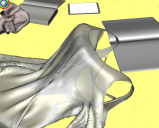
I have a cloth simulation: it should fall on a table. The cloth is dForce compatible but when I run the simulation, all the part of the dress gracely fall but the chest and collar.
I think is something morph related but wasn't able to spot it out. I am attaching some pictures to explain better. Hope that someone will be able to help me undestand.
Thank you,
Adam

start.PNG
1310 x 1039 - 559K

end.PNG
1258 x 978 - 506K
detail.PNG
1194 x 963 - 723K

Daz 3D is part of 
Connect
DAZ Productions, Inc.
7533 S Center View Ct #4664
West Jordan, UT 84084
Licensing Agreement | Terms of Service | Privacy Policy | EULA
© 2026 Daz Productions Inc. All Rights Reserved.
Comments
"dForce compatible" does not always mean that all parts of that item are setup for dForce, maybe only the skirt and sleeves have dForce settings by default and not the chest part. And even if the chest has been setup for dForce too, the dForce settings applied are most certainly optimized so it drapes well when used on a figure (eg make sure it doesn't "slip" from the shoulders by setting the collar as non-dynamic), not for falling on the ground.
So you'll have to check and maybe alter the dForce settings on those surfaces.
Most dForce clothing has a weight map that affects how strongly the areas are affected and is supposed to stop certain areas deforming - either because they're not supposed to (e.g. belts and buckles that are not flowing fabric) or because the results don't work well (highly detailed portions of the mesh, or areas with unwelded seams).
With this dress, the various cuffs and piping are typical examples of areas that do not simulate well, so the creator has disabled the effect in these areas.
To override these preset weightmaps....
Select the article of clothing
Under (Create) menu select "New Deforce Modifier Weight Node"
Under (Tools) menu select "Node Weight Map Brush"
The clothing should become mostly Red with faiding to Blue and maybe some Grey, blue is less deforce and grey is no deforce...
Right click on the article of clothing, in the popup menu select (Geometry Selection > Select all) this should highlight the entire clothing piece.
Right click it again and in pop up menu select (Weight Editing > Fill Selected) in the window that opens slide it to 100%...
tada! The entire piece of clothing will now be subject to the base deforce at 100%. You might have to go into surfaces to scale up all "Dynamic Strengths" to 1.0 as well depending on the clothing but the stuff above will override the carefully made weightmaps of the creator. :)
As said above there might be problems with explosions due to pipings and other areas not ment to bend but this way often works to get stuff to drop to the ground.
Have fun messing around with the menus and geometry options, deForce is crazy fun to mess with once ya know what all the little bits do. :)
Thanks for this! Exactly what I needed for a particular piece of clothing.
THANK YOU VERY MUCH INDEED!!
This worked 100% for me and I have also learned something new. GREAT!
Adam.
Generally, I've found, when a dforce item has been set up with some static parts, is to re-apply a dforce modifier if all I want is it drapped on a table, chair (or whatever). I also use VWD, which allows me to tweak it's placement but that is an alternative product from elsewhere and can make non-dforce items easier to work with.